

Working with Unified Branch Data Model
In this section, we will explore how to build an example data model using Branch as Code.
The data model represents the configuration of a Unified Branch for Meraki Dashboard.
The example repository intentionally uses a simplified configuration to keep this learning lab lightweight and free of hardware requirements.
Understanding the Data Model
Section titled “Understanding the Data Model”In Network as Code, the data model is a structured YAML document that describes the intended network configuration. This data model is consumed by the automation engine — in the case of Branch as Code, Terraform. Terraform reads the YAML content, extracts the parameters, and passes them to Meraki-specific modules and resources.
This is why we validate the data model first: to ensure that the automation engine receives complete and correct information before deployment.
Example: YAML → Terraform Resource
Data Model (YAML):
.. organizations: - name: Unified Branch Learning Org networks: - name: Unified Branch 1 syslog_servers: - host: 1.2.3.4 port: 514 roles: - Switch event log - Air Marshal events - Flows - URLs - Wireless event log - Appliance event logTerraform Interpretation:
# module.meraki.meraki_network_syslog_servers.networks_syslog_servers["Unified Branch Learning Org/Unified Branch 1"] will be created + resource "meraki_network_syslog_servers" "networks_syslog_servers" { + id = (known after apply) + network_id = (known after apply) + servers = [ + { + host = "3.4.5.6" + port = 514 + roles = [ + "Air Marshal events", + "Appliance event log", + "Flows", + "Switch event log", + "URLs", + "Wireless event log", ] }, ] }When using Infrastructure as Code, the data model represents the declaration of intent. The operator describes what the network should look like — not how to configure it. Terraform and Netascode modules translate this intent into the actual Meraki configuration. In IaC practices, the data model serves as the source of truth.
Schema and Validation
Section titled “Schema and Validation”Each field in the data model must follow the constraints defined in the Meraki schema:
- Type (string, number, enum…)
- Allowed values
- Value range
- Mandatory / optional
- Default values
Branch as Code uses the native Meraki schema. The complete requirements are documented in the Network as Code Meraki Data Model Overview
Example: Syslog Port:
| Name | Type | Constraint | Mandatory | Default Value |
|---|---|---|---|---|
| port | Integer | Integer 0–65535 | Yes | — |
If the port value is missing in the above referenced syslog configuration, rendering will fail because it is mandatory.
Example: Admin Configuration
organizations_admin: email: admin@example.com name: Branch Admin| Name | Type | Constraint | Mandatory | Default |
|---|---|---|---|---|
| organizations_admin.email | String | Length 1–127 | No | — |
| organizations_admin.name | String | Length 1–127 | No | — |
Here, both fields are optional and simply need to follow length constraints.
Understanding the Templates
Section titled “Understanding the Templates”Branch as Code uses a template-driven architecture. Templates allow you to abstract large portions of configuration logic into reusable building blocks. These are Network as Code templates, not Meraki configuration templates. They are CVD-aligned and designed to work with the Network as Code Meraki Terraform modules.
Templates offer:
- Consistency across deployments
- Separation of logic and input
- Alignment with Cisco Validated Designs (CVDs)
- Modularity (appliance, switching, wireless, WAN, etc.)
- Extensibility when customizing your environment
In the example repository, templates are intentionally minimized to avoid requiring hardware. Templates are stored in template-*.yaml files.
Note: Currently, only network-level templates are supported.
Example: Network Management Template
meraki: template: networks: - name: nw_management settings: local_status_page_enabled: true remote_status_page: true secure_port: false local_status_page_authentication: username: ${local_page_username} password: !env secret_password named_vlans: true snmp: access: users users: - username: ${snmp_username} passphrase: !env secret_password syslog_servers: - host: ${syslog_server} port: ${syslog_port} roles: - Switch event log - Air Marshal events - Flows - URLs - Wireless event log - Appliance event logIn this template we can notice some key concepts:
- Environment Variables for Secrets
Sensitive values (passwords, tokens) are provided via !env: !env secret_password. These come from the .env file configured earlier, which is excluded from version control. In production, secrets should rather be supplied via a CI/CD pipeline’s secret manager.
- Input Variables
The following values must be provided in the variables file:
- snmp_username
- syslog_server
- syslog_port
User shall be providing these value as input. We will check this out in the next step.
In summary, templates abstract the configuration - users specify only the parameters they need to change. The underlying logic (described by the templates) remains aligned with CVDs.
Deployments become consistent, repeatable, and low-risk as every time we apply template we ensure repeatability and consistency and eliminate any potential human configuration error.
Modifying Templates
Section titled “Modifying Templates”Templates are regular YAML files that you can adjust. Let’s consider that we want to perform following modififications:
- SNMP is not used → remove it
- Syslog is always 1.2.3.4:514 → hardcode values
- Named VLANs not desired → disable it
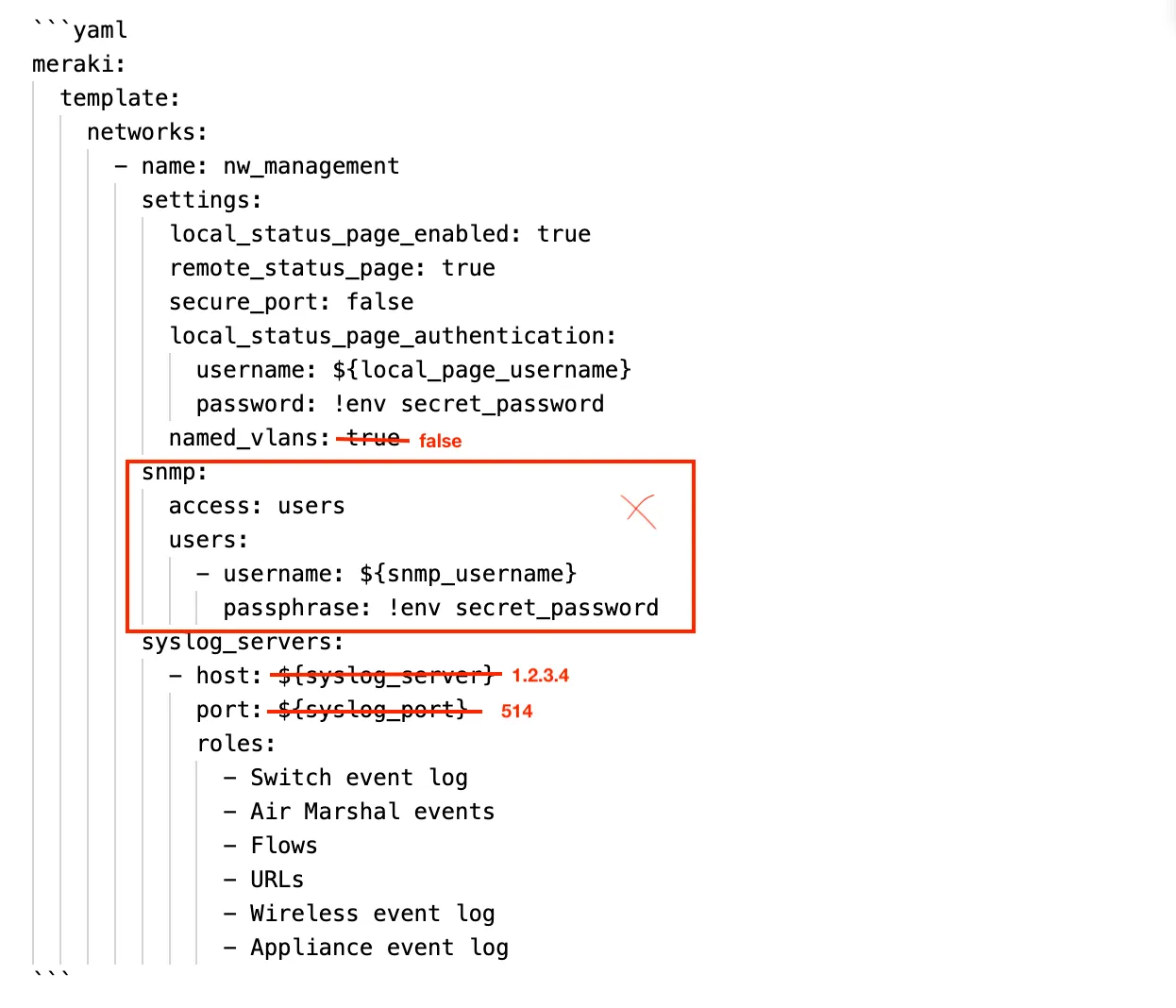
Then our configuration becomes:
meraki: template: networks: - name: nw_management settings: local_status_page_enabled: true remote_status_page: true secure_port: false local_status_page_authentication: username: ${local_page_username} password: !env secret_password named_vlans: false syslog_servers: - host: 1.2.3.4 port: 514 roles: - Switch event log - Air Marshal events - Flows - URLs - Wireless event log - Appliance event logAs part of Unified Branch as Code, supplied templates are tested and verified in the lab. Any modification requires further testing prior to deployment.
Working with Variables
Section titled “Working with Variables”The lab includes an example variables file pods_variables.nac.yaml
This file contains all parameters the user needs to adjust such as:
- IP addressing
- Hostnames
- Network names
- Template assignments
- Local usernames
It is important to note that every required variable referenced in templates must be provided.
For example, if a template uses ${syslog_server}, this key must exist in the variable file.
Configuring multiple branches
Section titled “Configuring multiple branches”Variables for multiple branches can be added in sequence in the same file.
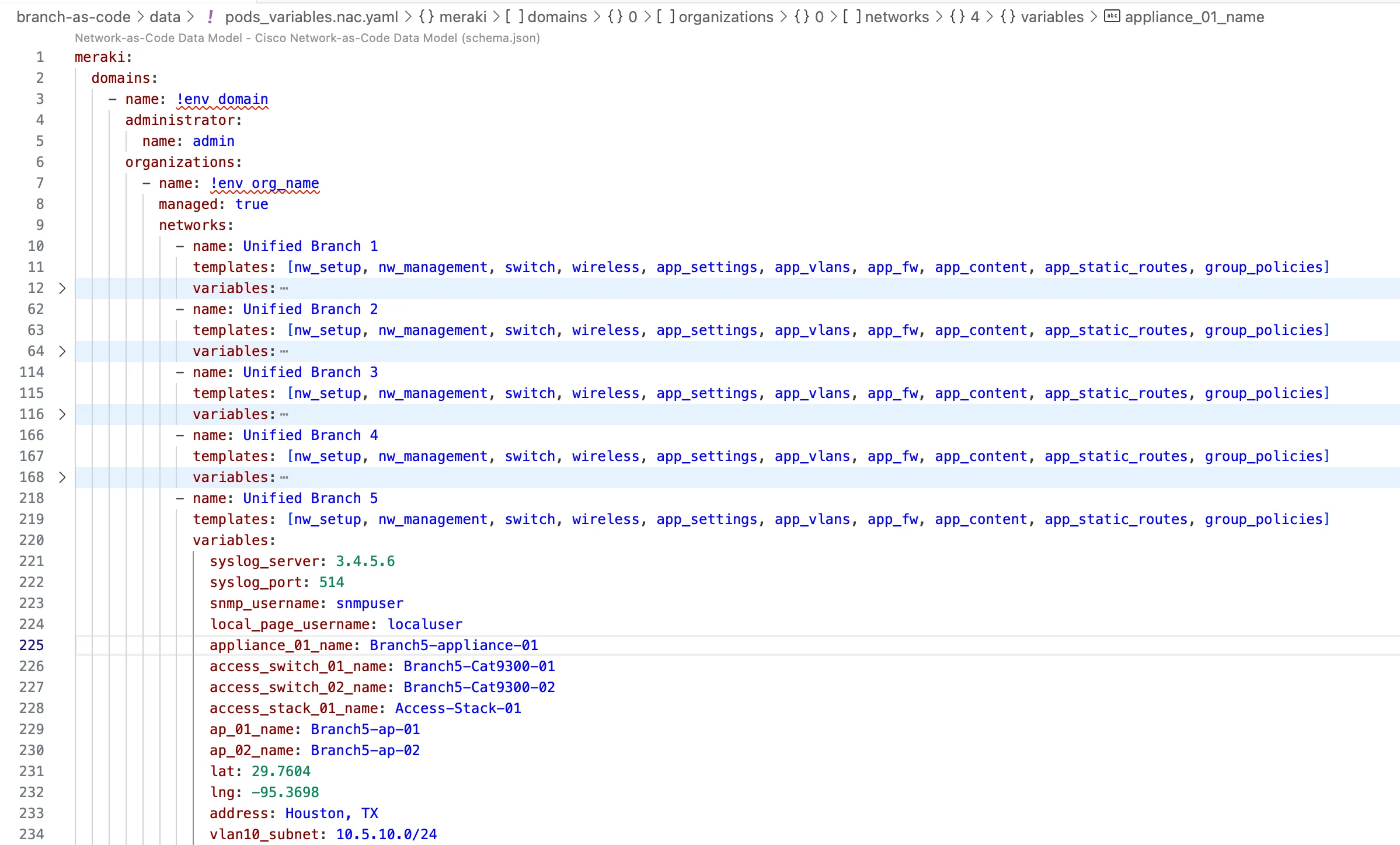
Here we can see that in this sample the 5 different branches are configured, all of them utilizing same templates just different variables are provided. With ease, the configuration can be replicated to hundreds of branches with appropriate settings.
This approach also allows for any override type of configurations. If we have 1 branch that requires special config, it may be overwritten or special template can be applied just to that particular branch.
For the lab, modifications are optional, but in production you must adjust values to match your environment.
Rendering the Templates
Section titled “Rendering the Templates”Rendering combines templates and variables (essentially everything that is in \data folder ) into one merged YAML file.
Templates + Variables → Full Configuration (merged YAML)
The variable file also defines which templates apply to each network:
- name: Unified Branch 1 templates: [nw_setup, nw_management, switch, wireless, app_settings, app_vlans, app_fw, app_content, app_static_routes, group_policies]In one example, if we do not want to configure wireless for the particular branch we can simply just remove associate wireless template.
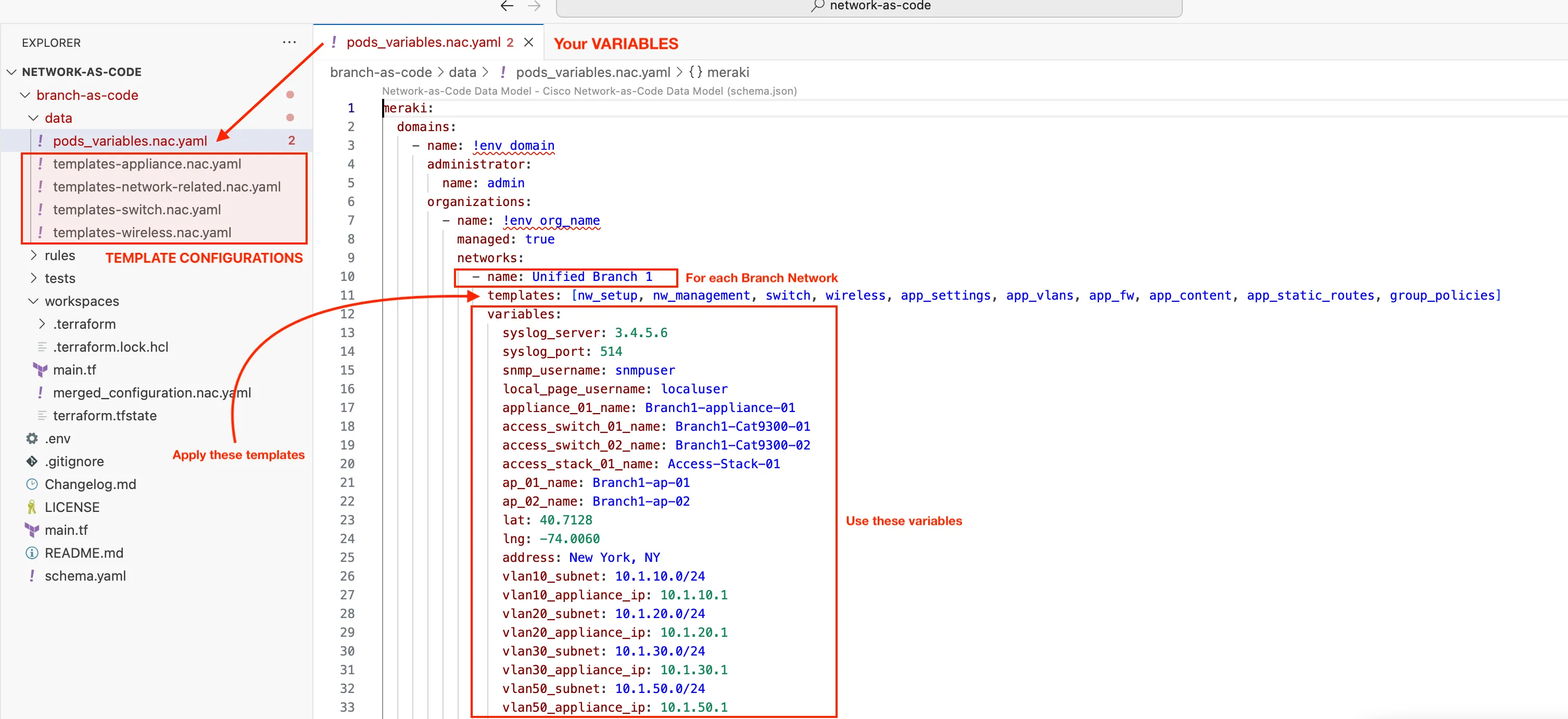
Rendering is performed in the workspaces directory through the netascode model merge module: github.com/netascode/terraform-meraki-nac-meraki/modules/model
This module is configured in main.tf in workspace folder:
module "model" { source = "github.com/netascode/terraform-meraki-nac-meraki/modules/model" yaml_directories = ["../data"] write_model_file = "merged_configuration.nac.yaml"}This module will:
- Load templates and variables from
/datafolder - Deep-merge them
- Generate
merged_configuration.nac.yaml