

Working with NaC Data Model
In this section, we will explore building an example data model for a customer using Network as Code (NaC). The data model will be structured to represent the configuration of an SD-WAN fabric. This hands-on guide includes practical use cases and exercises to help you understand how to define and organize the data needed for SD-WAN deployment.
Learning Objectives
Section titled “Learning Objectives”By the end of this section, you will be able to:
- Understand the SD-WAN data model structure and components
- Create application lists and SLA classes for policy objects
- Configure Application Aware Routing (AAR) policies
- Build device templates using existing feature templates
- Deploy site configurations with proper variable assignments
Understanding the Data Model
Section titled “Understanding the Data Model”The data model in Network as Code is the structured data (in YAML) that is read by the automation engine. Inside the automation engine (Terraform), the data model is read and the parameters are passed into the specific modules and resources. The following example shows how a terraform resource reads the value from the data model. One of the reasons that we perform validation against the data model is to ensure that when automation execution runs, the data that the automation engine is going to read is correct.
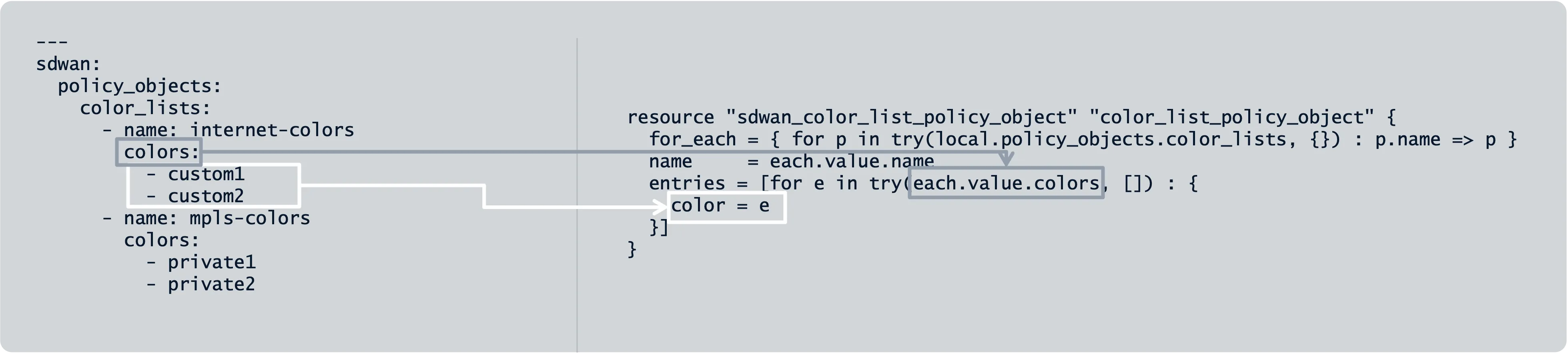
When we talk about infrastructure as code, the data model represents the declaration that the network operator wants to achieve. You declare the intent of the configuration of the network and it is the job of the underlying automation engine to translate the data model information into the actual configuration that is pushed to the network devices. This has the benefit of allowing the network operator to simply declare how the network should be configured instead of having to also write the code to perform the action. In Infrastructure as Code circles, the data model is known as the source of truth.
---sdwan: edge_device_templates: - name: "DT-BR-C8000V-01" description: "Branch Device Template" device_model: "C8000V" sites: - id: 100 routers: - chassis_id: "C8K-ABCD1234-5678-90EF" model: "C8000V" device_template: "DT-BR-C8000V-01"The data model is constrained by the schema definition. Each parameter in the data model is expected to follow a specific type, specific defined values, and whether it is mandatory or not. For SD-WAN, the chassis IDs and device models are required fields. The requirements for the data model are available for viewing in the Network as Code Documentation. The documentation is built from the schema of the data model automatically and enhanced by engineers working on the technology. This represents the source of truth for the data model.
| Name | Type | Constraint | Mandatory | Default Value |
|---|---|---|---|---|
| name | String | Yes | ||
| chassis_id | String | Must be valid chassis ID format | Yes | |
| model | Choice | C8000V, C1000V, C8300, C8500 | Yes | |
| device_template | String | Reference to existing device template | Yes | |
| site_id | Integer | min: 1, max: 4294967295 | Yes | |
| system_ip | String | Valid IPv4 address | Yes | |
| system_hostname | String | Valid hostname | Yes | |
| device_variables | Object | Key-value pairs for template variables | No |
SD-WAN Data Model Structure
Section titled “SD-WAN Data Model Structure”The SD-WAN data model is organized into several key components:
- centralized_policies: Control policies, AAR (Application Aware Routing), Data policies
- edge_device_templates: Device template definitions with feature templates
- edge_feature_templates: Individual feature configurations (System, VPN, Interface, etc.)
- localized_policies: Route policies, ACLs, QoS policies applied locally
- policy_objects: Reusable policy components (SLA classes, application groups)
- sites: Site-specific configurations and device deployments
Pre-defined Data Structure
Section titled “Pre-defined Data Structure”|-- data/| |-- centralized_policies.nac.yaml # Centralized policy and definitions: Control policy, AAR, Data policy| |-- edge_device_templates.nac.yaml # Device template definitions| |-- edge_feature_templates.nac.yaml # Feature template definitions| |-- localized_policies.nac.yaml # Localized policies definitions with components (route-policies, ACL, QoS)| |-- policy_objects.nac.yaml # Policy objects| |-- sites.nac.yaml # Sites data definitions (Template, Model, variables' values)Device Templates
Section titled “Device Templates”Device templates define the complete operational configuration for SD-WAN devices and consist of multiple feature templates:
sdwan: edge_device_templates: - name: "DT-BR-T2-C8000V-01" description: "Branch | OSPF | Dual Node" device_model: "C8000V" system_templates: - name: "FT-EDGE-SYSTEM-01" vpn_templates: - name: "FT-VPN-0-01" # Transport VPN - name: "FT-VPN-512-01" # Management VPN - name: "FT-VPN-10-01" # Service VPNFeature Templates
Section titled “Feature Templates”Feature templates define configuration for specific SD-WAN features. Each template contains both global values and device-specific variables (indicated with _variable tag):
sdwan: edge_feature_templates: system_templates: - name: "FT-EDGE-SYSTEM-01" description: "Base Cisco System template" timezone_variable: "timezone" system_description_variable: "system_description" latitude_variable: "system_latitude" longitude_variable: "system_longitude" hostname_variable: "system_hostname" console_baud_rate: 9600 idle_timeout: 300 location_variable: "system_location" on_demand_tunnel_variable: "ondemand_tunnel_enable" site_id_variable: "site_id" system_ip_variable: "system_ip" controller_groups_variable: "controller_groups"Variables defined in the feature templates, which are included in the target device template should be added to sites.nac file with corresponding values.
Sites Configuration
Section titled “Sites Configuration”Sites define the actual deployment with specific device assignments and variable values:
sdwan: sites: - id: 300 routers: - chassis_id: "C8K-D4D8222C-26DA-83D1-EFA8-EAA6C881AFBF" model: "C8000V" device_template: "DT-BR-T2-C8000V-01" device_variables: site_id: 300 system_ip: "10.0.0.5" system_hostname: "SD-BR02-C8KV-R1" timezone: "UTC" system_description: "Branch Router 1" system_latitude: "37.7749" system_longitude: "-122.4194" system_location: "San Francisco" ondemand_tunnel_enable: true controller_groups: "1" - chassis_id: "C8K-25679DF5-DE95-81BC-5D4A-56907294945B" model: "C8000V" device_template: "DT-BR-T2-C8000V-01" device_variables: site_id: 300 system_ip: "10.0.0.6" system_hostname: "SD-BR02-C8KV-R2" timezone: "UTC" system_description: "Branch Router 2"Note: Pay attention to localized policies used for a site in order to provide correct references in sites.nac for route-policies variables.
Some feature templates may use optional parameters, and for such cases when value is not required, a specific tag is introduced: TEMPLATE_IGNORE.
Example:
vpn10_ipv4_route1_prefix: TEMPLATE_IGNOREvpn10_ipv4_route1_nexthop1_ip: TEMPLATE_IGNOREPolicy Objects
Section titled “Policy Objects”Policy objects define reusable components like SLA classes and application groups:
sdwan: policy_objects: sla_classes: - name: "SLA-GOOGLE" loss: 2 latency: 250 application_groups: - name: "Google_Apps_New" applications: - "android-updates" - "chrome_update" - "youtube" - "youtube_hd"Pre-deployment Validation
Section titled “Pre-deployment Validation”Pre-deployment validation runs a set of syntax and semantic checks against our desired configuration using the nac-validate tool. This validation ensures that:
- All required fields are present
- Data types match schema requirements
- References between components are valid
- Semantic rules are followed
The nac-validate tool runs the SD-WAN as Code syntax and semantics checks as this cannot be done using Terraform. nac-validate is a publicly available tool written by Cisco CX.
Installation
Section titled “Installation”Python 3.7+ is required to install nac-validate: Github nac-validate. Tool can be installed using pip:
pip install nac-validatenac-validate ./data/If no output is provided by the tool, it means that no syntax or semantic issues were found.
Hands-On Use Case: Google Apps Application Aware Routing
Section titled “Hands-On Use Case: Google Apps Application Aware Routing”Let’s walk through a practical scenario where we need to update the centralized policy for Application Aware Routing to handle Google Apps traffic with specific SLA requirements.
Scenario Overview
Section titled “Scenario Overview”Your organization wants to optimize Google Apps traffic (android-updates, chrome_update, youtube, youtube_hd) by:
- Creating a dedicated application list for Google Apps
- Defining specific SLA requirements for Google traffic
- Implementing Application Aware Routing policy for optimal path selection
- Deploying the configuration to branch sites
Task 1: Create Application List for Google Apps
Section titled “Task 1: Create Application List for Google Apps”Objective: Create an application list to match Google Apps traffic for policy application.
Requirements:
- Application list name:
Google_Apps_New - Include applications:
android-updates,chrome_update,youtube,youtube_hd
Try It Yourself
Section titled “Try It Yourself”Add the following configuration to your policy_objects.nac.yaml file:
💡 Click to reveal the answer
sdwan: policy_objects: application_lists: - name: Google_Apps_New applications: - android-updates - chrome_update - youtube - youtube_hdExplanation:
- Application lists group related applications for easier policy management
- These specific Google applications are commonly used and benefit from dedicated routing policies
- The list can be referenced in Application Aware Routing policies
Task 2: Create SLA Class for Google Traffic
Section titled “Task 2: Create SLA Class for Google Traffic”Objective: Define SLA requirements specifically for Google Apps traffic.
Requirements:
- SLA Class name:
SLA-GOOGLE - Latency: 250ms
- Loss: 2%
- Fallback best tunnel criteria: latency
Try It Yourself
Section titled “Try It Yourself”Add the SLA class configuration to your policy_objects.nac.yaml file:
💡 Click to reveal the answer
sdwan: policy_objects: sla_classes: - name: SLA-GOOGLE latency_ms: 250 loss_percentage: 2 fallback_best_tunnel_criteria: latencyExplanation:
- SLA classes define performance thresholds for different traffic types
- Google Apps can tolerate higher latency (250ms) compared to voice traffic
- 2% loss threshold accommodates video streaming requirements
- Latency-based fallback prioritizes responsive user experience
Task 3: Update Application Aware Routing Policy
Section titled “Task 3: Update Application Aware Routing Policy”Objective: Insert a new sequence in the existing AAR policy to handle Google Apps traffic.
Requirements:
- Insert as sequence ID 5 (renumber existing ID 5 to 6)
- Policy name:
GOOGLE-APPS - Match criteria: Use
Google_Apps_Newapplication list - SLA class:
SLA-GOOGLE - Preferred colors:
biz-internet - Fallback action:
fallback_to_best_path
Try It Yourself
Section titled “Try It Yourself”Modify your centralized_policies.nac.yaml file to include the new AAR sequence:
💡 Click to reveal the answer
sdwan: centralized_policies: application_aware_routing: - name: AAR-Policy-01 sequences: # ... existing sequences 1-4 ... - id: 5 name: GOOGLE-APPS ip_type: ipv4 type: app_route match_criterias: - application_list: Google_Apps_New actions: - counter_name: AAR-GOOGLE log: true sla_class_list: - sla_class: SLA-GOOGLE preferred_colors: - biz-internet when_sla_not_met: fallback_to_best_path - id: 6 # Renumbered from 5 name: DEFAULT # ... existing default sequence configurationExplanation:
- Sequence insertion maintains policy evaluation order
- Google Apps traffic gets dedicated routing treatment
- Business internet is preferred for Google services
- Fallback ensures connectivity even when SLA isn’t met
Task 4: Build Device Template
Section titled “Task 4: Build Device Template”Objective: Create a device template using existing feature templates for site deployment.
Requirements:
- Device template for C8000V routers
- Include system, VPN, and interface feature templates
- Reference existing feature template components
Try It Yourself
Section titled “Try It Yourself”Add the device template configuration to your edge_device_templates.nac.yaml file:
💡 Click to reveal the answer
sdwan: edge_device_templates: - name: DT-Site300-C8000V description: "Site 300 Branch Device Template" device_model: C8000V system_templates: - name: FT-EDGE-SYSTEM-01 vpn_templates: - name: FT-VPN-0-01 # Transport VPN - name: FT-VPN-512-01 # Management VPN - name: FT-VPN-10-01 # Service VPN interface_templates: - name: FT-INT-GE-WAN-01 - name: FT-INT-GE-LAN-01Explanation:
- Device templates combine multiple feature templates
- Each template type serves a specific function (system, VPN, interface)
- Template reusability reduces configuration complexity
Task 5: Configure Site Deployment
Section titled “Task 5: Configure Site Deployment”Objective: Attach the new device template to site 300 with proper variable assignments.
Requirements:
- Site ID: 300
- Deploy two C8000V routers with the new device template
- Assign appropriate system IPs, hostnames, and other variables
Try It Yourself
Section titled “Try It Yourself”Add the site configuration to your sites.nac.yaml file:
💡 Click to reveal the answer
sdwan: sites: - id: 300 routers: - chassis_id: "C8K-D4D8222C-26DA-83D1-EFA8-EAA6C881AFBF" model: C8000V device_template: DT-Site300-C8000V device_variables: site_id: 300 system_ip: "10.0.0.5" system_hostname: "SD-BR02-C8KV-R1" timezone: "UTC" system_description: "Branch Router 1" system_latitude: "37.7749" system_longitude: "-122.4194" system_location: "San Francisco" ondemand_tunnel_enable: true controller_groups: "1" - chassis_id: "C8K-25679DF5-DE95-81BC-5D4A-56907294945B" model: C8000V device_template: DT-Site300-C8000V device_variables: site_id: 300 system_ip: "10.0.0.6" system_hostname: "SD-BR02-C8KV-R2" timezone: "UTC" system_description: "Branch Router 2" system_latitude: "37.7749" system_longitude: "-122.4194" system_location: "San Francisco" ondemand_tunnel_enable: true controller_groups: "1"Explanation:
- Each router requires unique chassis ID and system IP
- Device variables must match feature template requirements
- Geographic coordinates enable location-based policies
Validation and Testing
Section titled “Validation and Testing”After completing all tasks, validate your complete data model:
# Validate syntax and semanticsnac-validate ./data/
# Run Terraform plan to check deployment readinessterraform plan
Common Validation Issues
Section titled “Common Validation Issues”🔧 Troubleshooting Guide
Missing Required Fields:
- Ensure all mandatory variables are defined in sites configuration
- Check that referenced templates exist in feature templates
Invalid References:
- Verify application list names match between policy objects and AAR policies
- Confirm SLA class names are consistent across configurations
Schema Violations:
- Check data types (strings, integers, booleans)
- Validate IP address formats and chassis ID patterns
Best Practices Summary
Section titled “Best Practices Summary”- Modular Design: Use reusable templates and policy objects
- Consistent Naming: Follow naming conventions across all components
- Validation First: Always validate before deployment
- Documentation: Document variable purposes and constraints
- Version Control: Track changes to data model configurations
Conclusion
Section titled “Conclusion”Through this hands-on use case, you’ve learned to build a complete SD-WAN data model that includes policy objects, centralized policies, device templates, and site deployments. The declarative approach allows you to focus on what you want to achieve rather than how to configure each device individually.
The expandable answer format ensures you can learn at your own pace while having access to complete solutions when needed.