

Fundamentals of NaC with SD-WAN
This document is an important component of this guide, as it provides a foundational understanding of the structure of the code. Understanding how Terraform is structured, is important to effectively use the Network as Code (NaC) capabilities for SD-WAN.
Terraform Provider
Section titled “Terraform Provider”Terraform providers are plugins that allow Terraform to interact with cloud providers, SaaS providers, and other APIs. They enable the management of resources across different platforms using a consistent configuration language.
The Terraform provider acts as a bridge between your configuration files and the target infrastructure platform. It translates your declarative resource definitions into API calls, enabling automated provisioning and management. By using the appropriate provider, you ensure that your Terraform modules interact reliably with the intended systems, whether cloud services, network devices, or other platforms.
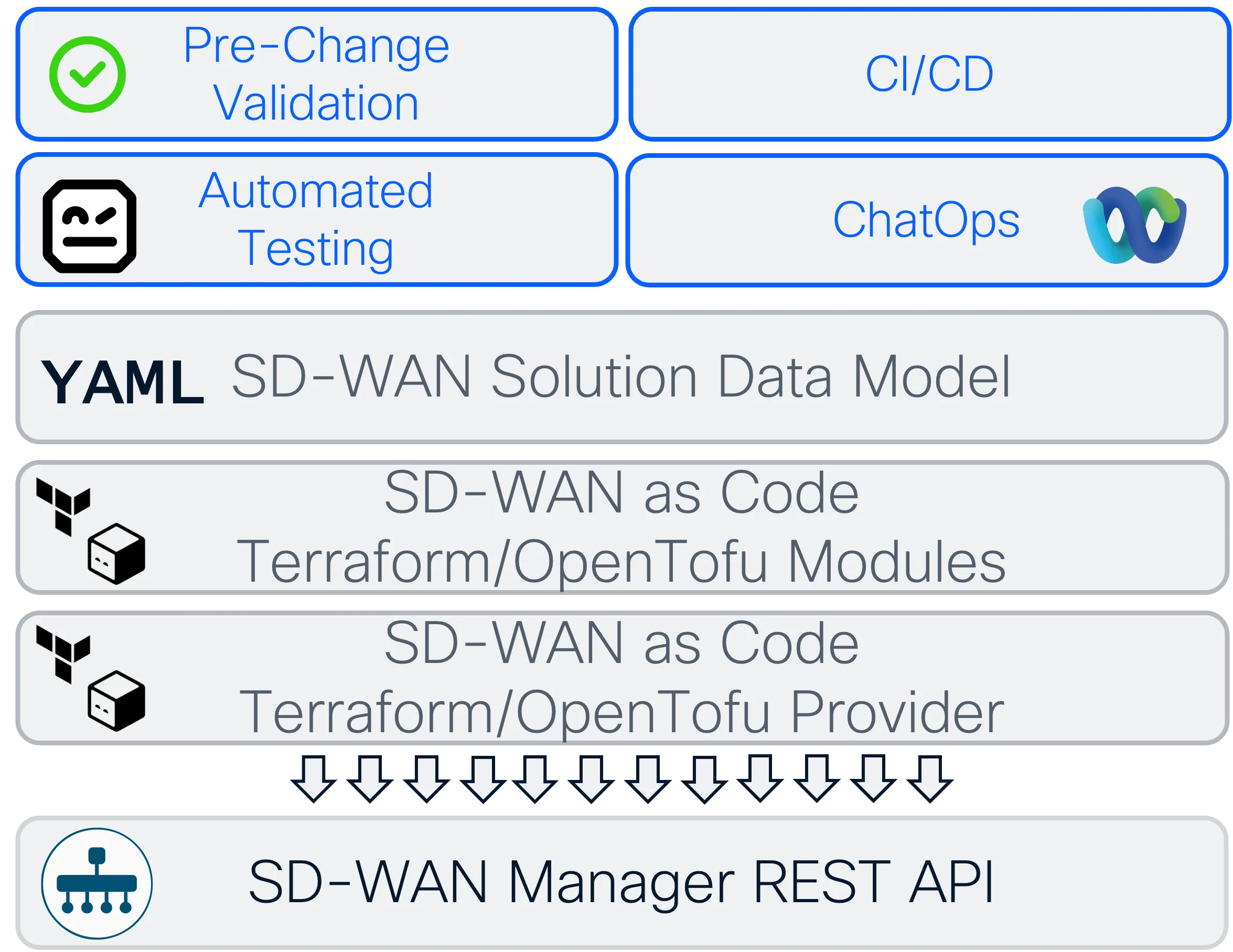
The Network as Code SD-WAN solution is built on top of the SD-WAN Terraform provider. This provider is built by the Cisco DevNet community. For all capabilities that we build on NaC SD-WAN, the capability must exist in the underlying provider.
In the following chart you can see the overall software architecture.
Terraform Modules
Section titled “Terraform Modules”Terraform modules are a way to organize Terraform configurations into reusable units. Modules are containers for multiple resources that are used together. A module consists of a collection of .tf and/or .tf.json files kept together in a directory.
In the Context of NaC, the YAML Data Model is used to define the desired state of the network infrastructure. This data model is then translated into Terraform configurations, allowing for automated provisioning and management of the network resources. This translation process involves mapping the YAML structure to Terraform’s resource definitions, ensuring that the intended configuration is accurately represented.
Every Terraform configuration has at least one module, known as its root module, which consists of the resources defined in the .tf files in the main working directory.
The root module can call other (child)modules, allowing you to create a hierarchy of modules that can be reused and shared across different configurations.
Each of the .tf files may have a specific purpose, a few common files include:
data.tffile for defining data sources.main.tffile for defining the main resources.variables.tffile for defining input variables.outputs.tffile for defining output values.providers.tffile for specifying provider configurations.
SD-WAN Architecture Components
Section titled “SD-WAN Architecture Components”The Network as Code SD-WAN solution manages several key components through Terraform:
SD-WAN Manager (vManage) Integration
Section titled “SD-WAN Manager (vManage) Integration”The Terraform provider communicates directly with SD-WAN Manager’s REST API to manage the overlay network configuration. All resources are created, updated, and deleted through this centralized management platform.
Key SD-WAN Resources Managed
Section titled “Key SD-WAN Resources Managed”- Device Templates: Comprehensive device configurations that combine multiple feature templates
- Feature Templates: Individual configuration components (System, VPN, Interface, etc.)
- Policy Objects: Reusable components like SLA classes, application groups, and prefix lists
- Centralized Policies: Control policies, Application Aware Routing (AAR), and Data policies
- Localized Policies: Route policies, ACLs, and QoS configurations applied at device level
- Site Configurations: Device attachments with template variables and site-specific settings
Data Model Structure
Section titled “Data Model Structure”The SD-WAN data model is organized into logical files that correspond to different configuration domains:
- centralized_policies.nac.yaml: Control and data policies that apply fabric-wide
- edge_device_templates.nac.yaml: Device template definitions and feature template associations
- edge_feature_templates.nac.yaml: Individual feature configurations with variables
- localized_policies.nac.yaml: Site-specific policies and route configurations
- policy_objects.nac.yaml: Reusable policy components and objects
- sites.nac.yaml: Site definitions with device assignments and variable values
Terraform working directory
Section titled “Terraform working directory”The Terraform working directory is the directory where your Terraform configuration files are located. This is typically the root module directory, but it can also be a subdirectory if you are working with child modules. When you run Terraform commands, such as terraform init, terraform plan, and terraform apply, you do so from the working directory. Terraform uses the configuration files in this directory to determine the desired state of your infrastructure and to manage the resources accordingly.
A typical NaC SD-WAN working directory structure might look like below. It includes at least one .tf file, the SD-WAN Data Model YAML files, the schema file, rules file and a tests directory.
.└── nac-sdwan-terraform ├── main.tf ├── defaults.yaml ├── data │ ├── centralized_policies.nac.yaml │ ├── edge_device_templates.nac.yaml │ ├── edge_feature_templates.nac.yaml │ ├── localized_policies.nac.yaml │ ├── policy_objects.nac.yaml │ └── sites.nac.yaml ├── .schema.yaml ├── .rules └── tests ├── filters └── templatesThe main.tf may look like below. This file is responsible for calling the modules required to build the SD-WAN fabric, which recursively imports required providers.
module "sdwan" {  source  = "netascode/nac-sdwan/sdwan"  version = ">= 0.1.0"
  yaml_files = ["defaults.yaml", "data/"]}
when you run terraform init, terraform plan, and terraform apply commands, Terraform initializes the working directory by downloading the necessary provider plugins, modules and setting up the backend for state management.
The working directory will look like this post initialization, look at the .terraform directory that is created. (the output has been truncated for readability)
.└── nac-sdwan-terraform ├── main.tf ├── defaults.yaml ├── data │ ├── centralized_policies.nac.yaml │ ├── edge_device_templates.nac.yaml │ ├── edge_feature_templates.nac.yaml │ ├── localized_policies.nac.yaml │ ├── policy_objects.nac.yaml │ └── sites.nac.yaml ├── .schema.yaml ├── .rules ├── tests │ ├── filters │ └── templates ├── .terraform │ ├── modules │ │ └── sdwan │ └── providers │ └── registry.terraform.io │ ├── ciscodevnet │ │ └── sdwan │ ├── hashicorp │ │ └── local │ └── netascode │ └── utils ├── terraform.tfstate └── .terraform.lock.hcl