

Understanding Network as Code (NaC)
Network as Code (NaC) is an architecture and methodology that applies the principles of Infrastructure as Code (IaC) to network management. It allows network engineers to define, deploy, and manage network configurations in a “software defined” manner. To assist network engineers in managing network configuration change, Network as Code leverages a standard base of tools and processes that enable automation, version control, and testing of network configurations.
One of the core benefits of Network as Code is that the engineer focuses on “describing the intent” of the network configuration and automation reads this data to apply the configuration to the network devices. Using this method, network engineers can focus on networking concepts and not on how to “create” automation. This allows:
- Network engineers to work on familiar networking concepts and terminology.
- Network engineers to focus on the intent of the network configuration rather than the implementation details.
- Network engineers to leverage existing software development practices, such as version control and testing, to manage network configurations.
- Network engineers to collaborate more effectively with software developers and operations teams, as they can use the same tools and processes to manage network configurations.
Traditional automation
Section titled “Traditional automation”In traditional network automation, network engineers often write scripts or use configuration management tools to automate specific tasks or configurations. This is the most common approach. Using tools like Ansible and Python scripts, engineers create automation that is specific to the requested change or task. While this approach can be effective for automating individual tasks, it often leads to challenges such as:
- Complexity: As the number of scripts and configurations grow, managing them becomes increasingly complex. This can lead to difficulties in maintaining and updating configurations.
- Lack of Standardization: Different engineers may use different tools and approaches, leading to inconsistencies in configurations and processes. This hurts the ability to collaborate and share knowledge effectively.
- Limited Reusability: Scripts and configurations are often tailored to specific tasks, making it difficult to reuse them across different projects or environments.
- Difficult Collaboration: Collaboration between network engineers and software developers can be challenging, as they may use different tools and processes.
- Limited Testing and Validation: Traditional automation often lacks robust testing and validation mechanisms, leading to potential errors and downtime when changes are applied.
- Limited Visibility: It can be difficult to track changes and understand the current state of the network, leading to potential issues with compliance and auditing.
Difference between Network as Code and traditional automation
Section titled “Difference between Network as Code and traditional automation”It is important to understand the differences between Network as Code and traditional automation approaches. When we look at the differences between traditional automation and Network as Code, one key aspect is how the automation requires to be integrated into the network operations. Infrastructure as Code (IaC) methodology requires a strict adherence to its practices, which can be challenging in the networking domain.
Customers are used to traditional change management, where change is implemented on network devices directly. When presented with the concept of Network as Code, they may struggle to understand how it fits into their operating model.
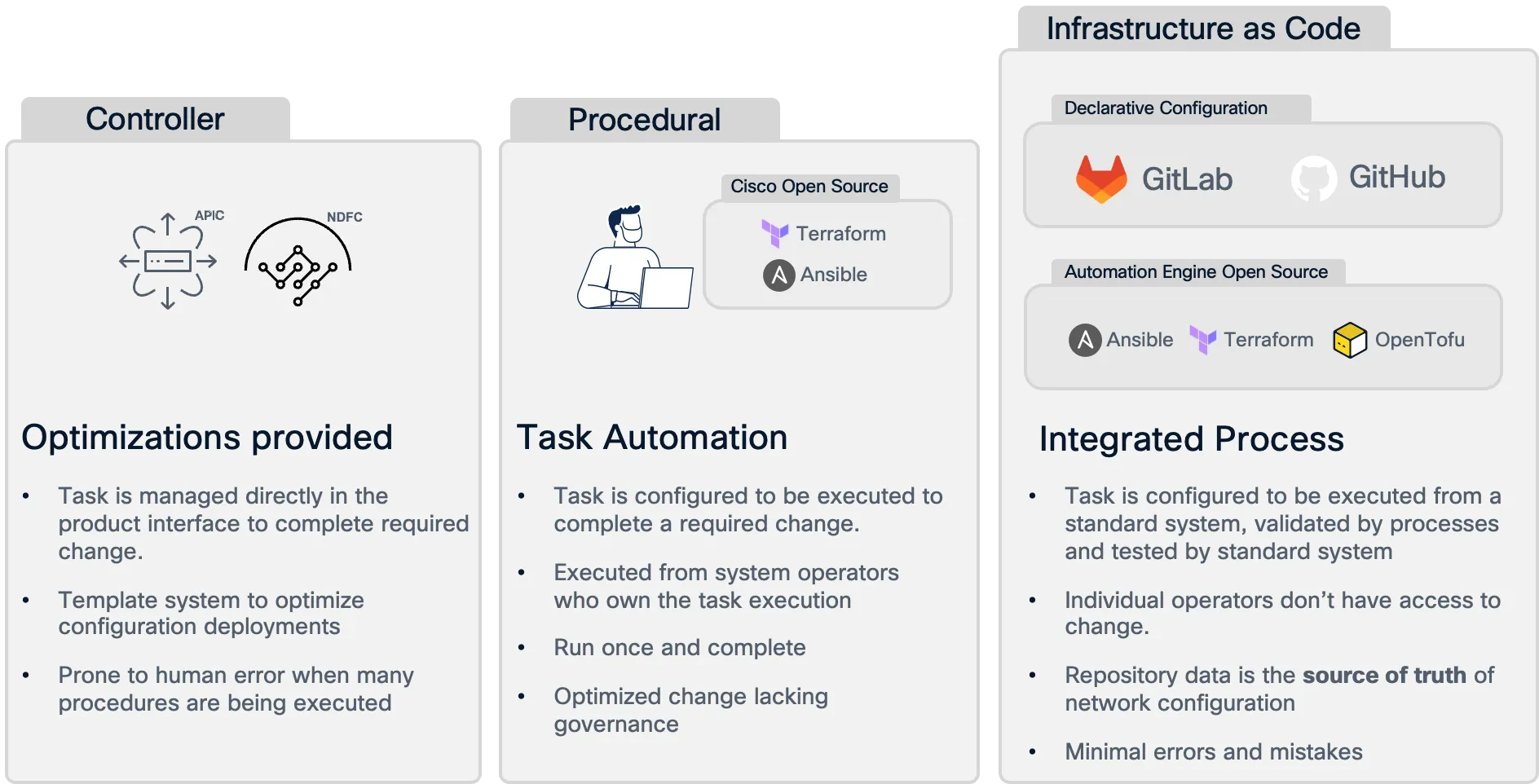
Network as Code (NaC) addresses these challenges by providing a structured and standardized approach to network management. Here are some key differences between Network as Code and traditional automation:
| Aspect | Network as Code (NaC) | Traditional Automation |
|---|---|---|
| Approach | Focuses on defining the intent of network configurations using declarative models. | Often involves writing scripts or using configuration management tools for specific tasks. |
| Standardization | Uses a standard set of tools and processes, promoting consistency across configurations. | Different engineers may use different tools and approaches, leading to inconsistencies. |
| Reusability | Configurations are designed to be reusable across different projects and environments. | Scripts and configurations are often tailored to specific tasks, limiting reusability. |
| Collaboration | Facilitates collaboration between network engineers and software developers by using the same tools and processes. | Collaboration can be challenging due to different tools and processes used by network engineers and software developers. |
| Testing and Validation | Integrates robust testing and validation mechanisms to ensure changes are safe and compliant. | Often lacks robust testing and validation, leading to potential errors when changes are applied. |
| Visibility | Provides better visibility into changes and the current state of the network, improving compliance and auditing. | Can be difficult to track changes and understand the current state of the network. |
Breaking down Network as Code
Section titled “Breaking down Network as Code”Network as Code can be broken down into several key components that work together to enable effective network management:
- Declarative Models: Network configurations are defined using declarative models that describe the desired state of the network. This allows engineers to focus on the intent of the configuration rather than the implementation details.
- Version Control: Network configurations are stored in version control systems, enabling teams to track changes, roll back to previous versions, and collaborate more effectively.
- Automation Tools: Network as Code leverages automation tools and frameworks to apply configurations to network devices. These tools read the declarative models and translate them into device-specific configurations.
- Testing and Validation: Network as Code includes robust testing and validation mechanisms to ensure that changes are safe, compliant, and do not introduce errors into the network. This can include automated tests, simulations, and validation against predefined rules.
Declarative Models
Section titled “Declarative Models”Declarative models are a key component of Network as Code. They allow network engineers to define the desired state of the network in a high-level, human-readable format. This approach contrasts with imperative models, where engineers specify the exact steps to achieve a configuration.
Declarative models focus on the “what” rather than the “how”. This means that engineers describe what they want the network to look like, and the automation tools handle the details of how to achieve that state. This abstraction allows for greater flexibility and easier management of complex network configurations.
Declarative models can be represented in various formats, such as YAML, JSON, or XML. For Network as Code we utilize YAML as the primary format for defining network configurations. YAML is a human-readable data serialization format that is easy to understand and write, making it suitable for defining network configurations.
For each technology, we have built a model that is unique to the technology. For example, for SD-WAN we have a model that defines the desired state of the SD-WAN fabric, including the configuration of device templates, feature templates, policies, and site attachments that need to be applied. This model is then used by the automation tools to apply the configuration to the SD-WAN Manager and the underlying network devices.
The model for SD-WAN is available in full detail on this site Data Model Section and includes the following top level elements:
- edge_device_templates: defines device template configurations that combine multiple feature templates.
- edge_feature_templates: defines individual feature configurations such as System, VPN, and Interface templates.
- centralized_policies: defines control policies, Application Aware Routing (AAR), and data policies that apply fabric-wide.
- localized_policies: defines site-specific policies including route policies, ACLs, and QoS configurations.
- policy_objects: defines reusable policy components such as SLA classes, application groups, and prefix lists.
- sites: defines site topology, device assignments, and template variable values for site-specific deployments.
The model is designed to be easy to consume for humans.
---sdwan: edge_device_templates: - name: "DT-BR-C8000V-01" description: "Branch Device Template" device_model: "C8000V" system_templates: - name: "FT-EDGE-SYSTEM-01" vpn_templates: - name: "FT-VPN-0-01" # Transport VPN - name: "FT-VPN-512-01" # Management VPNA feature template example would be something as:
sdwan: edge_feature_templates: - name: "FT-VPN-0-01" description: "Transport VPN Template" template_type: "cisco_vpn" vpn_id: 0 interfaces: - name: "ge0/0" interface_type: "transport" ip_address: "_variable" subnet_mask: "_variable" shutdown: false tunnel_interface: encapsulation: "ipsec" allow_service: - "all"You may have noticed that the tree structure for SD-WAN starts with sdwan, which is the top level element for the SD-WAN fabric. This is because the model is designed to be extensible and utilized for different SD-WAN deployment scenarios including branch, campus, and data center implementations. For this reason we call the sdwan model a solution model. The solution based model is designed different to device centric models. In the SD-WAN model we define device templates that combine multiple feature templates and then assign these templates to edge devices at specific sites.
This aligns with how SD-WAN Manager (vManage) operates. Device templates are assigned to edge routers in the fabric, and the configuration is applied based on the template and site-specific variables. For example, a branch router will have templates for transport VPN (VPN-0), management VPN (VPN-512), and service VPNs configured, while controllers like vSmart will have different template configurations for their control plane functions.
This top level structure also allows for the data to be split across files. For example, you can have a file that contains the device templates, another file that contains the feature templates, another file that contains the policy objects, and another file that contains the site configurations. This allows for better organization of the configuration and makes it easier to manage. This organization is very important to avoid conflicts when multiple engineers are working on the same SD-WAN fabric. The distribution of how these files are built is usually done in collaboration with the network operations team, as they are the ones that will be managing the fabric long term. If this will be used solely for delivery functionality, then the distribution is up to the delivery engineer.
Pre-Change Validation
Section titled “Pre-Change Validation”As you can see, the data model is represented in YAML which is a human-readable data serialization format (data structure). While this is a human-readable format, it can grow complex and difficult to manage as the network grows. To address this, we utilize a pre-change validation process that ensures the data model is valid before it is applied to the network controller and devices.
To make it possible for a computer to understand the different parameters and attributes of the data model we utilize a pre-defined schema that defines the structure of the data model. Think of the schema as a blueprint for the data model. It defines the expected structure, data types, and constraints for each element in the data model. In Network as Code parlance, imagine a user has the option to enter an IP address as value to a specific parameter. With this method, we can validate that the only option for that parameter is a string that matches the IP address format. If the user enters a value that does not match the expected format, the validation will fail and the user will be notified of the error. You can repeat the same process for other parameters, including specific values that are defined based on the only options that can be entered.
The schema method that is used is called Yamale. Yamale is a Python library that allows you to define a schema for your YAML data and validate it against that schema. Each of the architectures for Network as Code contains a specific schema to that data model.
Post-Change Validation
Section titled “Post-Change Validation”After the changes have been applied to the network controller and devices, it is important to validate that the changes were successful and that the network is configured and operating as expected. This is done through a post-change validation process that checks the state of the network devices and ensures that they are in the desired state.
The post-change validation process includes the following steps:
Collecting Data: Gather data from the network devices to understand their current state. This can include configuration data, operational data, and telemetry data. This data is collected by using the SD-WAN Manager (vManage) REST APIs or device specific APIs for some specific operational expected state validation.
Validating State: Compare the collected data against the desired state defined in the data model. This includes checking that all configurations have been applied correctly and that the network is functioning as intended.
Reporting Results: Generate a report that summarizes the results of the post-change validation process. This report should highlight any discrepancies between the actual state and the desired state, as well as any issues that were encountered during the validation process.
By following this post-change validation process, we can ensure that the network changes have been applied successfully and that the network is operating as expected.
To accomplish the pre- and post-change validation, we utilize two tools that are part of the Network as Code (NaC) framework. These tools are:
- nac-validate: This tool is used to validate the data model before it is applied to the network devices. It checks the data model against the predefined schema and ensures that it is valid.
- nac-test: This tool is used to validate the state of the network devices after the changes have been applied. It checks the state of the network devices against the desired state defined in the data model. If the state of the network devices does not match the desired state, it will provide feedback on what needs to be corrected.