

NaC Testing
In any discussion of Infrastructure as Code, you will find some form of testing. In any modern Development Operations (DevOps) run environment, testing is integrated at different development stages. First you have the unit tests, embedded into code that is being developed and then integration and system testing.
For Network as Code SD-WAN, we provide two aspects of testing. First to ensure that the structure and syntax of the data model is correct, and second post-deployment validation to ensure that the configuration and operational state of the SD-WAN fabric is correct after a change has been applied.
Overview
Section titled “Overview”For Network as Code SD-WAN there are two distinct tools that we utilize to achieve our testing objectives:
| yaml-lint | nac-validate | iac-test |
|---|---|---|
This tool is used to validate the syntax and structure of YAML files. It checks for errors in YAML files and ensures that they are well-formed. In combination with other tools like pre-commit you could ensure that changes to the YAML are structured correctly (in YAML format) before even getting posted into the GIT repository. | This tool is used to validate the SD-WAN data model syntax and structure. It checks for errors in the data model and ensures that it is ready for deployment. This element performs specific validation that could pass YAML lint but could be an invalid configuration and not allowed by schema. | This tool is used to validate the configuration and operational state of the SD-WAN fabric after a change has been applied. It checks that the configuration is correct and that the operational state of the network matches the expected state. |
Note: nac-validate and iac-test were previously known as iac-validate and iac-test
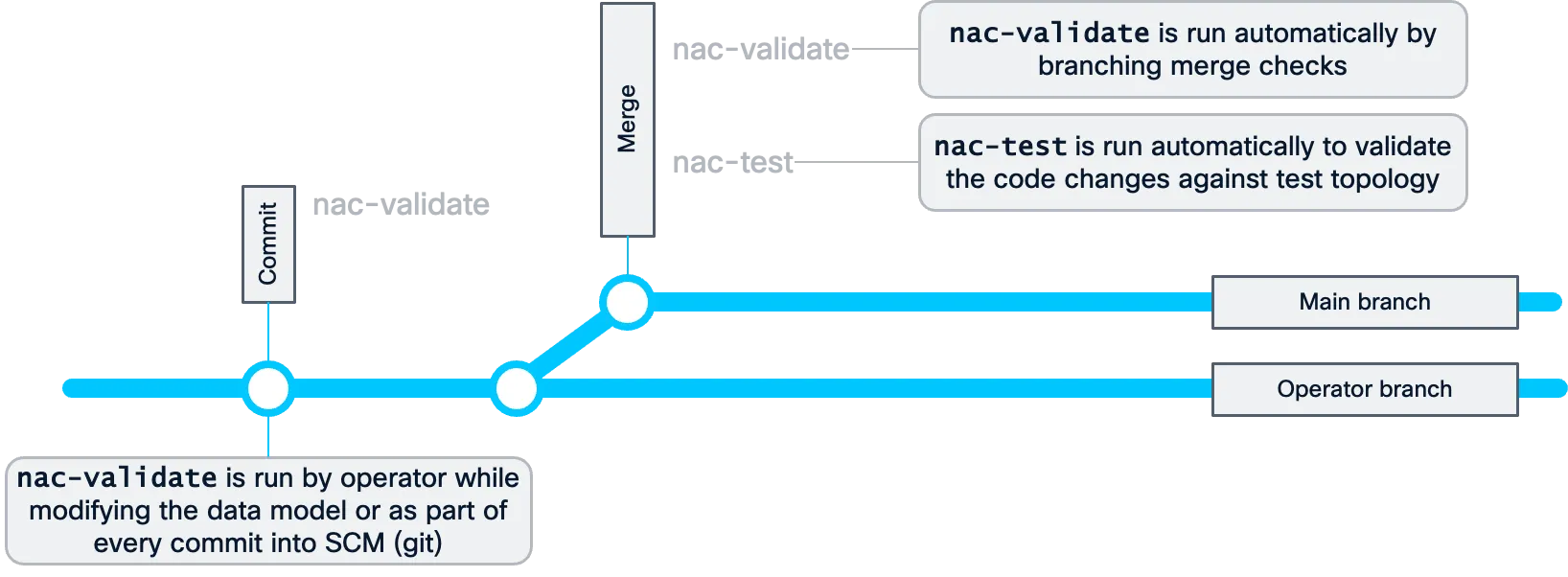
The combination of these tools provides the customer with the combination of tools that avoid common errors from hitting production changes. These tools can be both used inside an automation pipeline or as standalone tools. The following diagram describes what it would look like from a software lifecycle perspective.
Operators can be creating changes in the data model locally and performing checks against the work they are doing. Once completed, then when they push these changes into a central repository, the automation pipeline will perform the same validation checks and tests before accepting the changes.
Let’s take a look at each of these tools in more detail.
nac-validate
Section titled “nac-validate”The nac-validate tooling focuses on pre-deployment validation. The best way to “correlate” this to a software development process is to think of it as a linter. It checks the syntax and structure of the SD-WAN data model. To accomplish this, it uses a YAML schema to validate the data model. When working with code linting is a common practice to ensure that the code is syntactically correct and follows best practices. For Network as Code SD-WAN this facility allows the operators to validate their work while they are making changes to the data model.
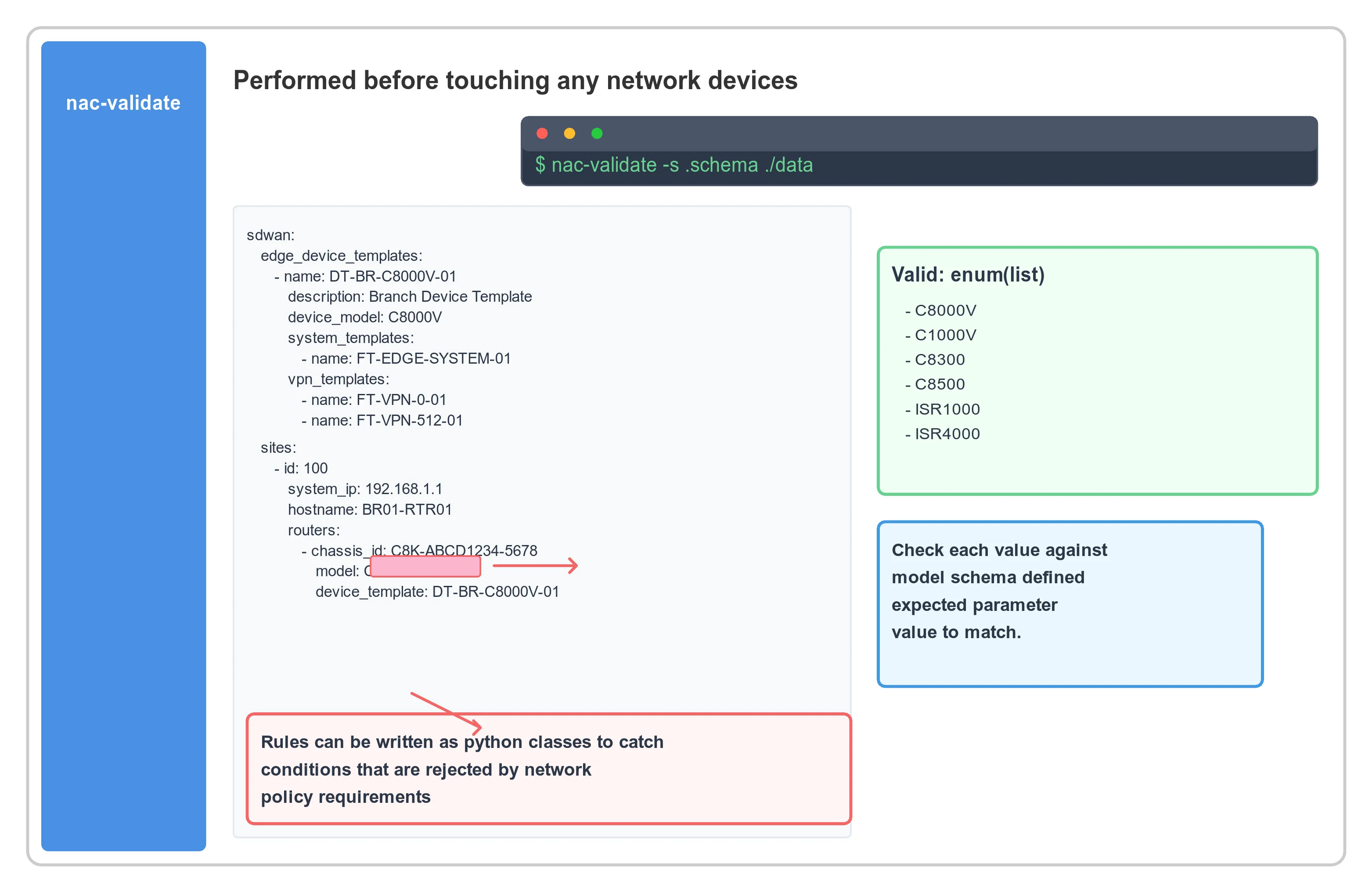
In addition to the semantic validation, nac-validate also can run rules to perform compliance checks. This is something that is used extensively by the Network as Code for SD-WAN to ensure that the data model is compliant with the requirements of the SD-WAN solution.
Usage: nac-validate [OPTIONS] PATHS...
 A CLI tool to perform syntactic and semantic validation of YAML files.

╭─ Arguments ─────────────────────────────────────────────────────────────────────────────────────────────────────────────────────────────────────────────────────────╮│ *    paths      PATHS...  List of paths pointing to YAML files or directories. [default: None] [required]                                                           │╰─────────────────────────────────────────────────────────────────────────────────────────────────────────────────────────────────────────────────────────────────────╯╭─ Options ───────────────────────────────────────────────────────────────────────────────────────────────────────────────────────────────────────────────────────────╮│ --verbosity   -v      [DEBUG|INFO|WARNING|ERROR|CRITICAL]  Verbosity level. [env var: NAC_VALIDATE_VERBOSITY] [default: WARNING]                                    ││ --schema      -s      FILE                                 Path to schema file. [env var: NAC_VALIDATE_SCHEMA] [default: .schema.yaml]                              ││ --rules       -r      DIRECTORY                            Path to directory with semantic validation rules. [env var: NAC_VALIDATE_RULES] [default: .rules]        ││ --output      -o      FILE                                 Write merged content from YAML files to a new YAML file. [env var: NAC_VALIDATE_OUTPUT] [default: None]  ││ --non-strict                                               Accept unexpected elements in YAML files. [env var: NAC_VALIDATE_NON_STRICT]                             ││ --version                                                  Display version number.                                                                                  ││ --help                                                     Show this message and exit.                                                                              │╰─────────────────────────────────────────────────────────────────────────────────────────────────────────────────────────────────────────────────────────────────────╯
The Schema File
Section titled “The Schema File”To be able to do the semantic validation in nac-validate, there is a schema file that defines the structure of the SD-WAN data model. This schema file is available as part of Network as Code SD-WAN for customers to use. When working with a customer, the schema file is installed inside of the repository build.
The schema file is built utilizing Yamale, a YAML schema validator. Yamale is a Python library that allows Network as Code to perform this validation. Our tool, nac-validate, uses this library to validate the data in the model after some pre-processing steps.
The schema validates critical SD-WAN components including:
- Device Templates: Ensures proper device template structure and dependencies
- Feature Templates: Validates feature template syntax and variable references
- Policy Objects: Checks SLA classes, application groups, and other policy components
- Sites Configuration: Validates site definitions, device assignments, and variable values
- Centralized Policies: Ensures proper policy structure and references
- Localized Policies: Validates route policies, ACLs, and QoS configurations
Step 1: Install and Run nac-validate
Section titled “Step 1: Install and Run nac-validate”Install the validation tool if not already available:
pip install nac-validateIn this step you will run the nac-validate tool locally to validate the SD-WAN data model:
cd ~/network-as-code/nac-sdwannac-validate ./data/When you run this command successfully, it should produce no output, indicating that your SD-WAN data model passes all validation checks. If there are validation errors, they will be displayed with specific details about the issues found.
Example of successful validation (no output):
$ nac-validate ./data/$Example of validation with errors:
$ nac-validate ./data/ERROR - Validation failed for file: data/edge_device_templates.nac.yamlERROR - Missing required field: device_model in device template DT-BR-C8000V-01ERROR - Invalid reference: Feature template FT-INVALID-TEMPLATE does not existCommon Validation Scenarios
Section titled “Common Validation Scenarios”Validate Specific File Types
Section titled “Validate Specific File Types”# Validate only device templatesnac-validate ./data/edge_device_templates.nac.yaml
# Validate only sites configurationnac-validate ./data/sites.nac.yaml
# Validate with verbose outputnac-validate ./data/ -v DEBUGSchema Validation Rules
Section titled “Schema Validation Rules”The SD-WAN schema enforces:
- Required Fields: All mandatory fields must be present
- Data Types: Correct data types for each field (string, integer, boolean)
- Reference Integrity: Template references must exist
- Value Constraints: Valid choices for enumerations (device models, etc.)
- Dependency Validation: Feature templates must be compatible with device templates
iac-test (Post-Deployment Testing)
Section titled “iac-test (Post-Deployment Testing)”The iac-test tool is used to perform post-deployment validation. This tool is used to validate that the configuration on SD-WAN Manager matches the configuration that is declared in the data model. As part of the SD-WAN solution, you will find a set of tests that verify the fabric configuration.
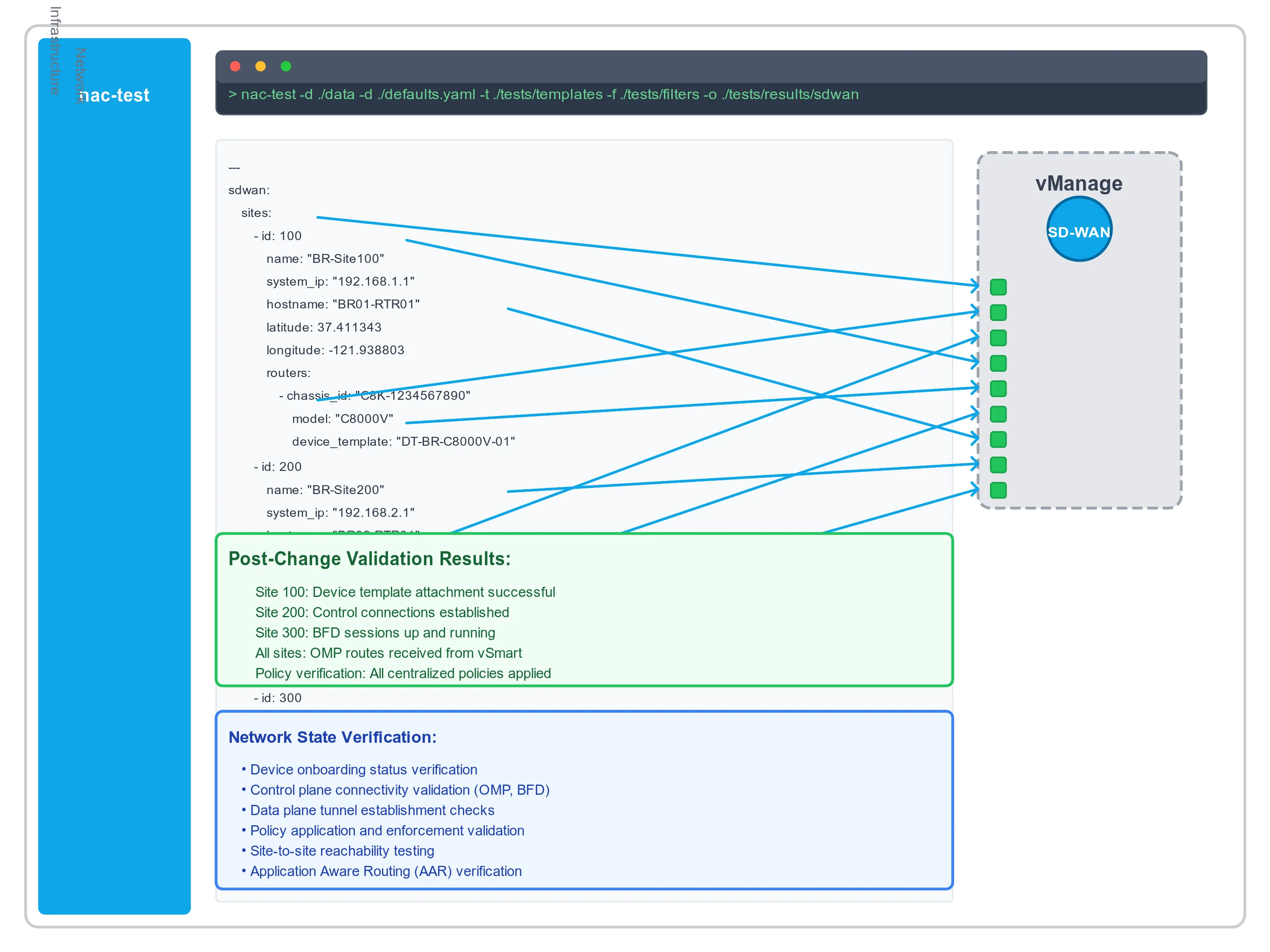
The primary focus of iac-test is to do a 1:1 verification that the intended configuration matches what is deployed. For this reason, to accomplish this task it is normally executed after the deployment of the configuration to SD-WAN Manager via Terraform.
Installation
Section titled “Installation”Python 3.7+ is required to install iac-test: Github iac-test. Tool can be installed using pip:
pip install iac-testThe following Robot Framework libraries are installed with iac-test:
- RESTinstance: For REST API interactions with SD-WAN Manager
- Requests: HTTP client library for API calls
- JSONLibrary: JSON manipulation and validation
iac-test --data ./data --data ./defaults.yaml --templates ./tests/templates --output ./tests/results --filters ./tests/filtersCommand Parameters Explanation
Section titled “Command Parameters Explanation”--data: All data YAML files will be first combined into single data structure provided as input to templating process--templates: Each template in the templates directory will be rendered and written to the output folder, keeping the folder structure--output: Directory where test results and reports will be generated--filters: Path to Jinja filters. Custom Jinja filters can be used by providing a set of Python classes where each filter is implemented as a separate Filter class in a .py file located in the —filters path
Types of SD-WAN Tests
Section titled “Types of SD-WAN Tests”There are 2 main groups of tests: Configuration and Operational.
Configuration Tests
Section titled “Configuration Tests”Configuration tests verify if the desired configuration is in place as per defined data model:
- Device Templates: Verify templates are created with correct feature template associations
- Feature Templates: Validate individual feature configurations match data model
- Policy Objects: Confirm SLA classes, application groups, and other objects are properly configured
- Centralized Policies: Validate control policies, AAR, and data policies
- Localized Policies: Check route policies, ACLs, and QoS configurations
- Site Attachments: Verify devices are properly attached to templates with correct variables
Operational Tests
Section titled “Operational Tests”Operational tests check operational parameters of the SD-WAN fabric:
- Control Connections: Verify OMP sessions between vEdges and controllers
- BFD Sessions: Check BFD session status between devices
- Device Status: Confirm device reachability and operational state
- Policy Application: Verify policies are active and functioning correctly
Step 1: Create Test Results Directory
Section titled “Step 1: Create Test Results Directory”To enable the execution of the iac-test tool, you need to create a results directory where the test results will be stored:
cd ~/network-as-code/nac-sdwanmkdir -p tests/resultsStep 2: Run Configuration Tests
Section titled “Step 2: Run Configuration Tests”Execute configuration tests to verify your SD-WAN deployment matches the data model:
cd ~/network-as-code/nac-sdwaniac-test --data ./data --data ./defaults.yaml --templates ./tests/templates --output ./tests/results --filters ./tests/filtersExample successful output:
Robot Framework remote server at 127.0.0.1:8270 started.Storing .pabotsuitenames file2025-01-15 10:57:29.020572 [PID:347524] [0] [ID:0] EXECUTING Config.DeviceTemplates.DeviceTemplates2025-01-15 10:57:30.225227 [PID:347524] [0] [ID:0] PASSED Config.DeviceTemplates.DeviceTemplates in 1.2 seconds2025-01-15 10:57:31.020572 [PID:347524] [0] [ID:1] EXECUTING Config.FeatureTemplates.FeatureTemplates2025-01-15 10:57:32.225227 [PID:347524] [0] [ID:1] PASSED Config.FeatureTemplates.FeatureTemplates in 1.2 seconds2025-01-15 10:57:33.020572 [PID:347524] [0] [ID:2] EXECUTING Config.PolicyObjects.PolicyObjects2025-01-15 10:57:34.225227 [PID:347524] [0] [ID:2] PASSED Config.PolicyObjects.PolicyObjects in 1.2 seconds15 tests, 15 passed, 0 failed, 0 skipped.===================================================Output: /home/user/network-as-code/nac-sdwan/tests/results/output.xmlXUnit: /home/user/network-as-code/nac-sdwan/tests/results/xunit.xmlLog: /home/user/network-as-code/nac-sdwan/tests/results/log.htmlReport: /home/user/network-as-code/nac-sdwan/tests/results/report.htmlStopping PabotLib processRobot Framework remote server at 127.0.0.1:8270 stopped.PabotLib process stoppedTotal testing: 3.60 secondsElapsed time: 4.20 secondsStep 3: Review Test Results
Section titled “Step 3: Review Test Results”The test execution generates comprehensive reports:
tests/results/├── config/│ ├── centralized_policies/│ ├── edge_device_templates/│ ├── edge_feature_templates/│ ├── localized_policies/│ └── policy_objects/├── log.html # Detailed execution log├── output.xml # Raw test output in XML format├── pabot_results/ # Parallel execution results├── report.html # Main test report (open this file)├── sdwan_common.resource # Shared test resources└── xunit.xml # XUnit format for CI/CD integrationOpen report.html to view comprehensive test results with:
- Test execution summary
- Pass/fail status for each test
- Detailed logs for failed tests
- Configuration comparison results
! [SD-WAN Test Report Example] (img/report_view_example.png)
Step 4: Interpret Test Results
Section titled “Step 4: Interpret Test Results”Successful Tests
Section titled “Successful Tests”- Green status: Configuration matches data model exactly
- All assertions passed: SD-WAN objects are properly configured
- No discrepancies: Deployed state matches intended state
Failed Tests
Section titled “Failed Tests”Failed tests indicate mismatches between data model and deployed configuration:
FAIL : Device template 'DT-BR-C8000V-01' missing feature template 'FT-EDGE-VPN10-01'FAIL : Policy object 'SLA-GOOGLE' has incorrect loss threshold: expected '2', got '3'FAIL : Site 300 device variables: missing 'system_hostname' for device with chassis_id 'C8K-ABC123'Common failure scenarios:
- Missing objects: Templates or policies not created
- Configuration drift: Manual changes made outside of Terraform
- Variable mismatches: Site variables don’t match template requirements
- Reference errors: Broken references between objects
Advanced Testing Scenarios
Section titled “Advanced Testing Scenarios”Test Specific Components
Section titled “Test Specific Components”# Test only device templatesiac-test --data ./data --templates ./tests/templates/config/edge_device_templates --output ./tests/results --include device_templates
# Test only policy objectsiac-test --data ./data --templates ./tests/templates/config/policy_objects --output ./tests/results --include policy_objectsDry Run Mode
Section titled “Dry Run Mode”# Generate tests without executing themiac-test --data ./data --templates ./tests/templates --output ./tests/results --dry-runVerbose Testing
Section titled “Verbose Testing”# Enable debug loggingiac-test --data ./data --templates ./tests/templates --output ./tests/results -v DEBUGIntegration with CI/CD Pipelines
Section titled “Integration with CI/CD Pipelines”Both nac-validate and iac-test are designed to integrate seamlessly into CI/CD pipelines:
Pre-Deployment Stage
Section titled “Pre-Deployment Stage”validate: script: - nac-validate ./data/ - echo "Data model validation passed"Post-Deployment Stage
Section titled “Post-Deployment Stage”test: script: - iac-test --data ./data --templates ./tests/templates --output ./tests/results - echo "Configuration tests completed" artifacts: reports: junit: tests/results/xunit.xml paths: - tests/results/Best Practices for SD-WAN Testing
Section titled “Best Practices for SD-WAN Testing”Data Model Validation
Section titled “Data Model Validation”- Run validation locally before committing changes
- Use verbose mode when debugging validation issues
- Fix all validation errors before attempting deployment
- Version control schema files with your data model
Post-Deployment Testing
Section titled “Post-Deployment Testing”- Test immediately after deployment to catch configuration drift
- Run tests regularly to ensure ongoing compliance
- Archive test results for compliance and auditing
- Set up alerts for test failures in production environments
Continuous Improvement
Section titled “Continuous Improvement”- Add custom tests for organization-specific requirements
- Monitor test execution time and optimize as needed
- Review failed tests to improve data model quality
- Update test templates as SD-WAN requirements evolve
Troubleshooting Common Issues
Section titled “Troubleshooting Common Issues”nac-validate Issues
Section titled “nac-validate Issues”# Schema file not foundexport NAC_VALIDATE_SCHEMA=/path/to/schema.yaml
# Permission issueschmod +r ./data/*.yaml
# YAML syntax errorsyaml-lint ./data/iac-test Issues
Section titled “iac-test Issues”# Connection issues to SD-WAN Managerexport SDWAN_URL="https://your-vmanage-ip"export SDWAN_USERNAME="admin"export SDWAN_PASSWORD="your-password"
# Test template issuesiac-test --render-only --data ./data --templates ./tests/templates --output ./debugConclusion
Section titled “Conclusion”The combination of nac-validate and iac-test provides comprehensive testing capabilities for SD-WAN as Code:
- Pre-deployment validation ensures data model correctness before deployment
- Post-deployment testing verifies that deployed configuration matches intent
- Continuous validation helps maintain configuration compliance over time
- CI/CD integration enables automated testing in DevOps workflows
By implementing these testing practices, you can significantly reduce the risk of configuration errors and ensure that your SD-WAN fabric operates according to your declared intent.