

Understanding Branch as Code CICD Pipeline
Automation pipelines are a set of automated processes that allow you to build, test, and deploy your code in a consistent and repeatable manner. They are essential for ensuring that your code is always in a deployable state and that any changes made to the code are thoroughly tested before being deployed to production.
We hear this in the context of software development, which isn’t what you are normally used to discussing with network operations. Yet many of these concepts are applicable to network operations as well. In the context of Network as Code with Meraki Dashboard, we utilize the underlying toolbase to automate the deployment of configuration. Yet the important element is that network changes are integrated into this software pipeline such that changes are integrated with validation and other software practices.
What is an Automation Pipeline?
Section titled “What is an Automation Pipeline?”An automation pipeline is a series of automated steps that take your code from development to production. It typically includes the following stages:
- Source Control: The code is stored in a version control system (VCS) such as Git. This allows for tracking changes, collaboration, and rollback if necessary.
- Build: The code is built into a deployable artifact. This can include compiling code, packaging files, and preparing the environment for deployment.
- Test: Automated tests are run to ensure that the code is functioning as expected. This can include unit tests, integration tests, and end-to-end tests.
- Deploy: The code is deployed to the target environment, such as a production server or a network device.
We can make the connection between these high level software concepts and network operations by looking at the following table:
| Stage | Software Development | Network Operations Equivalent |
|---|---|---|
| Source Control | Utilized to manage all code. Provides version control and tracking. | Utilized to manage all configuration. Provides version control and tracking. |
| Build | Compiles code, packages files, prepares environment. | Prepares configuration files, templates, and scripts for deployment. |
| Test | Runs automated tests to ensure code functions as expected. | Validates configuration and operational states before and after changes. |
| Deploy | Deploys code to target environment. | Deploys configuration to network devices via Meraki Dashboard. |
When you observe this in the context of software development, developers commit code into branches that are processed via software linting and other tools to ensure the code matches expected standards. Once peer review approves the code this is then moved to control branches like develop for further testing and integration. Finally code is then merged, compiled and tested to established standards.
The advantage of this for network configuration changes is the ability to integrate what we have mentioned before: Semantic validation, pre and post testing, and automated deployment. Network engineers simply codify intended state and the software pipeline is executed transparently to ensure all the required steps are completed to push the configuration correctly to the network.
Pipelines and Branch as Code
Section titled “Pipelines and Branch as Code”For Branch as Code, we have following stages to complete the deployment flow:
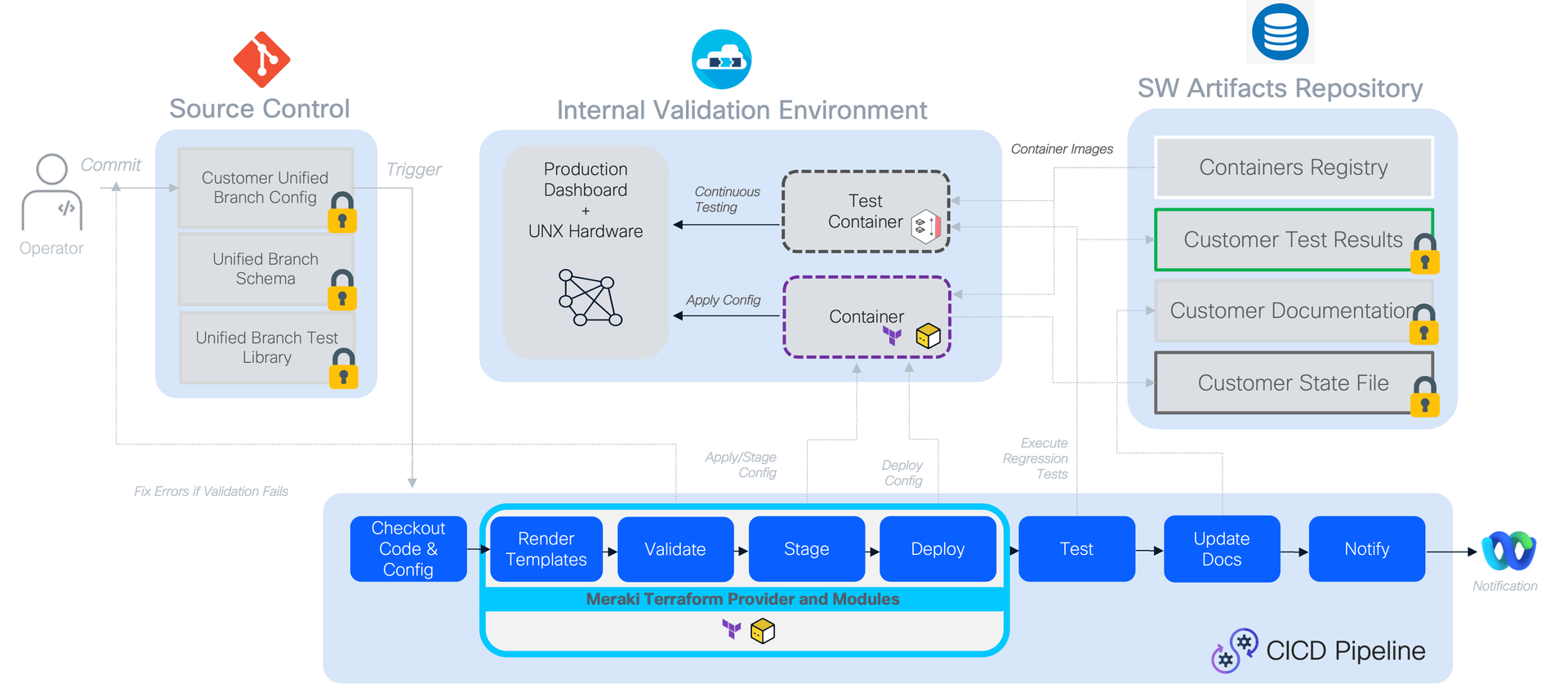
Complete Pipeline Flow Overview:
Validation Stage (pre-change validation)
Section titled “Validation Stage (pre-change validation)”During the validation stage, it is ensured that only valid configurations proceed to deployment.
What happens during validation:
-
Schema Compliance: The data model is validated against the predefined schema to ensure all required fields are present and data types are correct. This includes checking for mandatory fields like switch serial numbers and proper IP address formats.
-
Semantic Validation: Beyond basic schema compliance, the validation includes semantic checks that ensure the configuration makes logical sense from a networking perspective. This might include verifying that VLAN ranges don’t overlap, IP subnets are properly configured.
-
Custom Rules Engine: The validation stage can incorporate custom rules that enforce network-specific policies. These rules are written in Python and can range from simple naming convention enforcement to complex interconnectivity validation that prevents common configuration mistakes. These rules are available as part of the Services as Code service offering.
Branch Strategy Integration: We can implement validation across different Git branching strategies to provide early feedback to network engineers. When a network operator commits changes to a feature branch, the pipeline automatically runs validation-only jobs, allowing rapid iteration and error correction before changes are merged into the main branch. In this lab, branch strategy implementation is out of scope.
Benefits of Early Validation:
- Fast Feedback Loop: Engineers receive immediate feedback on their changes without waiting for full deployment cycles
- Reduced Risk: Invalid configurations are caught before they can impact the network
- Collaborative Development: Multiple engineers can work on different aspects of the network configuration with confidence that their changes will be validated consistently
Planning Stage
Section titled “Planning Stage”In this stage, Terraform generates an execution plan showing what changes it will make to reach the desired infrastructure state without actually applying them.
Deployment Stage
Section titled “Deployment Stage”The deployment stage transforms validated configuration data into actual network state through terraform provider. This stage represents the critical transition from intent (as expressed in the data model) to reality (as configured on network devices via Meraki Dashboard).
Testing Stage (post-deployment validation)
Section titled “Testing Stage (post-deployment validation)”The testing stage provides critical verification that the deployed configuration matches the intended state and that the network is functioning as expected. This stage uses the nac-test tool (previously known as iac-test) to perform comprehensive post-deployment validation.
Note: The current testing capabilities focus primarily on configuration accuracy validation. The testing ensures that what was deployed matches the intended configuration defined in the data model.
What Testing Validates:
- Configuration Accuracy: Verifies that the configuration deployed to Meraki Dashboard exactly matches what was defined in the data model. The testing stage checks for discrepancies between the intended configuration and the actual state on the devices.
Testing Process:
-
Template-Based Testing: The
nac-testtool uses Jinja2 templates that define the expected state based on the data model. These templates generate specific test cases that are executed against the actual network state. -
Human-Readable Output: Test results are generated in HTML report format for easy human review and analysis.
-
Comprehensive Reporting: Failed tests provide detailed information about what was expected versus what was found, making troubleshooting efficient and precise.
Testing Process Overview:
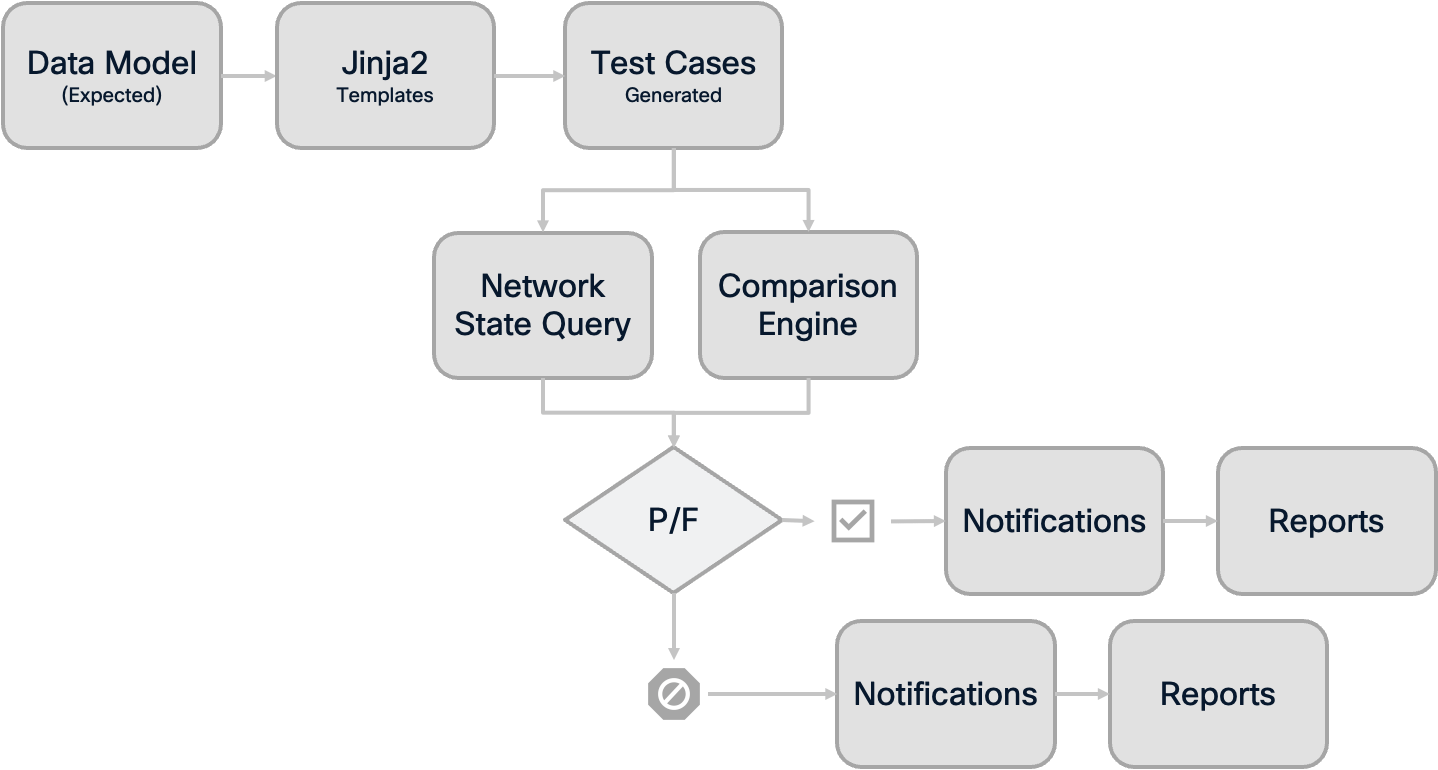
Integration with Pipeline:
- Artifact Collection: All test results are stored as pipeline artifacts, providing a permanent record of network state validation
- Failure Handling: Test failures provide immediate feedback on deployment issues and can trigger alerts to notify about the configuration discrepancies
- Change Documentation: Test reports serve as evidence for change documentation and operational processes
Benefits of Automated Testing:
- Confidence in Changes: Engineers can be confident that deployed changes work as intended
- Rapid Issue Detection: Problems are identified immediately after deployment, not during business hours when users report issues
- Documentation: Test results provide clear documentation of what was tested and aid in the troubleshooting process
Notification Stage (optional enhancement)
Section titled “Notification Stage (optional enhancement)”Notifications can also be configured as a final pipeline stage that provides stakeholders with real-time updates about deployment status and results. This stage can send deployment summaries to collaboration platforms like Cisco Webex Teams, Microsoft Teams, automatically distribute test reports and deployment artifacts to relevant stakeholders, and trigger alerts to on-call teams when critical deployments fail. Common integrations include sending adaptive cards with pipeline summaries, distributing comprehensive reports via email, or automatically creating ServiceNow change records with deployment results. This ensures that network operations teams stay informed about infrastructure changes without actively monitoring the pipeline interface.
Pipeline Benefits and Best Practices
Section titled “Pipeline Benefits and Best Practices”Implementing automation pipelines for Network as Code with Meraki Dashboard provides significant advantages over traditional network change management approaches:
Key Benefits
Section titled “Key Benefits”Risk Reduction: Every change is validated multiple times - first against schema and rules, then through deployment testing. This multi-layered approach dramatically reduces the risk of network outages or misconfigurations.
Consistency: All network changes follow the same standardized process, eliminating the variability that comes from manual processes or individual engineer preferences.
Auditability: Every change is tracked in version control, with complete visibility into who made what changes, when they were made, and what testing was performed.
Scalability: As network complexity grows, the pipeline approach scales much better than manual processes, allowing teams to manage larger and more complex network infrastructures.
Traditional vs Pipeline Approach Comparison:
| Traditional Manual Process | Automated Pipeline Process |
|---|---|
| 👤 Manual Configuration | 🤖 Automated Validation |
| ❌ Human Error Prone | ✅ Consistent & Reliable |
| 📝 Manual Documentation | 📊 Automatic Audit Trail |
| 🐌 Slow & Sequential | ⚡ Fast & Parallel |
| 🔍 Limited Testing | 🧪 Comprehensive Testing |
GitHub Actions Pipeline Documentation
Section titled “GitHub Actions Pipeline Documentation”Example: Step-by-Step CI/CD Pipeline for Branch as Code (based on bac-lab)
This lab uses GitHub Actions workflows for both full deployment pipelines and focused validation/testing jobs.
Workflow Overview
Section titled “Workflow Overview”| Workflow | Purpose | Typical Trigger |
|---|---|---|
pipeline.yml | Full pipeline (Validate → Plan → Deploy → Idempotency Test → Integration Test) | workflow_ |
syntax-validate. | Run syntax-focused validation | workflow_ |
semantics-validate. | Run semantic/ | workflow_ |
scheduled-integration-test. | Run periodic or one-time integration testing | schedule + workflow_ |
Full Pipeline Example (pipeline.yml)
Section titled “Full Pipeline Example (pipeline.yml)”name: Deploy Small Branch as Code
on: workflow_dispatch:
jobs: validate: runs-on: ubuntu-latest container: image: danischm/nac:0.1.6 steps: - uses: actions/checkout@v5 - run: grep -v '^\s*#' .env | grep -v '^\s*$' >> "$GITHUB_ENV" - run: terraform fmt -check - run: | terraform init -input=false terraform apply -auto-approve -input=false -target='module.meraki.module.model.local_sensitive_file.model[0]' - run: nac-validate ./merged_configuration.nac.yaml
plan: needs: [validate] runs-on: ubuntu-latest container: image: danischm/nac:0.1.6 steps: - uses: actions/checkout@v5 - run: grep -v '^\s*#' .env | grep -v '^\s*$' >> "$GITHUB_ENV" - run: | rm -rf .terraform/modules terraform get -update terraform init -input=false terraform plan -out=plan.tfplan -input=false
deploy: needs: [plan] runs-on: ubuntu-latest container: image: danischm/nac:0.1.6 steps: - uses: actions/checkout@v5 - run: grep -v '^\s*#' .env | grep -v '^\s*$' >> "$GITHUB_ENV" - run: | terraform init -input=false terraform apply -input=false -auto-approve plan.tfplanPurpose: Executes an end-to-end deployment path with gated jobs and artifact handoff between stages.
Individual Validation Task Example (syntax-validate.yml)
Section titled “Individual Validation Task Example (syntax-validate.yml)”name: Run Syntax Validation
on: workflow_dispatch:
jobs: syntax-validate: runs-on: ubuntu-latest steps: - uses: actions/checkout@v5 - uses: actions/setup-python@v6 with: python-version: '3.11' - run: pip install nac-validate - run: nac-validate -r rules data/org_global.nac.yaml -s schema.yaml --verbosity DEBUGPurpose: Runs syntax-focused checks independently of full deploy pipeline.
Individual Semantic Task Example (semantics-validate.yml)
Section titled “Individual Semantic Task Example (semantics-validate.yml)”name: Run Semantic / Business Rule
on: workflow_dispatch:
jobs: semantics-validate: runs-on: ubuntu-latest steps: - uses: actions/checkout@v5 - uses: actions/setup-python@v6 with: python-version: '3.11' - run: pip install nac-validate - run: nac-validate -r rules data/org_global.nac.yaml --non-strict --verbosity DEBUGPurpose: Validates policy/business logic rules independently of deployment.
Automated Testing Task Example (scheduled-integration-test.yml)
Section titled “Automated Testing Task Example (scheduled-integration-test.yml)”name: Scheduled Integration Test
on: schedule: - cron: '0 * * * *' workflow_dispatch:
jobs: integration-test: runs-on: ubuntu-latest container: image: danischm/nac:0.1.6 steps: - uses: actions/checkout@v5 - run: | terraform init -input=false terraform apply -target=module.meraki.module.model -auto-approve -input=false - run: nac-test -d ./merged_configuration.nac.yaml -t ./tests/templates -o ./tests/resultsPurpose: Executes automated post-deployment validation on demand or on schedule.
Summary
Section titled “Summary”Automation pipelines represent a fundamental shift in how network changes are managed, bringing the reliability and consistency of software development practices to network operations. By implementing the multi-stage pipeline approach (validate, deploy, test), organizations can significantly reduce the risk of network outages while improving the speed and consistency of network changes.
The combination of schema validation, automated deployment through Terraform, and post-deployment testing creates a robust framework that ensures network configurations are both syntactically correct and operationally sound. This foundation prepares network engineering teams to embrace Infrastructure as Code practices while maintaining the reliability and security that network operations demand.