

Device
Catalyst CenterLocation in GUI:
Provision » Inventory
Diagram
Section titled “Diagram”
Diagram
Section titled “Diagram”
Diagram
Section titled “Diagram”
Classes
Section titled “Classes”catalyst_center
Section titled “catalyst_center”| Name | Type | Constraint | Mandatory | Default Value |
|---|---|---|---|---|
| inventory | Class | inventory | No |
inventory (catalyst_center)
Section titled “inventory (catalyst_center)”| Name | Type | Constraint | Mandatory | Default Value |
|---|---|---|---|---|
| devices | List | devices | No |
devices (catalyst_center.inventory)
Section titled “devices (catalyst_center.inventory)”| Name | Type | Constraint | Mandatory | Default Value |
|---|---|---|---|---|
| name | String | Yes | ||
| fqdn_name | String | No | ||
| type | Choice | AccessPoint, WirelessController | No | |
| rf_profile | String | No | ||
| device_ip | IP | No | ||
| pid | Any | String or Null | No | |
| serial_number | Any | String or Null | No | |
| state | Choice | INIT, PNP, PROVISION, REPROVISION, ASSIGN | Yes | |
| device_role | Choice | ACCESS, CORE, DISTRIBUTION, BORDER ROUTER | Yes | |
| site | String | Yes | ||
| fabric_site | String | No | ||
| fabric_zone | String | No | ||
| fabric_roles | List | Choice[BORDER_NODE, CONTROL_, EDGE_NODE, WIRELESS_, EMBEDDED_] | No | |
| enable_wireless | Boolean | true, false | No | |
| clean_up_config | Boolean | true, false | No | |
| enable_ | Boolean | true, false | No | |
| image_name | String | No | ||
| image_id | String | No | ||
| image_skip | Boolean | true, false | No | |
| stack | Class | stack | No | |
| ap_ | Choice | 5, 15, 25 | No | |
| onboarding_ | Class | onboarding_ | No | |
| dayn_templates | Class | dayn_templates | No | |
| primary_ | List | String | No | |
| secondary_ | List | String | No | |
| anchor_ | List | String | No | |
| port_ | List | port_ | No | |
| port_channels | List | port_channels | No | |
| tags | List | String | No | |
| access_point | Class | access_point | No | |
| wireless_ | Class | wireless_ | No | |
| rma | Class | rma | No |
devices (catalyst_center.inventory)
Section titled “devices (catalyst_center.inventory)”| Name | Type | Constraint | Mandatory | Default Value |
|---|---|---|---|---|
| name | String | Yes | ||
| fqdn_name | String | No | ||
| type | Choice | AccessPoint, WirelessController | No | |
| rf_profile | String | No | ||
| device_ip | IP | No | ||
| pid | Any | String or Null | No | |
| serial_number | Any | String or Null | No | |
| state | Choice | INIT, PNP, PROVISION, REPROVISION, ASSIGN | Yes | |
| device_role | Choice | ACCESS, CORE, DISTRIBUTION, BORDER ROUTER | Yes | |
| site | String | Yes | ||
| fabric_site | String | No | ||
| fabric_zone | String | No | ||
| fabric_roles | List | Choice[BORDER_NODE, CONTROL_, EDGE_NODE, WIRELESS_, EMBEDDED_] | No | |
| enable_wireless | Boolean | true, false | No | |
| clean_up_config | Boolean | true, false | No | |
| enable_ | Boolean | true, false | No | |
| image_name | String | No | ||
| image_id | String | No | ||
| image_skip | Boolean | true, false | No | |
| stack | Class | stack | No | |
| ap_ | Choice | 5, 15, 25 | No | |
| onboarding_ | Class | onboarding_ | No | |
| dayn_templates | Class | dayn_templates | No | |
| primary_ | List | String | No | |
| secondary_ | List | String | No | |
| anchor_ | List | String | No | |
| port_ | List | port_ | No | |
| port_channels | List | port_channels | No | |
| tags | List | String | No | |
| access_point | Class | access_point | No | |
| rma | Class | rma | No |
devices (catalyst_center.inventory)
Section titled “devices (catalyst_center.inventory)”| Name | Type | Constraint | Mandatory | Default Value |
|---|---|---|---|---|
| name | String | Yes | ||
| fqdn_name | String | No | ||
| type | Choice | AccessPoint | No | |
| rf_profile | String | No | ||
| device_ip | IP | No | ||
| pid | Any | String or Null | No | |
| serial_number | Any | String or Null | No | |
| state | Choice | INIT, PNP, PROVISION, REPROVISION, ASSIGN, MARK_ | Yes | |
| device_role | Choice | ACCESS, CORE, DISTRIBUTION, BORDER ROUTER | Yes | |
| site | String | Yes | ||
| fabric_site | String | No | ||
| fabric_zone | String | No | ||
| fabric_roles | List | Choice[BORDER_NODE, CONTROL_, EDGE_NODE, WIRELESS_, EMBEDDED_] | No | |
| enable_wireless | Boolean | true, false | No | |
| clean_up_config | Boolean | true, false | No | |
| enable_ | Boolean | true, false | No | |
| image_name | String | No | ||
| image_id | String | No | ||
| image_skip | Boolean | true, false | No | |
| stack | Class | stack | No | |
| ap_ | Choice | 5, 15, 25 | No | |
| onboarding_ | Class | onboarding_ | No | |
| dayn_templates | Class | dayn_templates | No | |
| primary_ | List | String | No | |
| secondary_ | List | String | No | |
| port_ | List | port_ | No | |
| port_channels | List | port_channels | No | |
| tags | List | String | No |
stack (catalyst_center.inventory.devices)
Section titled “stack (catalyst_center.inventory.devices)”| Name | Type | Constraint | Mandatory | Default Value |
|---|---|---|---|---|
| top_ | String | Yes | ||
| cabling_scheme | Choice | 1A, 1B | Yes |
onboarding_template (catalyst_center.inventory.devices)
Section titled “onboarding_template (catalyst_center.inventory.devices)”| Name | Type | Constraint | Mandatory | Default Value |
|---|---|---|---|---|
| name | String | Yes | ||
| variables | List | variables | No |
dayn_templates (catalyst_center.inventory.devices)
Section titled “dayn_templates (catalyst_center.inventory.devices)”| Name | Type | Constraint | Mandatory | Default Value |
|---|---|---|---|---|
| regular | List | regular | No | |
| composite | List | composite | No | |
| redeploy_ | Choice | ALWAYS, NEVER, ON_CHANGE | No |
port_assignments (catalyst_center.inventory.devices)
Section titled “port_assignments (catalyst_center.inventory.devices)”| Name | Type | Constraint | Mandatory | Default Value |
|---|---|---|---|---|
| interface_name | String | No | ||
| interfaces_ | String | Regex: ^[A-Za-z] | No | |
| interface_ | String | No | ||
| connected_ | Choice | USER_DEVICE, ACCESS_POINT, TRUNKING_DEVICE, AUTHENTICATOR_, SUPPLICANT_ | Yes | |
| data_vlan_name | String | No | ||
| voice_vlan_name | String | No | ||
| security_ | String | No | ||
| authenticate_ | Choice | No Authentication, Open Authentication, Closed Authentication, Low Impact | No |
port_channels (catalyst_center.inventory.devices)
Section titled “port_channels (catalyst_center.inventory.devices)”| Name | Type | Constraint | Mandatory | Default Value |
|---|---|---|---|---|
| id | Integer | Yes | ||
| connected_ | Choice | TRUNK, EXTENDED_NODE | Yes | |
| protocol | Choice | ON, LACP, PAGP | No | |
| description | String | No | ||
| interface_names | List | String | Yes | |
| native_vlan_id | Integer | min: 1, max: 4094 | No | |
| allowed_ | String | No |
access_point (catalyst_center.inventory.devices)
Section titled “access_point (catalyst_center.inventory.devices)”| Name | Type | Constraint | Mandatory | Default Value |
|---|---|---|---|---|
| configuration | String | No | ||
| manage_hostname | Boolean | true, false | No | false |
wireless_management (catalyst_center.inventory.devices)
Section titled “wireless_management (catalyst_center.inventory.devices)”| Name | Type | Constraint | Mandatory | Default Value |
|---|---|---|---|---|
| ip_address | IP | Yes | ||
| subnet_mask | IP | Yes | ||
| gateway | IP | Yes | ||
| vlan_id | Integer | min: 1, max: 4094 | No | |
| interface_name | String | Yes |
rma (catalyst_center.inventory.devices)
Section titled “rma (catalyst_center.inventory.devices)”| Name | Type | Constraint | Mandatory | Default Value |
|---|---|---|---|---|
| action | Choice | MARK_, REPLACE | Yes | |
| replacement_ | String | No |
variables (catalyst_center.inventory.devices.onboarding_template)
Section titled “variables (catalyst_center.inventory.devices.onboarding_template)”| Name | Type | Constraint | Mandatory | Default Value |
|---|---|---|---|---|
| name | String | Yes | ||
| value | Any | String or List[String] or Integer | Yes |
variables (catalyst_center.inventory.devices.onboarding_template)
Section titled “variables (catalyst_center.inventory.devices.onboarding_template)”| Name | Type | Constraint | Mandatory | Default Value |
|---|---|---|---|---|
| name | String | Yes | ||
| value | Any | String or List[String] | Yes |
regular (catalyst_center.inventory.devices.dayn_templates)
Section titled “regular (catalyst_center.inventory.devices.dayn_templates)”| Name | Type | Constraint | Mandatory | Default Value |
|---|---|---|---|---|
| name | String | Yes | ||
| variables | List | variables | No | |
| redeploy_ | Choice | ALWAYS, NEVER, ON_CHANGE | No | |
| copying_config | Boolean | true, false | No | |
| force_ | Boolean | true, false | No |
composite (catalyst_center.inventory.devices.dayn_templates)
Section titled “composite (catalyst_center.inventory.devices.dayn_templates)”| Name | Type | Constraint | Mandatory | Default Value |
|---|---|---|---|---|
| name | String | Yes | ||
| variables | List | variables | No | |
| redeploy_ | Choice | ALWAYS, NEVER, ON_CHANGE | No | |
| copying_config | Boolean | true, false | No | |
| force_ | Boolean | true, false | No |
variables (catalyst_center.inventory.devices.dayn_templates.composite)
Section titled “variables (catalyst_center.inventory.devices.dayn_templates.composite)”| Name | Type | Constraint | Mandatory | Default Value |
|---|---|---|---|---|
| name | String | Yes | ||
| value | Any | String or List[String] or Integer | Yes | |
| template_name | String | Yes |
variables (catalyst_center.inventory.devices.dayn_templates.composite)
Section titled “variables (catalyst_center.inventory.devices.dayn_templates.composite)”| Name | Type | Constraint | Mandatory | Default Value |
|---|---|---|---|---|
| name | String | Yes | ||
| value | Any | String or List[String] | Yes | |
| template_name | String | Yes |
Devices represent the network equipment managed by Catalyst Center. The device data model defines inventory attributes, site assignment, provisioning parameters, and fabric roles. Devices must be discovered (via Discovery or manual add), assigned to a site, and provisioned before they can participate in the network. In SDA fabric deployments, devices are additionally assigned fabric roles (edge, border, control plane) for Fabric Site participation. Applicable to both SDA fabric and non-fabric deployments.
Device Provisioning States and Lifecycle
Section titled “Device Provisioning States and Lifecycle”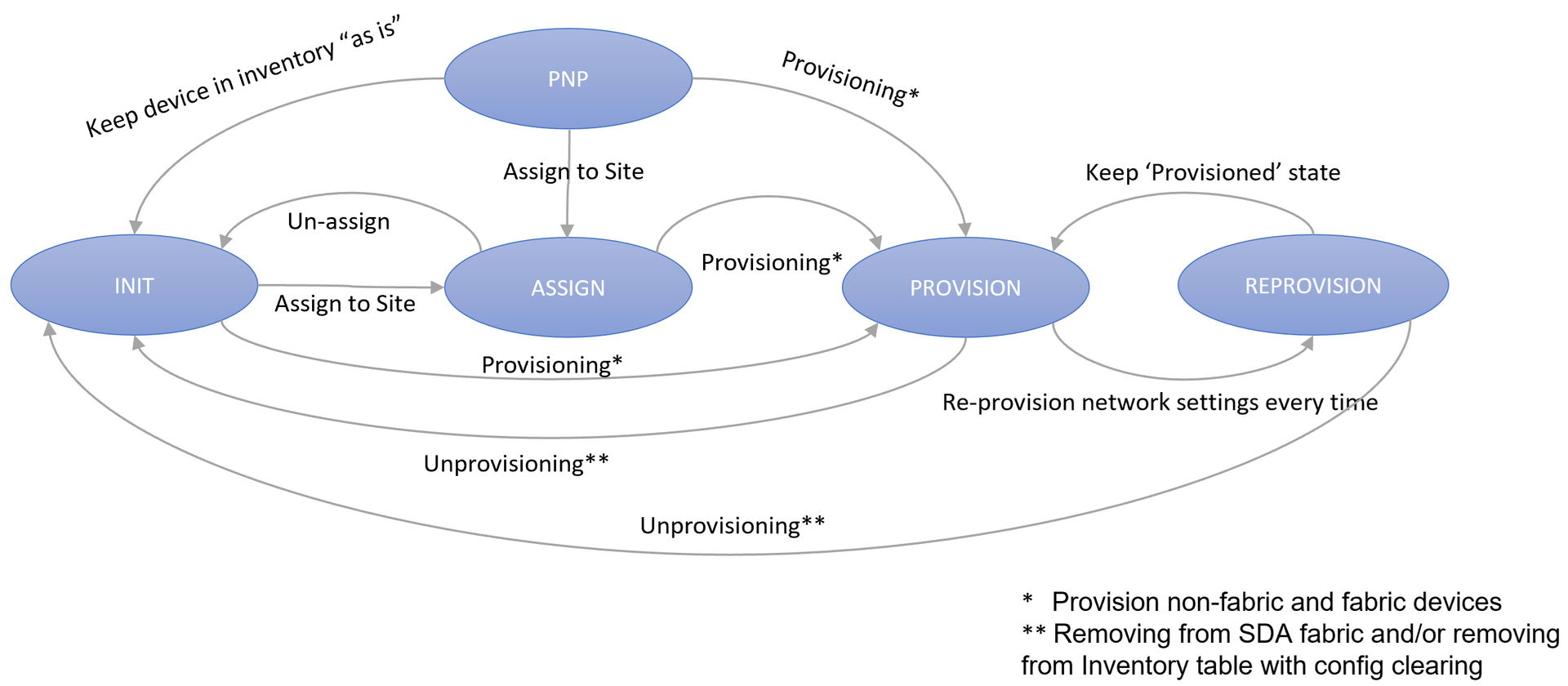
The device provisioning lifecycle in Catalyst Center follows a well-defined state machine that manages devices from initial discovery through full deployment and ongoing management. Understanding these states and their transitions is crucial for effective network automation and troubleshooting.
Device States
Section titled “Device States”INIT (Initial State)
Section titled “INIT (Initial State)”The starting state for all devices when first added to the inventory. Devices in this state are discovered but not yet assigned to any site or configured for provisioning.
Characteristics:
- Device is discovered and added to inventory
- No site assignment
- No configuration applied
- Basic device information collected (IP, serial number, PID)
Possible Transitions:
- To ASSIGN: Assign device to a specific site for configuration
- To PROVISION: Begin the provisioning process for non-fabric devices, as well as fabric provisioning if fabric attributes are specified
PNP (Plug and Play)
Section titled “PNP (Plug and Play)”Devices in this state are ready for zero-touch provisioning when they boot up and contact the Catalyst Center. This state is typically used for new devices that will be deployed in remote locations.
Characteristics:
- Device prepared for zero-touch deployment
- Configuration templates pre-assigned
- Waiting for device to contact Catalyst Center
- No active management until device boots
Possible Transitions:
- To PROVISION: Begin the provisioning process for non-fabric devices, as well as fabric provisioning if fabric attributes are specified
- To INIT: Keep device in Inventory “as is” after PNP process
- ASSIGN: Assign device to a specific site
ASSIGN
Section titled “ASSIGN”Devices are assigned to a specific site but not yet provisioned with configuration. This state allows for site-specific settings preparation before actual provisioning.
Characteristics:
- Device assigned to a site hierarchy
- Site-specific credentials and settings applied
- Ready for provisioning process
- Configuration templates can be assigned
Possible Transitions:
- To PROVISION: Begin the provisioning process for non-fabric devices, as well as fabric provisioning if fabric attributes are specified
- To INIT: Un-assign device from site
PROVISION
Section titled “PROVISION”The active provisioning state where devices receive their full configuration and become operational network elements. This is the target state for most production devices.
Characteristics:
- Full configuration deployment in progress or completed
- Device actively managed by Catalyst Center
- Templates applied and configuration synchronized
- Monitoring and compliance checking active
- Fabric roles assigned (if applicable)
Possible Transitions:
- To REPROVISION: When configuration changes require redeployment
- To INIT: Unprovision device completely (removes from SDA fabric and/or Inventory with config clearing)
REPROVISION
Section titled “REPROVISION”A state that re-runs Catalyst Center provisioning on a device that is already in PROVISION state. Re-provision applies changed intent (Design » Network Settings) to the device and re-pushes the Day-N CLI templates bound to it. It does not force a re-push of intent that Catalyst Center considers already applied.
Characteristics:
- Device remains operational during re-provisioning
- Day-N CLI templates bound to the device are re-pushed by the Catalyst Center provisioning job. In this module, whether
dayn_templatesare actually redeployed is controlled separately byredeploy_template(defaultNEVER) — see Templates. - Network Settings intent (NTP, DNS, syslog, SNMP, banner, source interfaces, and so on) is pushed only when it has changed on the Catalyst Center side. If the intent has not changed since the last successful provision, Catalyst Center skips the push.
- Maintains existing fabric membership and site assignment
Possible Transitions:
- To PROVISION: Return to standard provisioned state after updates complete
- To INIT: Unprovision device completely (removes from SDA fabric and/or Inventory with config clearing)
Note: Updating Network Settings and re-provisioning a device are two independent flows on the Catalyst Center side. Editing
network_settingsin the data model updates Catalyst Center’s intent database, but that delta is not deterministically observed by a REPROVISION issued in the sameterraform apply. If you need to guarantee that a fresh Network Settings change is pushed to a specific device, editnetwork_settingson one apply, wait for Catalyst Center to surface the device as non-compliant, then set the device toREPROVISIONon a subsequent apply.Reconciling out-of-band changes made directly on a device (for example, configuration lines removed on the switch) is a different Catalyst Center feature (Compliance » Fix All Configuration Compliance Issues) and is not covered by REPROVISION. This module does not currently expose the compliance-fix workflow.
State Transition Operations
Section titled “State Transition Operations”Provisioning Operations
Section titled “Provisioning Operations”- Provision non-fabric devices: Apply standard network configuration
- Provision fabric devices: Apply SDA fabric configuration and assign fabric roles
- Both operations move devices from INIT, ASSIGN or PNP states to PROVISION state
Unprovisioning Operations
Section titled “Unprovisioning Operations”- Standard Unprovisioning: Removes device from Inventory management with configuration clearing
- SDA Fabric Removal: Removes from both SDA fabric and Inventory with configuration clearing
Best Practices
Section titled “Best Practices”State Management
Section titled “State Management”- Use ASSIGN state for devices requiring site-specific preparation
- Use PNP state for zero-touch deployment scenarios
- Monitor devices in REPROVISION state for completion
Operational Considerations
Section titled “Operational Considerations”- Devices in PROVISION state should be monitored for compliance
- REPROVISION operations should be scheduled during maintenance windows
- Use proper unprovisioning procedures to avoid configuration conflicts
- Maintain device inventory accuracy across all states
Examples
Section titled “Examples”Example-1: SD-Access Border Router Device Configuration
Section titled “Example-1: SD-Access Border Router Device Configuration”This example demonstrates how to configure a border router device in Catalyst Center inventory with SD-Access fabric capabilities. Border routers serve as critical infrastructure components that connect the SD-Access fabric to external networks and provide advanced routing and policy enforcement functions.
The border router device configuration includes:
- Device name (BR01) for identification and inventory management
- Management IP address (192.168.10.1) for device communication and monitoring
- PROVISION state for active deployment and configuration management
- Border router role designation for network function
- Site assignment (Global/Canada) for geographic and organizational placement
- Fabric site association (Global/Canada) for SD-Access fabric membership
- Multiple fabric roles including BORDER_NODE for external connectivity and CONTROL_PLANE_NODE for fabric control plane operations
catalyst_center: inventory: devices: - name: BR01 fqdn_name: BR01.company.local device_ip: 192.168.10.1 state: PROVISION device_role: BORDER ROUTER site: Global/Canada fabric_site: Global/Canada fabric_roles: - BORDER_NODE - CONTROL_PLANE_NODEExample-2: Access Switch with Edge Node Functionality
Section titled “Example-2: Access Switch with Edge Node Functionality”This example shows how to configure an access layer switch with SD-Access edge node capabilities for endpoint connectivity and policy enforcement at the network edge.
catalyst_center: inventory: devices: - name: ACCESS-SW01 fqdn_name: ACCESS-SW01.company.local device_ip: 192.168.20.10 serial_number: FOC2644021A pid: C9300-24P state: PROVISION device_role: ACCESS site: Global/North America/Campus/Building A/Floor 1 fabric_site: Global/North America/Campus fabric_roles: - EDGE_NODE tags: - FLOOR1_DEVICES - EMPLOYEE_ACCESSExample-3: Plug-n-Play Functionality
Section titled “Example-3: Plug-n-Play Functionality”This example shows how to configure a device to be on-boarded into Catalyst Center inventory using plug and play.
Note : The below assumes that a day zero on-boarding template named PNP_Template has already be provisioned using the data model. The PNP_Template during the PNP process, switches the device’s https source-interface to the device’s desired management interface IP address.
Note : During the PNP claim process, the value of name defined in the data model is used as the device name in the Plug and Play device database of the Catalyst Center GUI.
catalyst_center: inventory: devices: - name: PNP_DEVICE fqdn_name: PNP_DEVICE.cisco.eu device_ip: 192.158.142.20 serial_number: FAB12345602 pid: C9300-48P state: PNP device_role: BORDER ROUTER site: Global/Poland/Krakow/Bld A onboarding_template: name: PNP_Template variables: - name: device_host_name value: PNP_DEVICE - name: infra_vlan value: "100" - name: infra_vlan_network_add value: 181.1.1.90 - name: infra_vlan_network_mask value: 255.255.255.248 - name: loopback_0_IP value: 192.158.142.20 - name: loopback_0_mask value: 255.255.255.255 - name: Border_AS value: "65005" - name: peer_BGP_neigbor value: 181.1.1.89 - name: peer_AS value: "65002" - name: peer_interface value: GigabitEthernet1/0/1After the plug and play process is completed, the device state can be updated to PROVISION to enable full management and configuration capabilities within Catalyst Center.
catalyst_center: inventory: devices: - name: PNP_DEVICE fqdn_name: PNP_DEVICE.cisco.eu device_ip: 192.158.142.20 serial_number: FAB12345602 pid: C9300-48P state: PROVISION device_role: BORDER ROUTER site: Global/Poland/Krakow/Bld AExample-4: Plug-n-Play with Switch Stack Configuration
Section titled “Example-4: Plug-n-Play with Switch Stack Configuration”This example shows how to configure a switch stack to be on-boarded into Catalyst Center inventory using Plug and Play. The stack block specifies stack-specific parameters that control the physical switch numbering and the StackWise cabling layout.
Note :
serial_numbermust be a comma-separated list of all member-switch serial numbers in the stack (no spaces between entries).top_of_stack_serial_numberselects the switch that will be assigned stack member number1. This is purely a numbering convention - it does not imply that switch1will be the active (master) switch in the stack. The active role is elected by the stack itself following standard StackWise election rules.cabling_schemespecifies the StackWise cabling layout. Two values are currently supported:1Aand1B.- Both
top_of_stack_serial_numberandcabling_schememust be provided when thestackblock is used.
catalyst_center: inventory: devices: - name: PNP_STACK fqdn_name: PNP_STACK.cisco.eu device_ip: 192.168.50.2 serial_number: "FOC2724Y8RE,FOC2724Y8SJ" pid: C9300X-48HX state: PNP stack: top_of_stack_serial_number: FOC2724Y8SJ cabling_scheme: "1A" device_role: BORDER ROUTER site: Global/Poland/Krakow/Bld A clean_up_config: falseExample-5: Plug-n-Play with Image Upgrade
Section titled “Example-5: Plug-n-Play with Image Upgrade”This example shows how to upgrade a device’s software image as part of the Plug and Play (PnP) onboarding process. When image_skip is set to false, Catalyst Center includes image-upgrade information in the PnP claim payload and upgrades the device to the target image during onboarding, ensuring the device boots with the desired software version on its first day of operation.
Note :
- The device platform must be booting in install mode (not bundle mode) for the PnP image upgrade to succeed.
- In the Catalyst Center GUI image repository, the image must already exist and be assigned to the device’s platform and site. Tagging the image as Golden is recommended.
image_skipcontrols the upgrade behavior:image_skip: true(default) — PnP devices are not upgraded; the device boots with whatever image it ships with.image_skip: false— the PnP claim payload includesimageInfoand Catalyst Center upgrades the device during onboarding.
image_name— whenimage_skip: falseis configured,image_nameshould be defined at the device level so that Catalyst Center knows which image to push during the PnP claim. It must point to an existing image filename in the SWIM repository (for example,cat9k_iosxe.17.15.05.SPA.bin).
catalyst_center: inventory: devices: - name: Edge-2 fqdn_name: Edge-2.cisco.eu device_ip: 172.16.251.4 pid: C9300-48P state: PNP serial_number: FOC2710YM9V device_role: "ACCESS" site: Global/Poland/Krakow/Bld A image_skip: false # Image filename in the SWIM repository. # When `image_skip: false`, `image_name` must be defined image_name: cat9k_iosxe.17.15.05.SPA.binSetting image_skip globally via defaults.yaml
Section titled “Setting image_skip globally via defaults.yaml”To enable PnP image upgrade for all PnP devices without repeating the flag on each one, set image_skip under the pnp.devices block in defaults.yaml:
defaults: catalyst_center: pnp: devices: image_skip: falseWhen set in defaults.yaml, the flag applies to all PnP devices that do not explicitly override it. Individual devices can still opt out by setting image_skip: true at the device level.
Note:
image_nameis per-device only. To upgrade every PnP device, keepimage_skip: falseindefaults.yamland set the appropriateimage_nameon each device.
Example-6: Access Point Plug-n-Play
Section titled “Example-6: Access Point Plug-n-Play”This example shows how to configure an Access Point to be on-boarded into Catalyst Center inventory using plug and play.
Note : It is mandatory to provide the type as AccessPoint, rf_profile, and site in order to add and claim the device in Provision -> Plug and Play
catalyst_center: inventory: devices: - name: AP_PNP fqdn_name: AP_PNP.cisco.eu pid: C9136I-E serial_number: FGL3727MF6Y state: PNP type: AccessPoint rf_profile: TYPICAL device_role: ACCESS site: Global/Poland/Krakow/Bld A/FLOOR_2After the plug and play process is completed, the Access Point can be updated to PROVISION to provision full management and configuration capabilities within Catalyst Center.
catalyst_center: inventory: devices: - name: AP_PNP fqdn_name: AP_PNP.cisco.eu pid: C9136I-E serial_number: FGL3727MF6Y state: PROVISION type: AccessPoint rf_profile: TYPICAL device_role: ACCESS site: Global/Poland/Krakow/Bld A/FLOOR_2Example-7: Embedded Wireless Controller Provisioning
Section titled “Example-7: Embedded Wireless Controller Provisioning”This example demonstrates how to enable the fabric Embedded Wireless Controller (EWC) role on a fabric device so it manages wireless access points from within the fabric.
Note :
- It is mandatory to include
EMBEDDED_WIRELESS_CONTROLLER_NODEin thefabric_roleslist (in addition to the existing role(s) such asEDGE_NODE,BORDER_NODE,CONTROL_PLANE_NODE). - An Embedded Wireless Controller must always have managed AP locations. It is mandatory to populate
primary_managed_ap_locations(and optionallysecondary_managed_ap_locations) whenever theEMBEDDED_WIRELESS_CONTROLLER_NODErole is present. A device carrying the EWC role without any managed AP locations is an invalid configuration and is rejected by validation.
Note:
type: WirelessControlleris not required for an Embedded Wireless Controller; theEMBEDDED_WIRELESS_CONTROLLER_NODErole is sufficient.type: WirelessControllerapplies only to non-embedded (standalone / fabric) Wireless Controllers — see Example-14.
Mandatory prerequisite: Embedded WLC image
Section titled “Mandatory prerequisite: Embedded WLC image”Before enabling the EMBEDDED_WIRELESS_CONTROLLER_NODE role, the Embedded Wireless Controller image must already be installed, committed, and activated on the switch. This is an out-of-band (OOB) prerequisite performed directly on the device (for example via CLI) and is not part of the data model / Terraform workflow. Terraform does not install or activate the Embedded WLC image; it only enables the fabric EWC role on a switch that already has the image active.
Verify the base image and the Embedded WLC image are in an activated state using show install summary. Both the base IMG and the C9800-SW wireless-controller PKG should show state C (Activated & Committed):
FIAB1> show install summary[ Switch 1 ] Installed Package(s) Information:State (St): I - Inactive, U - Activated & Uncommitted,            C - Activated & Committed, D - Deactivated & Uncommitted--------------------------------------------------------------------------------Type  St   Filename/Version--------------------------------------------------------------------------------IMG   C    17.15.03.0.5635PKG   C    flash:C9800-SW-iosxe-wlc.17.15.03.SPA.bin
--------------------------------------------------------------------------------Auto abort timer: inactive--------------------------------------------------------------------------------
Supported role combinations
Section titled “Supported role combinations”The EWC role can be combined with specific wired fabric role(s). Two supported combinations are shown below.
Option 1 — Border + Control Plane + Edge + Embedded Wireless Controller (a fabric-in-a-box that is also the wireless controller):
catalyst_center: inventory: devices: - name: FIAB1 fqdn_name: FIAB1 device_ip: 192.168.142.20 pid: C9300L-24T-4X state: PROVISION device_role: ACCESS site: Global/Poland/Warsaw/Bld_B fabric_site: Global/Poland/Warsaw fabric_roles: - BORDER_NODE - CONTROL_PLANE_NODE - EDGE_NODE - EMBEDDED_WIRELESS_CONTROLLER_NODE primary_managed_ap_locations: - Global/Poland/Warsaw/Bld_B/FLOOR_1 secondary_managed_ap_locations: - Global/Poland/Warsaw/Bld_B/FLOOR_2Option 2 — Edge + Embedded Wireless Controller:
catalyst_center: inventory: devices: - name: FIAB2 fqdn_name: FIAB2 device_ip: 192.168.142.30 pid: C9300L-24T-4X state: PROVISION device_role: ACCESS site: Global/Poland/Krakow/Bld A fabric_site: Global/Poland/Krakow fabric_roles: - EDGE_NODE - EMBEDDED_WIRELESS_CONTROLLER_NODE primary_managed_ap_locations: - Global/Poland/Krakow/Bld A secondary_managed_ap_locations: - Global/Poland/Krakow/Bld BAdding the EWC role to an Edge-only fabric device requires two Terraform applies
Section titled “Adding the EWC role to an Edge-only fabric device requires two Terraform applies”Enabling the Embedded Wireless Controller on an Edge-only fabric device requires two separate terraform apply runs. The device must first be provisioned with its wired fabric Edge role, and the EWC role plus managed AP locations are added on a second apply.
Step 1 — Provision the device with the wired fabric Edge role only (no EWC role, no managed AP locations):
catalyst_center: inventory: devices: - name: FIAB2 fqdn_name: FIAB2 device_ip: 192.168.142.30 pid: C9300L-24T-4X state: PROVISION device_role: ACCESS site: Global/Poland/Krakow/Bld A fabric_site: Global/Poland/Krakow fabric_roles: - EDGE_NODERun terraform apply.
Step 2 — Add the EMBEDDED_WIRELESS_CONTROLLER_NODE role together with the managed AP locations:
catalyst_center: inventory: devices: - name: FIAB2 fqdn_name: FIAB2 device_ip: 192.168.142.30 pid: C9300L-24T-4X state: PROVISION device_role: ACCESS site: Global/Poland/Krakow/Bld A fabric_site: Global/Poland/Krakow fabric_roles: - EDGE_NODE - EMBEDDED_WIRELESS_CONTROLLER_NODE primary_managed_ap_locations: - Global/Poland/Krakow/Bld A secondary_managed_ap_locations: - Global/Poland/Krakow/Bld BRun terraform apply again.
Removing the EWC role
Section titled “Removing the EWC role”When removing the Embedded Wireless Controller from a device, remove the EMBEDDED_WIRELESS_CONTROLLER_NODE role and its primary_managed_ap_locations / secondary_managed_ap_locations in the same terraform apply. The managed AP locations must never be left behind after the EWC role is removed — removing the role while keeping the AP locations is an invalid configuration and is rejected by validation.
Example-8: Management IP Address Update
Section titled “Example-8: Management IP Address Update”This example demonstrates how to update the management IP address of an existing device. When the device_ip in the data model differs from the device’s current management IP in Catalyst Center, the module automatically triggers a management address update. The device must be identifiable by its name or fqdn_name (hostname match against Catalyst Center inventory).
Note: This resource uses an ephemeral approach: it only appears in Terraform state when
device_ipdiffers from the current Catalyst Center management IP. After a successful apply, the next apply will detect the IPs match, automatically remove the resource from state, and make no further changes. This means zero state footprint when IPs are in sync. This feature does not apply to Access Points (type: AccessPoint).
catalyst_center: inventory: devices: - name: SW-CORE-01 fqdn_name: SW-CORE-01.company.local device_ip: 10.1.1.100 # new management IP (was 10.1.1.10) state: PROVISION device_role: CORE site: Global/HQ/DataCenterExample-9: Device Unprovisioning with clean_up_config
Section titled “Example-9: Device Unprovisioning with clean_up_config”When unprovisioning a device (transitioning from PROVISION to INIT), Catalyst Center attempts to connect to the device and remove its configuration. However, if the device is unreachable (e.g. hardware failure, network outage, or the device has already been physically removed), the unprovisioning will fail because Catalyst Center cannot clean the configuration.
The clean_up_config: false flag instructs Catalyst Center to skip the configuration cleanup step, allowing the device to be deleted from inventory even when it is unreachable or error-free cleanup is not possible.
Important: This is a two-step process:
- First
terraform apply: Setclean_up_config: falseon the device while it is still inPROVISIONstate. This tells Catalyst Center to skip configuration cleanup on the next state change.- Second
terraform apply: Change the device state toINIT(unprovision). Becauseclean_up_configwas already set tofalse, Catalyst Center will remove the device without attempting to reach it.
Step 1 — Set clean_up_config: false on the unreachable device:
catalyst_center: inventory: devices: - name: SW-UNREACHABLE-01 fqdn_name: SW-UNREACHABLE-01.company.local device_ip: 10.1.1.50 state: PROVISION device_role: ACCESS site: Global/HQ/Building A/Floor 1 clean_up_config: falseRun terraform apply to register the flag with Catalyst Center.
Step 2 — Unprovision the device by setting state: INIT:
catalyst_center: inventory: devices: - name: SW-UNREACHABLE-01 fqdn_name: SW-UNREACHABLE-01.company.local device_ip: 10.1.1.50 state: INIT device_role: ACCESS site: Global/HQ/Building A/Floor 1 clean_up_config: falseRun terraform apply again. Catalyst Center will remove the device from inventory without attempting to clean its configuration.
Setting clean_up_config globally via defaults.yaml
Section titled “Setting clean_up_config globally via defaults.yaml”If you have multiple unreachable devices or want to apply this flag to all devices by default, you can set it in the defaults.yaml file instead of on each individual device:
defaults: catalyst_center: inventory: devices: clean_up_config: falseWhen set in defaults.yaml, the flag applies to all devices that do not explicitly override it. Individual devices can still override the default by setting clean_up_config: true at the device level.
Example-10: RMA (Return Material Authorization) Device Replacement
Section titled “Example-10: RMA (Return Material Authorization) Device Replacement”This example demonstrates how to replace a faulty device using the RMA workflow. The process is driven by the optional rma block on the device, and is a 3-step process requiring separate terraform apply runs. The device state stays PROVISION throughout, so none of the device’s existing resources (provisioning, fabric roles, templates, port assignments) are touched while the replacement is in flight.
Prerequisites:
- The faulty device must be unreachable in Catalyst Center
- The replacement device must be physically connected and reachable by Catalyst Center
serial_numberholds the faulty (current) device’s serial number, andrma.replacement_serial_numberholds the new (replacement) device’s serial number
How it works: The
rma.actionvalue alone decides which resources are created — everyfor_eachkey is derived from static data-model values (device name andrma.action), so plan andterraform importare never affected by apply-time-unknown values (see netascode/nac-catalystcenter#530). Whenrma.actionisMARK_FOR_REPLACEMENTorREPLACE, the module creates thecatalystcenter_device_replacement(mark) resource, which records the device as faulty in Catalyst Center. Whenrma.actionisREPLACE, the module additionally triggerscatalystcenter_device_replacement_workflow, usingserial_numberas the faulty device andrma.replacement_serial_numberas the replacement device. Removing thermablock un-marks the device and returns it to normal management.
Step 1 — Mark the faulty device for replacement:
Add an rma block with action: MARK_FOR_REPLACEMENT. Leave state as PROVISION. Only the mark is applied; all existing device resources remain untouched.
catalyst_center: inventory: devices: - name: SW-ACCESS-01 fqdn_name: SW-ACCESS-01.company.local device_ip: 10.1.1.20 pid: C9300-24P serial_number: FOC12345678 # faulty (current) device serial state: PROVISION device_role: ACCESS site: Global/HQ/Building A/Floor 1 fabric_site: Global/HQ fabric_roles: - EDGE_NODE rma: action: MARK_FOR_REPLACEMENTRun terraform apply. Catalyst Center marks the device for replacement.
Step 2 — Trigger the replacement with the new device’s serial number:
Change rma.action to REPLACE and set rma.replacement_serial_number to the new (replacement) device’s serial number. Keep serial_number as the faulty device’s serial number.
catalyst_center: inventory: devices: - name: SW-ACCESS-01 fqdn_name: SW-ACCESS-01.company.local device_ip: 10.1.1.20 pid: C9300-24P serial_number: FOC12345678 # faulty (current) device serial state: PROVISION device_role: ACCESS site: Global/HQ/Building A/Floor 1 fabric_site: Global/HQ fabric_roles: - EDGE_NODE rma: action: REPLACE replacement_serial_number: FOC87654321 # NEW replacement device serialRun terraform apply. The module keeps the mark in place and triggers the Catalyst Center RMA workflow, which transfers the configuration from the faulty device to the replacement device. The workflow runs asynchronously in Catalyst Center.
Step 3 (Cleanup) — Remove the rma block once the replacement completes:
Once Catalyst Center finishes the replacement and shows the new device in inventory, remove the rma block and update serial_number to the new device’s serial number.
- name: SW-ACCESS-01 fqdn_name: SW-ACCESS-01.company.local device_ip: 10.1.1.20 pid: C9300-24P serial_number: FOC87654321 # replacement device serial state: PROVISION device_role: ACCESS site: Global/HQ/Building A/Floor 1 fabric_site: Global/HQ fabric_roles: - EDGE_NODERun terraform apply. The catalystcenter_device_replacement.mark and catalystcenter_device_replacement_workflow.rma resources drop out of the plan and are removed; the mark is deleted safely because the rma block is gone. The final result is a stable state with the device provisioned under the new serial number.
Note: Keep the
rmablock in place until Catalyst Center reports the replacement as complete. Removing it while the device is still being replaced would un-mark it and abort the in-flight replacement.
Note: The RMA process is fully repeatable. After cleanup the same steps can be used again for any future replacement of the same device.
Example-11: Deploying a Built-in or Pre-existing CLI Template
Section titled “Example-11: Deploying a Built-in or Pre-existing CLI Template”This example shows how to deploy a CLI template that already exists in Catalyst Center (a built-in template, or a custom template created outside of Terraform) without redefining it under Templates. Reference the template from the device using the <project_name>#<template_name> form. The module resolves the template via data sources (project lookup by name → template lookup by (project_id, template_name) → latest committed version) and deploys it to the device exactly like a managed template.
This form is supported in all three places a device consumes a template:
dayn_templates.regular[].name— built-in regular Day-N template.dayn_templates.composite[].name— built-in composite Day-N template (members and their latest committed versions are discovered automatically; per-member variables are matched ontemplate_name).onboarding_template.name— built-in onboarding template (consumed by the PnP device-claim flow).
The <project_name>#<template_name> prefix is required — bare names are still treated as references to templates declared under templates.projects[] in the data model. Use this form only when the template is not declared in the data model.
Regular Day-N template:
catalyst_center: inventory: devices: - name: ACCESS-SW02 fqdn_name: ACCESS-SW02.company.local device_ip: 192.168.20.11 state: PROVISION device_role: ACCESS site: Global/HQ/Building A/Floor 1 dayn_templates: regular: - name: Onboarding Configuration#BUILT_IN_HARDENING variables: - name: management_vlan value: "100" - name: ntp_server value: 10.0.0.1Composite Day-N template. Reference the composite under dayn_templates.composite[]. The module reads the composite’s member templates from Catalyst Center, so only the composite itself is named here; per-member variables are tagged with template_name set to the member template name (exactly as for managed composites):
catalyst_center: inventory: devices: - name: ACCESS-SW02 fqdn_name: ACCESS-SW02.company.local device_ip: 192.168.20.11 state: PROVISION device_role: ACCESS site: Global/HQ/Building A/Floor 1 dayn_templates: composite: - name: Project_DayN#ACL_COMPOSITE variables: - name: acl_ip_address value: 21.21.21.0 template_name: ACL_41 - name: acl_ip_address value: 22.22.22.0 template_name: ACL_42Onboarding template (PnP):
catalyst_center: inventory: devices: - name: ACCESS-SW02 serial_number: FCW2152XXXX pid: C9300-48U state: PROVISION site: Global/HQ/Building A/Floor 1 onboarding_template: name: Onboarding Configuration#BUILT_IN_PNP variables: - name: hostname value: ACCESS-SW02Variable values are still supplied per device under variables[] exactly as for templates declared in the data model. The template content (and, for composites, the member list) stays in Catalyst Center — Terraform never reads or modifies the template definition.
Limitations:
- The referenced project and template must already exist in Catalyst Center; otherwise
terraform planfails when the data sources cannot resolve the lookup. For composites, the member templates must also be committed (have at least one saved version).- Composite-ness is taken from the device section (
dayn_templates.composite[]vsregular[]), so a built-in composite must be referenced undercomposite[]for its members to be deployed.
Example-12: Reconciling State When a Device is Removed Out-of-Band (Non-Fabric)
Section titled “Example-12: Reconciling State When a Device is Removed Out-of-Band (Non-Fabric)”When a device provisioned through the data model (state: PROVISION) is later removed from Catalyst Center inventory out-of-band — for example, manually deleted from the Catalyst Center GUI — the data model becomes out of sync with the controller. A state: PROVISION entry asserts that the device must exist in Catalyst Center inventory. On the next terraform plan, apply, or destroy, the run fails because the device can no longer be found in inventory: device-discovery validation reports the device as missing, and the provisioning resource cannot resolve the device’s network_device_id.
Scenario (non-fabric device): The device was provisioned via the data model (Terraform) and then removed from inventory using the Catalyst Center GUI.
Resolution — reconcile the data model with the controller:
- Change the device
statetoINITin the data model. - Run
terraform apply.
Setting the state to INIT unprovisions the device from the data model’s perspective and realigns Terraform with the controller. In the INIT state the device is excluded from the module’s device-discovery validation and from the provisioning workflow, so Terraform no longer requires it to be present in inventory. The provisioning resource for that device is then torn down: because the device is already absent from inventory, the provider detects that the resource no longer exists (its pre-delete verification lookup returns not found / 404) and removes it from Terraform state without raising an error.
Important: The state must be set specifically to
INIT.
catalyst_center: inventory: devices: - name: SW-ACCESS-01 fqdn_name: SW-ACCESS-01.company.local device_ip: 10.1.1.20 state: INIT device_role: ACCESS site: Global/HQ/Building A/Floor 1Run terraform apply. The device entry is reconciled and removed from Terraform state. If the device is no longer managed at all, its block can then be removed from the data model entirely on a subsequent apply.
Note: This procedure applies to non-fabric devices. Setting
state: INITis the supported way to realign the data model when a device has been removed from Catalyst Center outside of Terraform.
Example-13: Non-Fabric Guest Anchor WLC with Anchor Managed AP Locations
Section titled “Example-13: Non-Fabric Guest Anchor WLC with Anchor Managed AP Locations”This example demonstrates how to provision a Guest Anchor Wireless Controller (WLC) and assign it anchor managed AP locations. In a guest anchor deployment, a foreign WLC tunnels guest traffic to an anchor WLC that terminates it in a dedicated (typically DMZ) segment. The anchor WLC is provisioned as a non-fabric device and the sites it anchors are declared via anchor_managed_ap_locations.
Note: This is a non-fabric WLC provisioning scenario. The anchor WLC is added to inventory and provisioned as a standalone (non-fabric) device — it is not assigned to a
fabric_siteand carries nofabric_roles. Theanchor_managed_ap_locationsattribute applies to non-fabric WLCs.
catalyst_center:  wireless:    ssids:      - name: Guest_SSID        auth_type: WPA2_PERSONAL        passphrase: AnchorGuest123        wlan_type: Guest        l3_auth_type: open        ssid_radio_type: Triple Band        broadcast_ssid: true        fast_transition: ADAPTIVE        protected_management_frame: OPTIONAL        rsn_cipher_suite_ccmp128: true        auth_key_psk: true
    anchor_groups:      - name: Guest_SSID_Anchor        mobility_anchors:          - device_name: C9800-KRK-WLC1            ip_address: 181.1.1.13            anchor_priority: PRIMARY            managed_anchor_wlc: true
    interfaces:      - name: anchor-vlan        vlan_id: 100
  network_profiles:    wireless:      - name: C9800_KRK_Profile        sites:          - Global        ssid_details:          - name: Guest_SSID            enable_fabric: false            enable_flex_connect: false            anchor_group_name: Guest_SSID_Anchor            interface_name: anchor-vlan
  inventory:    devices:      - name: C9800-KRK-WLC1        fqdn_name: C9800-KRK-WLC1.cisco.eu        device_ip: 181.1.1.13        pid: C9800-CL-K9        state: PROVISION        device_role: ACCESS        type: WirelessController        site: Global/Poland/Krakow/Bld_A        anchor_managed_ap_locations:          - Global/Poland/Krakow/Bld_A
Example-14: Wireless Controller
Section titled “Example-14: Wireless Controller”This example demonstrates how to provision a non-fabric (standalone) Wireless LAN Controller — for example a dedicated C9800 in ACCESS role that is not part of an SDA fabric. Declare it with type: WirelessController.
Wireless controllers require AP locations before assignment or provisioning.
Non-fabric wireless controllers require primary/secondary or anchor managed AP locations to be specified before provisioning. Fabric wireless controllers require primary or secondary managed AP locations along with the fabric_site assignment.
Note:
type: WirelessControlleris required for Wireless Controllers — either non-fabric, or fabric with theWIRELESS_CONTROLLER_NODErole. Embedded Wireless Controllers (EMBEDDED_WIRELESS_CONTROLLER_NODE) do not use it.
catalyst_center: inventory: devices: - name: C9800-KRK-WLC1 fqdn_name: C9800-KRK-WLC1.cisco.eu device_ip: 181.1.1.13 pid: C9800-CL-K9 state: PROVISION device_role: ACCESS type: WirelessController site: Global/Poland/Krakow/Bld_A primary_managed_ap_locations: - Global/Poland/Krakow/Bld_A secondary_managed_ap_locations: - Global/Poland/Krakow/Bld_BA fabric Wireless Controller is declared the same way, additionally assigned to a fabric_site with the WIRELESS_CONTROLLER_NODE fabric role:
catalyst_center: inventory: devices: - name: C9800-WAR-WLC2 fqdn_name: C9800-WAR-WLC2.cisco.eu device_ip: 181.1.1.21 pid: C9800-CL-K9 state: PROVISION device_role: ACCESS type: WirelessController site: Global/Poland/Warsaw/Bld_B fabric_site: Global/Poland/Warsaw fabric_roles: - WIRELESS_CONTROLLER_NODE primary_managed_ap_locations: - Global/Poland/Warsaw/Bld_BExample-15: Wireless Controller Plug-n-Play
Section titled “Example-15: Wireless Controller Plug-n-Play”This example demonstrates how to onboard a Catalyst 9800 Wireless Controller through Plug and Play. Catalyst Center registers a 9800 under the Catalyst WLC device type and claims it with the settings of its wireless management interface, so a wireless_management block is mandatory while the device is in state: PNP.
Note :
ip_address,subnet_mask,gatewayandinterface_nameare required. Omitting the address, mask or gateway makes Catalyst Center reject the claim withNCOB01330. Omittinginterface_nameis worse: the claim endpoint ignores its absence and reports success, then the Day-0 workflow fails asynchronously withNCOB02093because the management interface configuration cannot be generated, leaving the device in Plug and Play stateErroruntil it is reset and re-claimed.interface_nameis the controller interface the management VLAN rides on.vlan_idis optional: set it to the tagged VLAN where the upstream switch presents management on a trunk, and omit it where management arrives untagged.type: WirelessControlleris required on every non-embedded Wireless Controller, whether it is standalone or a fabric controller carrying theWIRELESS_CONTROLLER_NODErole.- An Embedded Wireless Controller is a Catalyst 9000 switch and is claimed like any other switch, without a
wireless_managementblock and withouttype— see Example-7.
catalyst_center: inventory: devices: - name: C9800-KRK-WLC2 fqdn_name: C9800-KRK-WLC2.cisco.eu serial_number: FLX300603AG pid: C9800-CL-K9 state: PNP device_role: ACCESS type: WirelessController site: Global/Poland/Krakow/Bld_A wireless_management: ip_address: 181.1.1.22 subnet_mask: 255.255.255.0 gateway: 181.1.1.1 vlan_id: 312 interface_name: TenGigabitEthernet0/0/1A fabric Wireless Controller is claimed the same way and also carries type: WirelessController, in addition to its fabric_site and the WIRELESS_CONTROLLER_NODE role:
catalyst_center: inventory: devices: - name: C9800-WAR-WLC3 fqdn_name: C9800-WAR-WLC3.cisco.eu serial_number: FLX300603AH pid: C9800-CL-K9 state: PNP device_role: ACCESS type: WirelessController site: Global/Poland/Warsaw/Bld_B fabric_site: Global/Poland/Warsaw fabric_roles: - WIRELESS_CONTROLLER_NODE wireless_management: ip_address: 181.1.2.22 subnet_mask: 255.255.255.0 gateway: 181.1.2.1 vlan_id: 313 interface_name: TenGigabitEthernet0/0/1Once the controller has been claimed and appears in inventory, move it to state: PROVISION and add its managed AP locations as shown in Example-14. The wireless_management block is only read while the device is in state: PNP.
To keep a Day-N template variable such as a password out of the exported model, and to rotate it later, see Example-13 on the Template page.
Devices represent the network equipment managed by Catalyst Center. The device data model defines inventory attributes, site assignment, provisioning parameters, and fabric roles. Devices must be discovered (via Discovery or manual add), assigned to a site, and provisioned before they can participate in the network. In SDA fabric deployments, devices are additionally assigned fabric roles (edge, border, control plane) for Fabric Site participation. Applicable to both SDA fabric and non-fabric deployments.
Device Provisioning States and Lifecycle
Section titled “Device Provisioning States and Lifecycle”
The device provisioning lifecycle in Catalyst Center follows a well-defined state machine that manages devices from initial discovery through full deployment and ongoing management. Understanding these states and their transitions is crucial for effective network automation and troubleshooting.
Device States
Section titled “Device States”INIT (Initial State)
Section titled “INIT (Initial State)”The starting state for all devices when first added to the inventory. Devices in this state are discovered but not yet assigned to any site or configured for provisioning.
Characteristics:
- Device is discovered and added to inventory
- No site assignment
- No configuration applied
- Basic device information collected (IP, serial number, PID)
Possible Transitions:
- To ASSIGN: Assign device to a specific site for configuration
- To PROVISION: Begin the provisioning process for non-fabric devices, as well as fabric provisioning if fabric attributes are specified
PNP (Plug and Play)
Section titled “PNP (Plug and Play)”Devices in this state are ready for zero-touch provisioning when they boot up and contact the Catalyst Center. This state is typically used for new devices that will be deployed in remote locations.
Characteristics:
- Device prepared for zero-touch deployment
- Configuration templates pre-assigned
- Waiting for device to contact Catalyst Center
- No active management until device boots
Possible Transitions:
- To PROVISION: Begin the provisioning process for non-fabric devices, as well as fabric provisioning if fabric attributes are specified
- To INIT: Keep device in Inventory “as is” after PNP process
- ASSIGN: Assign device to a specific site
ASSIGN
Section titled “ASSIGN”Devices are assigned to a specific site but not yet provisioned with configuration. This state allows for site-specific settings preparation before actual provisioning.
Characteristics:
- Device assigned to a site hierarchy
- Site-specific credentials and settings applied
- Ready for provisioning process
- Configuration templates can be assigned
Possible Transitions:
- To PROVISION: Begin the provisioning process for non-fabric devices, as well as fabric provisioning if fabric attributes are specified
- To INIT: Un-assign device from site
PROVISION
Section titled “PROVISION”The active provisioning state where devices receive their full configuration and become operational network elements. This is the target state for most production devices.
Characteristics:
- Full configuration deployment in progress or completed
- Device actively managed by Catalyst Center
- Templates applied and configuration synchronized
- Monitoring and compliance checking active
- Fabric roles assigned (if applicable)
Possible Transitions:
- To REPROVISION: When configuration changes require redeployment
- To INIT: Unprovision device completely (removes from SDA fabric and/or Inventory with config clearing)
REPROVISION
Section titled “REPROVISION”A state that re-runs Catalyst Center provisioning on a device that is already in PROVISION state. Re-provision applies changed intent (Design » Network Settings) to the device and re-pushes the Day-N CLI templates bound to it. It does not force a re-push of intent that Catalyst Center considers already applied.
Characteristics:
- Device remains operational during re-provisioning
- Day-N CLI templates bound to the device are re-pushed by the Catalyst Center provisioning job. In this module, whether
dayn_templatesare actually redeployed is controlled separately byredeploy_template(defaultNEVER) — see Templates. - Network Settings intent (NTP, DNS, syslog, SNMP, banner, source interfaces, and so on) is pushed only when it has changed on the Catalyst Center side. If the intent has not changed since the last successful provision, Catalyst Center skips the push.
- Maintains existing fabric membership and site assignment
Possible Transitions:
- To PROVISION: Return to standard provisioned state after updates complete
- To INIT: Unprovision device completely (removes from SDA fabric and/or Inventory with config clearing)
Note: Updating Network Settings and re-provisioning a device are two independent flows on the Catalyst Center side. Editing
network_settingsin the data model updates Catalyst Center’s intent database, but that delta is not deterministically observed by a REPROVISION issued in the sameterraform apply. If you need to guarantee that a fresh Network Settings change is pushed to a specific device, editnetwork_settingson one apply, wait for Catalyst Center to surface the device as non-compliant, then set the device toREPROVISIONon a subsequent apply.Reconciling out-of-band changes made directly on a device (for example, configuration lines removed on the switch) is a different Catalyst Center feature (Compliance » Fix All Configuration Compliance Issues) and is not covered by REPROVISION. This module does not currently expose the compliance-fix workflow.
State Transition Operations
Section titled “State Transition Operations”Provisioning Operations
Section titled “Provisioning Operations”- Provision non-fabric devices: Apply standard network configuration
- Provision fabric devices: Apply SDA fabric configuration and assign fabric roles
- Both operations move devices from INIT, ASSIGN or PNP states to PROVISION state
Unprovisioning Operations
Section titled “Unprovisioning Operations”- Standard Unprovisioning: Removes device from Inventory management with configuration clearing
- SDA Fabric Removal: Removes from both SDA fabric and Inventory with configuration clearing
Best Practices
Section titled “Best Practices”State Management
Section titled “State Management”- Use ASSIGN state for devices requiring site-specific preparation
- Use PNP state for zero-touch deployment scenarios
- Monitor devices in REPROVISION state for completion
Operational Considerations
Section titled “Operational Considerations”- Devices in PROVISION state should be monitored for compliance
- REPROVISION operations should be scheduled during maintenance windows
- Use proper unprovisioning procedures to avoid configuration conflicts
- Maintain device inventory accuracy across all states
Examples
Section titled “Examples”Example-1: SD-Access Border Router Device Configuration
Section titled “Example-1: SD-Access Border Router Device Configuration”This example demonstrates how to configure a border router device in Catalyst Center inventory with SD-Access fabric capabilities. Border routers serve as critical infrastructure components that connect the SD-Access fabric to external networks and provide advanced routing and policy enforcement functions.
The border router device configuration includes:
- Device name (BR01) for identification and inventory management
- Management IP address (192.168.10.1) for device communication and monitoring
- PROVISION state for active deployment and configuration management
- Border router role designation for network function
- Site assignment (Global/Canada) for geographic and organizational placement
- Fabric site association (Global/Canada) for SD-Access fabric membership
- Multiple fabric roles including BORDER_NODE for external connectivity and CONTROL_PLANE_NODE for fabric control plane operations
catalyst_center: inventory: devices: - name: BR01 fqdn_name: BR01.company.local device_ip: 192.168.10.1 state: PROVISION device_role: BORDER ROUTER site: Global/Canada fabric_site: Global/Canada fabric_roles: - BORDER_NODE - CONTROL_PLANE_NODEExample-2: Access Switch with Edge Node Functionality
Section titled “Example-2: Access Switch with Edge Node Functionality”This example shows how to configure an access layer switch with SD-Access edge node capabilities for endpoint connectivity and policy enforcement at the network edge.
catalyst_center: inventory: devices: - name: ACCESS-SW01 fqdn_name: ACCESS-SW01.company.local device_ip: 192.168.20.10 serial_number: FOC2644021A pid: C9300-24P state: PROVISION device_role: ACCESS site: Global/North America/Campus/Building A/Floor 1 fabric_site: Global/North America/Campus fabric_roles: - EDGE_NODE tags: - FLOOR1_DEVICES - EMPLOYEE_ACCESSExample-3: Plug-n-Play Functionality
Section titled “Example-3: Plug-n-Play Functionality”This example shows how to configure a device to be on-boarded into Catalyst Center inventory using plug and play.
Note : The below assumes that a day zero on-boarding template named PNP_Template has already be provisioned using the data model. The PNP_Template during the PNP process, switches the device’s https source-interface to the device’s desired management interface IP address.
Note : During the PNP claim process, the value of name defined in the data model is used as the device name in the Plug and Play device database of the Catalyst Center GUI.
catalyst_center: inventory: devices: - name: PNP_DEVICE fqdn_name: PNP_DEVICE.cisco.eu device_ip: 192.158.142.20 serial_number: FAB12345602 pid: C9300-48P state: PNP device_role: BORDER ROUTER site: Global/Poland/Krakow/Bld A onboarding_template: name: PNP_Template variables: - name: device_host_name value: PNP_DEVICE - name: infra_vlan value: "100" - name: infra_vlan_network_add value: 181.1.1.90 - name: infra_vlan_network_mask value: 255.255.255.248 - name: loopback_0_IP value: 192.158.142.20 - name: loopback_0_mask value: 255.255.255.255 - name: Border_AS value: "65005" - name: peer_BGP_neigbor value: 181.1.1.89 - name: peer_AS value: "65002" - name: peer_interface value: GigabitEthernet1/0/1After the plug and play process is completed, the device state can be updated to PROVISION to enable full management and configuration capabilities within Catalyst Center.
catalyst_center: inventory: devices: - name: PNP_DEVICE fqdn_name: PNP_DEVICE.cisco.eu device_ip: 192.158.142.20 serial_number: FAB12345602 pid: C9300-48P state: PROVISION device_role: BORDER ROUTER site: Global/Poland/Krakow/Bld AExample-4: Plug-n-Play with Switch Stack Configuration
Section titled “Example-4: Plug-n-Play with Switch Stack Configuration”This example shows how to configure a switch stack to be on-boarded into Catalyst Center inventory using Plug and Play. The stack block specifies stack-specific parameters that control the physical switch numbering and the StackWise cabling layout.
Note :
serial_numbermust be a comma-separated list of all member-switch serial numbers in the stack (no spaces between entries).top_of_stack_serial_numberselects the switch that will be assigned stack member number1. This is purely a numbering convention - it does not imply that switch1will be the active (master) switch in the stack. The active role is elected by the stack itself following standard StackWise election rules.cabling_schemespecifies the StackWise cabling layout. Two values are currently supported:1Aand1B.- Both
top_of_stack_serial_numberandcabling_schememust be provided when thestackblock is used.
catalyst_center: inventory: devices: - name: PNP_STACK fqdn_name: PNP_STACK.cisco.eu device_ip: 192.168.50.2 serial_number: "FOC2724Y8RE,FOC2724Y8SJ" pid: C9300X-48HX state: PNP stack: top_of_stack_serial_number: FOC2724Y8SJ cabling_scheme: "1A" device_role: BORDER ROUTER site: Global/Poland/Krakow/Bld A clean_up_config: falseExample-5: Plug-n-Play with Image Upgrade
Section titled “Example-5: Plug-n-Play with Image Upgrade”This example shows how to upgrade a device’s software image as part of the Plug and Play (PnP) onboarding process. When image_skip is set to false, Catalyst Center includes image-upgrade information in the PnP claim payload and upgrades the device to the target image during onboarding, ensuring the device boots with the desired software version on its first day of operation.
Note :
- The device platform must be booting in install mode (not bundle mode) for the PnP image upgrade to succeed.
- In the Catalyst Center GUI image repository, the image must already exist and be assigned to the device’s platform and site. Tagging the image as Golden is recommended.
image_skipcontrols the upgrade behavior:image_skip: true(default) — PnP devices are not upgraded; the device boots with whatever image it ships with.image_skip: false— the PnP claim payload includesimageInfoand Catalyst Center upgrades the device during onboarding.
image_name— whenimage_skip: falseis configured,image_nameshould be defined at the device level so that Catalyst Center knows which image to push during the PnP claim. It must point to an existing image filename in the SWIM repository (for example,cat9k_iosxe.17.15.05.SPA.bin).
catalyst_center: inventory: devices: - name: Edge-2 fqdn_name: Edge-2.cisco.eu device_ip: 172.16.251.4 pid: C9300-48P state: PNP serial_number: FOC2710YM9V device_role: "ACCESS" site: Global/Poland/Krakow/Bld A image_skip: false # Image filename in the SWIM repository. # When `image_skip: false`, `image_name` must be defined image_name: cat9k_iosxe.17.15.05.SPA.binSetting image_skip globally via defaults.yaml
Section titled “Setting image_skip globally via defaults.yaml”To enable PnP image upgrade for all PnP devices without repeating the flag on each one, set image_skip under the pnp.devices block in defaults.yaml:
defaults: catalyst_center: pnp: devices: image_skip: falseWhen set in defaults.yaml, the flag applies to all PnP devices that do not explicitly override it. Individual devices can still opt out by setting image_skip: true at the device level.
Note:
image_nameis per-device only. To upgrade every PnP device, keepimage_skip: falseindefaults.yamland set the appropriateimage_nameon each device.
Example-6: Access Point Plug-n-Play
Section titled “Example-6: Access Point Plug-n-Play”This example shows how to configure an Access Point to be on-boarded into Catalyst Center inventory using plug and play.
Note : It is mandatory to provide the type as AccessPoint, rf_profile, and site in order to add and claim the device in Provision -> Plug and Play
catalyst_center: inventory: devices: - name: AP_PNP fqdn_name: AP_PNP.cisco.eu pid: C9136I-E serial_number: FGL3727MF6Y state: PNP type: AccessPoint rf_profile: TYPICAL device_role: ACCESS site: Global/Poland/Krakow/Bld A/FLOOR_2After the plug and play process is completed, the Access Point can be updated to PROVISION to provision full management and configuration capabilities within Catalyst Center.
catalyst_center: inventory: devices: - name: AP_PNP fqdn_name: AP_PNP.cisco.eu pid: C9136I-E serial_number: FGL3727MF6Y state: PROVISION type: AccessPoint rf_profile: TYPICAL device_role: ACCESS site: Global/Poland/Krakow/Bld A/FLOOR_2Example-7: Embedded Wireless Controller Provisioning
Section titled “Example-7: Embedded Wireless Controller Provisioning”This example demonstrates how to enable the fabric Embedded Wireless Controller (EWC) role on a fabric device so it manages wireless access points from within the fabric.
Note :
- It is mandatory to include
EMBEDDED_WIRELESS_CONTROLLER_NODEin thefabric_roleslist (in addition to the existing role(s) such asEDGE_NODE,BORDER_NODE,CONTROL_PLANE_NODE). - An Embedded Wireless Controller must always have managed AP locations. It is mandatory to populate
primary_managed_ap_locations(and optionallysecondary_managed_ap_locations) whenever theEMBEDDED_WIRELESS_CONTROLLER_NODErole is present. A device carrying the EWC role without any managed AP locations is an invalid configuration and is rejected by validation.
Note:
type: WirelessControlleris not required for an Embedded Wireless Controller; theEMBEDDED_WIRELESS_CONTROLLER_NODErole is sufficient.type: WirelessControllerapplies only to non-embedded (standalone / fabric) Wireless Controllers — see Example-14.
Mandatory prerequisite: Embedded WLC image
Section titled “Mandatory prerequisite: Embedded WLC image”Before enabling the EMBEDDED_WIRELESS_CONTROLLER_NODE role, the Embedded Wireless Controller image must already be installed, committed, and activated on the switch. This is an out-of-band (OOB) prerequisite performed directly on the device (for example via CLI) and is not part of the data model / Terraform workflow. Terraform does not install or activate the Embedded WLC image; it only enables the fabric EWC role on a switch that already has the image active.
Verify the base image and the Embedded WLC image are in an activated state using show install summary. Both the base IMG and the C9800-SW wireless-controller PKG should show state C (Activated & Committed):
FIAB1> show install summary[ Switch 1 ] Installed Package(s) Information:State (St): I - Inactive, U - Activated & Uncommitted,            C - Activated & Committed, D - Deactivated & Uncommitted--------------------------------------------------------------------------------Type  St   Filename/Version--------------------------------------------------------------------------------IMG   C    17.15.03.0.5635PKG   C    flash:C9800-SW-iosxe-wlc.17.15.03.SPA.bin
--------------------------------------------------------------------------------Auto abort timer: inactive--------------------------------------------------------------------------------
Supported role combinations
Section titled “Supported role combinations”The EWC role can be combined with specific wired fabric role(s). Two supported combinations are shown below.
Option 1 — Border + Control Plane + Edge + Embedded Wireless Controller (a fabric-in-a-box that is also the wireless controller):
catalyst_center: inventory: devices: - name: FIAB1 fqdn_name: FIAB1 device_ip: 192.168.142.20 pid: C9300L-24T-4X state: PROVISION device_role: ACCESS site: Global/Poland/Warsaw/Bld_B fabric_site: Global/Poland/Warsaw fabric_roles: - BORDER_NODE - CONTROL_PLANE_NODE - EDGE_NODE - EMBEDDED_WIRELESS_CONTROLLER_NODE primary_managed_ap_locations: - Global/Poland/Warsaw/Bld_B/FLOOR_1 secondary_managed_ap_locations: - Global/Poland/Warsaw/Bld_B/FLOOR_2Option 2 — Edge + Embedded Wireless Controller:
catalyst_center: inventory: devices: - name: FIAB2 fqdn_name: FIAB2 device_ip: 192.168.142.30 pid: C9300L-24T-4X state: PROVISION device_role: ACCESS site: Global/Poland/Krakow/Bld A fabric_site: Global/Poland/Krakow fabric_roles: - EDGE_NODE - EMBEDDED_WIRELESS_CONTROLLER_NODE primary_managed_ap_locations: - Global/Poland/Krakow/Bld A secondary_managed_ap_locations: - Global/Poland/Krakow/Bld BAdding the EWC role to an Edge-only fabric device requires two Terraform applies
Section titled “Adding the EWC role to an Edge-only fabric device requires two Terraform applies”Enabling the Embedded Wireless Controller on an Edge-only fabric device requires two separate terraform apply runs. The device must first be provisioned with its wired fabric Edge role, and the EWC role plus managed AP locations are added on a second apply.
Step 1 — Provision the device with the wired fabric Edge role only (no EWC role, no managed AP locations):
catalyst_center: inventory: devices: - name: FIAB2 fqdn_name: FIAB2 device_ip: 192.168.142.30 pid: C9300L-24T-4X state: PROVISION device_role: ACCESS site: Global/Poland/Krakow/Bld A fabric_site: Global/Poland/Krakow fabric_roles: - EDGE_NODERun terraform apply.
Step 2 — Add the EMBEDDED_WIRELESS_CONTROLLER_NODE role together with the managed AP locations:
catalyst_center: inventory: devices: - name: FIAB2 fqdn_name: FIAB2 device_ip: 192.168.142.30 pid: C9300L-24T-4X state: PROVISION device_role: ACCESS site: Global/Poland/Krakow/Bld A fabric_site: Global/Poland/Krakow fabric_roles: - EDGE_NODE - EMBEDDED_WIRELESS_CONTROLLER_NODE primary_managed_ap_locations: - Global/Poland/Krakow/Bld A secondary_managed_ap_locations: - Global/Poland/Krakow/Bld BRun terraform apply again.
Removing the EWC role
Section titled “Removing the EWC role”When removing the Embedded Wireless Controller from a device, remove the EMBEDDED_WIRELESS_CONTROLLER_NODE role and its primary_managed_ap_locations / secondary_managed_ap_locations in the same terraform apply. The managed AP locations must never be left behind after the EWC role is removed — removing the role while keeping the AP locations is an invalid configuration and is rejected by validation.
Example-8: Management IP Address Update
Section titled “Example-8: Management IP Address Update”This example demonstrates how to update the management IP address of an existing device. When the device_ip in the data model differs from the device’s current management IP in Catalyst Center, the module automatically triggers a management address update. The device must be identifiable by its name or fqdn_name (hostname match against Catalyst Center inventory).
Note: This resource uses an ephemeral approach: it only appears in Terraform state when
device_ipdiffers from the current Catalyst Center management IP. After a successful apply, the next apply will detect the IPs match, automatically remove the resource from state, and make no further changes. This means zero state footprint when IPs are in sync. This feature does not apply to Access Points (type: AccessPoint).
catalyst_center: inventory: devices: - name: SW-CORE-01 fqdn_name: SW-CORE-01.company.local device_ip: 10.1.1.100 # new management IP (was 10.1.1.10) state: PROVISION device_role: CORE site: Global/HQ/DataCenterExample-9: Device Unprovisioning with clean_up_config
Section titled “Example-9: Device Unprovisioning with clean_up_config”When unprovisioning a device (transitioning from PROVISION to INIT), Catalyst Center attempts to connect to the device and remove its configuration. However, if the device is unreachable (e.g. hardware failure, network outage, or the device has already been physically removed), the unprovisioning will fail because Catalyst Center cannot clean the configuration.
The clean_up_config: false flag instructs Catalyst Center to skip the configuration cleanup step, allowing the device to be deleted from inventory even when it is unreachable or error-free cleanup is not possible.
Important: This is a two-step process:
- First
terraform apply: Setclean_up_config: falseon the device while it is still inPROVISIONstate. This tells Catalyst Center to skip configuration cleanup on the next state change.- Second
terraform apply: Change the device state toINIT(unprovision). Becauseclean_up_configwas already set tofalse, Catalyst Center will remove the device without attempting to reach it.
Step 1 — Set clean_up_config: false on the unreachable device:
catalyst_center: inventory: devices: - name: SW-UNREACHABLE-01 fqdn_name: SW-UNREACHABLE-01.company.local device_ip: 10.1.1.50 state: PROVISION device_role: ACCESS site: Global/HQ/Building A/Floor 1 clean_up_config: falseRun terraform apply to register the flag with Catalyst Center.
Step 2 — Unprovision the device by setting state: INIT:
catalyst_center: inventory: devices: - name: SW-UNREACHABLE-01 fqdn_name: SW-UNREACHABLE-01.company.local device_ip: 10.1.1.50 state: INIT device_role: ACCESS site: Global/HQ/Building A/Floor 1 clean_up_config: falseRun terraform apply again. Catalyst Center will remove the device from inventory without attempting to clean its configuration.
Setting clean_up_config globally via defaults.yaml
Section titled “Setting clean_up_config globally via defaults.yaml”If you have multiple unreachable devices or want to apply this flag to all devices by default, you can set it in the defaults.yaml file instead of on each individual device:
defaults: catalyst_center: inventory: devices: clean_up_config: falseWhen set in defaults.yaml, the flag applies to all devices that do not explicitly override it. Individual devices can still override the default by setting clean_up_config: true at the device level.
Example-10: RMA (Return Material Authorization) Device Replacement
Section titled “Example-10: RMA (Return Material Authorization) Device Replacement”This example demonstrates how to replace a faulty device using the RMA workflow. The process is driven by the optional rma block on the device, and is a 3-step process requiring separate terraform apply runs. The device state stays PROVISION throughout, so none of the device’s existing resources (provisioning, fabric roles, templates, port assignments) are touched while the replacement is in flight.
Prerequisites:
- The faulty device must be unreachable in Catalyst Center
- The replacement device must be physically connected and reachable by Catalyst Center
serial_numberholds the faulty (current) device’s serial number, andrma.replacement_serial_numberholds the new (replacement) device’s serial number
How it works: The
rma.actionvalue alone decides which resources are created — everyfor_eachkey is derived from static data-model values (device name andrma.action), so plan andterraform importare never affected by apply-time-unknown values (see netascode/nac-catalystcenter#530). Whenrma.actionisMARK_FOR_REPLACEMENTorREPLACE, the module creates thecatalystcenter_device_replacement(mark) resource, which records the device as faulty in Catalyst Center. Whenrma.actionisREPLACE, the module additionally triggerscatalystcenter_device_replacement_workflow, usingserial_numberas the faulty device andrma.replacement_serial_numberas the replacement device. Removing thermablock un-marks the device and returns it to normal management.
Step 1 — Mark the faulty device for replacement:
Add an rma block with action: MARK_FOR_REPLACEMENT. Leave state as PROVISION. Only the mark is applied; all existing device resources remain untouched.
catalyst_center: inventory: devices: - name: SW-ACCESS-01 fqdn_name: SW-ACCESS-01.company.local device_ip: 10.1.1.20 pid: C9300-24P serial_number: FOC12345678 # faulty (current) device serial state: PROVISION device_role: ACCESS site: Global/HQ/Building A/Floor 1 fabric_site: Global/HQ fabric_roles: - EDGE_NODE rma: action: MARK_FOR_REPLACEMENTRun terraform apply. Catalyst Center marks the device for replacement.
Step 2 — Trigger the replacement with the new device’s serial number:
Change rma.action to REPLACE and set rma.replacement_serial_number to the new (replacement) device’s serial number. Keep serial_number as the faulty device’s serial number.
catalyst_center: inventory: devices: - name: SW-ACCESS-01 fqdn_name: SW-ACCESS-01.company.local device_ip: 10.1.1.20 pid: C9300-24P serial_number: FOC12345678 # faulty (current) device serial state: PROVISION device_role: ACCESS site: Global/HQ/Building A/Floor 1 fabric_site: Global/HQ fabric_roles: - EDGE_NODE rma: action: REPLACE replacement_serial_number: FOC87654321 # NEW replacement device serialRun terraform apply. The module keeps the mark in place and triggers the Catalyst Center RMA workflow, which transfers the configuration from the faulty device to the replacement device. The workflow runs asynchronously in Catalyst Center.
Step 3 (Cleanup) — Remove the rma block once the replacement completes:
Once Catalyst Center finishes the replacement and shows the new device in inventory, remove the rma block and update serial_number to the new device’s serial number.
- name: SW-ACCESS-01 fqdn_name: SW-ACCESS-01.company.local device_ip: 10.1.1.20 pid: C9300-24P serial_number: FOC87654321 # replacement device serial state: PROVISION device_role: ACCESS site: Global/HQ/Building A/Floor 1 fabric_site: Global/HQ fabric_roles: - EDGE_NODERun terraform apply. The catalystcenter_device_replacement.mark and catalystcenter_device_replacement_workflow.rma resources drop out of the plan and are removed; the mark is deleted safely because the rma block is gone. The final result is a stable state with the device provisioned under the new serial number.
Note: Keep the
rmablock in place until Catalyst Center reports the replacement as complete. Removing it while the device is still being replaced would un-mark it and abort the in-flight replacement.
Note: The RMA process is fully repeatable. After cleanup the same steps can be used again for any future replacement of the same device.
Example-11: Deploying a Built-in or Pre-existing CLI Template
Section titled “Example-11: Deploying a Built-in or Pre-existing CLI Template”This example shows how to deploy a CLI template that already exists in Catalyst Center (a built-in template, or a custom template created outside of Terraform) without redefining it under Templates. Reference the template from the device using the <project_name>#<template_name> form. The module resolves the template via data sources (project lookup by name → template lookup by (project_id, template_name) → latest committed version) and deploys it to the device exactly like a managed template.
This form is supported in all three places a device consumes a template:
dayn_templates.regular[].name— built-in regular Day-N template.dayn_templates.composite[].name— built-in composite Day-N template (members and their latest committed versions are discovered automatically; per-member variables are matched ontemplate_name).onboarding_template.name— built-in onboarding template (consumed by the PnP device-claim flow).
The <project_name>#<template_name> prefix is required — bare names are still treated as references to templates declared under templates.projects[] in the data model. Use this form only when the template is not declared in the data model.
Regular Day-N template:
catalyst_center: inventory: devices: - name: ACCESS-SW02 fqdn_name: ACCESS-SW02.company.local device_ip: 192.168.20.11 state: PROVISION device_role: ACCESS site: Global/HQ/Building A/Floor 1 dayn_templates: regular: - name: Onboarding Configuration#BUILT_IN_HARDENING variables: - name: management_vlan value: "100" - name: ntp_server value: 10.0.0.1Composite Day-N template. Reference the composite under dayn_templates.composite[]. The module reads the composite’s member templates from Catalyst Center, so only the composite itself is named here; per-member variables are tagged with template_name set to the member template name (exactly as for managed composites):
catalyst_center: inventory: devices: - name: ACCESS-SW02 fqdn_name: ACCESS-SW02.company.local device_ip: 192.168.20.11 state: PROVISION device_role: ACCESS site: Global/HQ/Building A/Floor 1 dayn_templates: composite: - name: Project_DayN#ACL_COMPOSITE variables: - name: acl_ip_address value: 21.21.21.0 template_name: ACL_41 - name: acl_ip_address value: 22.22.22.0 template_name: ACL_42Onboarding template (PnP):
catalyst_center: inventory: devices: - name: ACCESS-SW02 serial_number: FCW2152XXXX pid: C9300-48U state: PROVISION site: Global/HQ/Building A/Floor 1 onboarding_template: name: Onboarding Configuration#BUILT_IN_PNP variables: - name: hostname value: ACCESS-SW02Variable values are still supplied per device under variables[] exactly as for templates declared in the data model. The template content (and, for composites, the member list) stays in Catalyst Center — Terraform never reads or modifies the template definition.
Limitations:
- The referenced project and template must already exist in Catalyst Center; otherwise
terraform planfails when the data sources cannot resolve the lookup. For composites, the member templates must also be committed (have at least one saved version).- Composite-ness is taken from the device section (
dayn_templates.composite[]vsregular[]), so a built-in composite must be referenced undercomposite[]for its members to be deployed.
Example-12: Reconciling State When a Device is Removed Out-of-Band (Non-Fabric)
Section titled “Example-12: Reconciling State When a Device is Removed Out-of-Band (Non-Fabric)”When a device provisioned through the data model (state: PROVISION) is later removed from Catalyst Center inventory out-of-band — for example, manually deleted from the Catalyst Center GUI — the data model becomes out of sync with the controller. A state: PROVISION entry asserts that the device must exist in Catalyst Center inventory. On the next terraform plan, apply, or destroy, the run fails because the device can no longer be found in inventory: device-discovery validation reports the device as missing, and the provisioning resource cannot resolve the device’s network_device_id.
Scenario (non-fabric device): The device was provisioned via the data model (Terraform) and then removed from inventory using the Catalyst Center GUI.
Resolution — reconcile the data model with the controller:
- Change the device
statetoINITin the data model. - Run
terraform apply.
Setting the state to INIT unprovisions the device from the data model’s perspective and realigns Terraform with the controller. In the INIT state the device is excluded from the module’s device-discovery validation and from the provisioning workflow, so Terraform no longer requires it to be present in inventory. The provisioning resource for that device is then torn down: because the device is already absent from inventory, the provider detects that the resource no longer exists (its pre-delete verification lookup returns not found / 404) and removes it from Terraform state without raising an error.
Important: The state must be set specifically to
INIT.
catalyst_center: inventory: devices: - name: SW-ACCESS-01 fqdn_name: SW-ACCESS-01.company.local device_ip: 10.1.1.20 state: INIT device_role: ACCESS site: Global/HQ/Building A/Floor 1Run terraform apply. The device entry is reconciled and removed from Terraform state. If the device is no longer managed at all, its block can then be removed from the data model entirely on a subsequent apply.
Note: This procedure applies to non-fabric devices. Setting
state: INITis the supported way to realign the data model when a device has been removed from Catalyst Center outside of Terraform.
Example-13: Non-Fabric Guest Anchor WLC with Anchor Managed AP Locations
Section titled “Example-13: Non-Fabric Guest Anchor WLC with Anchor Managed AP Locations”This example demonstrates how to provision a Guest Anchor Wireless Controller (WLC) and assign it anchor managed AP locations. In a guest anchor deployment, a foreign WLC tunnels guest traffic to an anchor WLC that terminates it in a dedicated (typically DMZ) segment. The anchor WLC is provisioned as a non-fabric device and the sites it anchors are declared via anchor_managed_ap_locations.
Note: This is a non-fabric WLC provisioning scenario. The anchor WLC is added to inventory and provisioned as a standalone (non-fabric) device — it is not assigned to a
fabric_siteand carries nofabric_roles. Theanchor_managed_ap_locationsattribute applies to non-fabric WLCs.
catalyst_center:  wireless:    ssids:      - name: Guest_SSID        auth_type: WPA2_PERSONAL        passphrase: AnchorGuest123        wlan_type: Guest        l3_auth_type: open        ssid_radio_type: Triple Band        broadcast_ssid: true        fast_transition: ADAPTIVE        protected_management_frame: OPTIONAL        rsn_cipher_suite_ccmp128: true        auth_key_psk: true
    anchor_groups:      - name: Guest_SSID_Anchor        mobility_anchors:          - device_name: C9800-KRK-WLC1            ip_address: 181.1.1.13            anchor_priority: PRIMARY            managed_anchor_wlc: true
    interfaces:      - name: anchor-vlan        vlan_id: 100
  network_profiles:    wireless:      - name: C9800_KRK_Profile        sites:          - Global        ssid_details:          - name: Guest_SSID            enable_fabric: false            enable_flex_connect: false            anchor_group_name: Guest_SSID_Anchor            interface_name: anchor-vlan
  inventory:    devices:      - name: C9800-KRK-WLC1        fqdn_name: C9800-KRK-WLC1.cisco.eu        device_ip: 181.1.1.13        pid: C9800-CL-K9        state: PROVISION        device_role: ACCESS        type: WirelessController        site: Global/Poland/Krakow/Bld_A        anchor_managed_ap_locations:          - Global/Poland/Krakow/Bld_A
Example-14: Wireless Controller
Section titled “Example-14: Wireless Controller”This example demonstrates how to provision a non-fabric (standalone) Wireless LAN Controller — for example a dedicated C9800 in ACCESS role that is not part of an SDA fabric. Declare it with type: WirelessController.
Wireless controllers require AP locations before assignment or provisioning.
Non-fabric wireless controllers require primary/secondary or anchor managed AP locations to be specified before provisioning. Fabric wireless controllers require primary or secondary managed AP locations along with the fabric_site assignment.
Note:
type: WirelessControlleris required for Wireless Controllers — either non-fabric, or fabric with theWIRELESS_CONTROLLER_NODErole. Embedded Wireless Controllers (EMBEDDED_WIRELESS_CONTROLLER_NODE) do not use it.
catalyst_center: inventory: devices: - name: C9800-KRK-WLC1 fqdn_name: C9800-KRK-WLC1.cisco.eu device_ip: 181.1.1.13 pid: C9800-CL-K9 state: PROVISION device_role: ACCESS type: WirelessController site: Global/Poland/Krakow/Bld_A primary_managed_ap_locations: - Global/Poland/Krakow/Bld_A secondary_managed_ap_locations: - Global/Poland/Krakow/Bld_BA fabric Wireless Controller is declared the same way, additionally assigned to a fabric_site with the WIRELESS_CONTROLLER_NODE fabric role:
catalyst_center: inventory: devices: - name: C9800-WAR-WLC2 fqdn_name: C9800-WAR-WLC2.cisco.eu device_ip: 181.1.1.21 pid: C9800-CL-K9 state: PROVISION device_role: ACCESS type: WirelessController site: Global/Poland/Warsaw/Bld_B fabric_site: Global/Poland/Warsaw fabric_roles: - WIRELESS_CONTROLLER_NODE primary_managed_ap_locations: - Global/Poland/Warsaw/Bld_BDevices represent the network equipment managed by Catalyst Center. The device data model defines inventory attributes, site assignment, provisioning parameters, and fabric roles. Devices must be discovered (via Discovery or manual add), assigned to a site, and provisioned before they can participate in the network. In SDA fabric deployments, devices are additionally assigned fabric roles (edge, border, control plane) for Fabric Site participation. Applicable to both SDA fabric and non-fabric deployments.
Device Provisioning States and Lifecycle
Section titled “Device Provisioning States and Lifecycle”
The device provisioning lifecycle in Catalyst Center follows a well-defined state machine that manages devices from initial discovery through full deployment and ongoing management. Understanding these states and their transitions is crucial for effective network automation and troubleshooting.
Device States
Section titled “Device States”INIT (Initial State)
Section titled “INIT (Initial State)”The starting state for all devices when first added to the inventory. Devices in this state are discovered but not yet assigned to any site or configured for provisioning.
Characteristics:
- Device is discovered and added to inventory
- No site assignment
- No configuration applied
- Basic device information collected (IP, serial number, PID)
Possible Transitions:
- To ASSIGN: Assign device to a specific site for configuration
- To PROVISION: Begin the provisioning process for non-fabric devices, as well as fabric provisioning if fabric attributes are specified
PNP (Plug and Play)
Section titled “PNP (Plug and Play)”Devices in this state are ready for zero-touch provisioning when they boot up and contact the Catalyst Center. This state is typically used for new devices that will be deployed in remote locations.
Characteristics:
- Device prepared for zero-touch deployment
- Configuration templates pre-assigned
- Waiting for device to contact Catalyst Center
- No active management until device boots
Possible Transitions:
- To PROVISION: Begin the provisioning process for non-fabric devices, as well as fabric provisioning if fabric attributes are specified
- To INIT: Keep device in Inventory “as is” after PNP process
- ASSIGN: Assign device to a specific site
ASSIGN
Section titled “ASSIGN”Devices are assigned to a specific site but not yet provisioned with configuration. This state allows for site-specific settings preparation before actual provisioning.
Characteristics:
- Device assigned to a site hierarchy
- Site-specific credentials and settings applied
- Ready for provisioning process
- Configuration templates can be assigned
Possible Transitions:
- To PROVISION: Begin the provisioning process for non-fabric devices, as well as fabric provisioning if fabric attributes are specified
- To INIT: Un-assign device from site
PROVISION
Section titled “PROVISION”The active provisioning state where devices receive their full configuration and become operational network elements. This is the target state for most production devices.
Characteristics:
- Full configuration deployment in progress or completed
- Device actively managed by Catalyst Center
- Templates applied and configuration synchronized
- Monitoring and compliance checking active
- Fabric roles assigned (if applicable)
Possible Transitions:
- To REPROVISION: When configuration changes require redeployment
- To INIT: Unprovision device completely (removes from SDA fabric and/or Inventory with config clearing)
REPROVISION
Section titled “REPROVISION”A state that re-runs Catalyst Center provisioning on a device that is already in PROVISION state. Re-provision applies changed intent (Design » Network Settings) to the device and re-pushes the Day-N CLI templates bound to it. It does not force a re-push of intent that Catalyst Center considers already applied.
Characteristics:
- Device remains operational during re-provisioning
- Day-N CLI templates bound to the device are re-pushed by the Catalyst Center provisioning job. In this module, whether
dayn_templatesare actually redeployed is controlled separately byredeploy_template(defaultNEVER) — see Templates. - Network Settings intent (NTP, DNS, syslog, SNMP, banner, source interfaces, and so on) is pushed only when it has changed on the Catalyst Center side. If the intent has not changed since the last successful provision, Catalyst Center skips the push.
- Maintains existing fabric membership and site assignment
Possible Transitions:
- To PROVISION: Return to standard provisioned state after updates complete
- To INIT: Unprovision device completely (removes from SDA fabric and/or Inventory with config clearing)
Note: Updating Network Settings and re-provisioning a device are two independent flows on the Catalyst Center side. Editing
network_settingsin the data model updates Catalyst Center’s intent database, but that delta is not deterministically observed by a REPROVISION issued in the sameterraform apply. If you need to guarantee that a fresh Network Settings change is pushed to a specific device, editnetwork_settingson one apply, wait for Catalyst Center to surface the device as non-compliant, then set the device toREPROVISIONon a subsequent apply.Reconciling out-of-band changes made directly on a device (for example, configuration lines removed on the switch) is a different Catalyst Center feature (Compliance » Fix All Configuration Compliance Issues) and is not covered by REPROVISION. This module does not currently expose the compliance-fix workflow.
State Transition Operations
Section titled “State Transition Operations”Provisioning Operations
Section titled “Provisioning Operations”- Provision non-fabric devices: Apply standard network configuration
- Provision fabric devices: Apply SDA fabric configuration and assign fabric roles
- Both operations move devices from INIT, ASSIGN or PNP states to PROVISION state
Unprovisioning Operations
Section titled “Unprovisioning Operations”- Standard Unprovisioning: Removes device from Inventory management with configuration clearing
- SDA Fabric Removal: Removes from both SDA fabric and Inventory with configuration clearing
Best Practices
Section titled “Best Practices”State Management
Section titled “State Management”- Use ASSIGN state for devices requiring site-specific preparation
- Use PNP state for zero-touch deployment scenarios
- Monitor devices in REPROVISION state for completion
Operational Considerations
Section titled “Operational Considerations”- Devices in PROVISION state should be monitored for compliance
- REPROVISION operations should be scheduled during maintenance windows
- Use proper unprovisioning procedures to avoid configuration conflicts
- Maintain device inventory accuracy across all states
Examples
Section titled “Examples”Example-1: SD-Access Border Router Device Configuration
This example demonstrates how to configure a border router device in Catalyst Center inventory with SD-Access fabric capabilities. Border routers serve as critical infrastructure components that connect the SD-Access fabric to external networks and provide advanced routing and policy enforcement functions.
The border router device configuration includes:
- Device name (BR01) for identification and inventory management
- Management IP address (192.168.10.1) for device communication and monitoring
- PROVISION state for active deployment and configuration management
- Border router role designation for network function
- Site assignment (Global/Canada) for geographic and organizational placement
- Fabric site association (Global/Canada) for SD-Access fabric membership
- Multiple fabric roles including BORDER_NODE for external connectivity and CONTROL_PLANE_NODE for fabric control plane operations
catalyst_center: inventory: devices: - name: BR01 fqdn_name: BR01.company.local device_ip: 192.168.10.1 state: PROVISION device_role: BORDER ROUTER site: Global/Canada fabric_site: Global/Canada fabric_roles: - BORDER_NODE - CONTROL_PLANE_NODEExample-2: Access Switch with Edge Node Functionality
This example shows how to configure an access layer switch with SD-Access edge node capabilities for endpoint connectivity and policy enforcement at the network edge.
catalyst_center: inventory: devices: - name: ACCESS-SW01 fqdn_name: ACCESS-SW01.company.local device_ip: 192.168.20.10 serial_number: FOC2644021A pid: C9300-24P state: PROVISION device_role: ACCESS site: Global/North America/Campus/Building A/Floor 1 fabric_site: Global/North America/Campus fabric_roles: - EDGE_NODE tags: - FLOOR1_DEVICES - EMPLOYEE_ACCESSExample-3: Plug-n-Play Functionality
This example shows how to configure a device to be on-boarded into Catalyst Center inventory using plug and play.
Note : The below assumes that a day zero on-boarding template named PNP_Template has already be provisioned using the data model. The PNP_Template during the PNP process, switches the device’s https source-interface to the device’s desired management interface IP address.
Note : During the PNP claim process, the value of name defined in the data model is used as the device name in the Plug and Play device database of the Catalyst Center GUI.
catalyst_center: inventory: devices: - name: PNP_DEVICE fqdn_name: PNP_DEVICE.cisco.eu device_ip: 192.158.142.20 serial_number: FAB12345602 pid: C9300-48P state: PNP device_role: BORDER ROUTER site: Global/Poland/Krakow/Bld A onboarding_template: name: PNP_Template variables: - name: device_host_name value: PNP_DEVICE - name: infra_vlan value: "100" - name: infra_vlan_network_add value: 181.1.1.90 - name: infra_vlan_network_mask value: 255.255.255.248 - name: loopback_0_IP value: 192.158.142.20 - name: loopback_0_mask value: 255.255.255.255 - name: Border_AS value: "65005" - name: peer_BGP_neigbor value: 181.1.1.89 - name: peer_AS value: "65002" - name: peer_interface value: GigabitEthernet1/0/1After the plug and play process is completed, the device state can be updated to PROVISION to enable full management and configuration capabilities within Catalyst Center.
catalyst_center: inventory: devices: - name: PNP_DEVICE fqdn_name: PNP_DEVICE.cisco.eu device_ip: 192.158.142.20 serial_number: FAB12345602 pid: C9300-48P state: PROVISION device_role: BORDER ROUTER site: Global/Poland/Krakow/Bld AExample-4: Plug-n-Play with Switch Stack Configuration
This example shows how to configure a switch stack to be on-boarded into Catalyst Center inventory using Plug and Play. The stack block specifies stack-specific parameters that control the physical switch numbering and the StackWise cabling layout.
Note :
serial_numbermust be a comma-separated list of all member-switch serial numbers in the stack (no spaces between entries).top_of_stack_serial_numberselects the switch that will be assigned stack member number1. This is purely a numbering convention - it does not imply that switch1will be the active (master) switch in the stack. The active role is elected by the stack itself following standard StackWise election rules.cabling_schemespecifies the StackWise cabling layout. Two values are currently supported:1Aand1B.- Both
top_of_stack_serial_numberandcabling_schememust be provided when thestackblock is used.
catalyst_center: inventory: devices: - name: PNP_STACK fqdn_name: PNP_STACK.cisco.eu device_ip: 192.168.50.2 serial_number: "FOC2724Y8RE,FOC2724Y8SJ" pid: C9300X-48HX state: PNP stack: top_of_stack_serial_number: FOC2724Y8SJ cabling_scheme: "1A" device_role: BORDER ROUTER site: Global/Poland/Krakow/Bld A clean_up_config: falseExample-5: Plug-n-Play with Image Upgrade
This example shows how to upgrade a device’s software image as part of the Plug and Play (PnP) onboarding process. When image_skip is set to false, Catalyst Center includes image-upgrade information in the PnP claim payload and upgrades the device to the target image during onboarding, ensuring the device boots with the desired software version on its first day of operation.
Note :
- The device platform must be booting in install mode (not bundle mode) for the PnP image upgrade to succeed.
- In the Catalyst Center GUI image repository, the image must already exist and be assigned to the device’s platform and site. Tagging the image as Golden is recommended.
image_skipcontrols the upgrade behavior:image_skip: true(default) — PnP devices are not upgraded; the device boots with whatever image it ships with.image_skip: false— the PnP claim payload includesimageInfoand Catalyst Center upgrades the device during onboarding.
image_name— whenimage_skip: falseis configured,image_nameshould be defined at the device level so that Catalyst Center knows which image to push during the PnP claim. It must point to an existing image filename in the SWIM repository (for example,cat9k_iosxe.17.15.05.SPA.bin).
catalyst_center: inventory: devices: - name: Edge-2 fqdn_name: Edge-2.cisco.eu device_ip: 172.16.251.4 pid: C9300-48P state: PNP serial_number: FOC2710YM9V device_role: "ACCESS" site: Global/Poland/Krakow/Bld A image_skip: false # Image filename in the SWIM repository. # When `image_skip: false`, `image_name` must be defined image_name: cat9k_iosxe.17.15.05.SPA.binSetting image_skip globally via defaults.yaml
Section titled “Setting image_skip globally via defaults.yaml”To enable PnP image upgrade for all PnP devices without repeating the flag on each one, set image_skip under the pnp.devices block in defaults.yaml:
defaults: catalyst_center: pnp: devices: image_skip: falseWhen set in defaults.yaml, the flag applies to all PnP devices that do not explicitly override it. Individual devices can still opt out by setting image_skip: true at the device level.
Note:
image_nameis per-device only. To upgrade every PnP device, keepimage_skip: falseindefaults.yamland set the appropriateimage_nameon each device.
Example-6: Access Point Plug-n-Play
This example shows how to configure an Access Point to be on-boarded into Catalyst Center inventory using plug and play.
Note : It is mandatory to provide the type as AccessPoint, rf_profile, and site in order to add and claim the device in Provision -> Plug and Play
catalyst_center: inventory: devices: - name: AP_PNP fqdn_name: AP_PNP.cisco.eu pid: C9136I-E serial_number: FGL3727MF6Y state: PNP type: AccessPoint rf_profile: TYPICAL device_role: ACCESS site: Global/Poland/Krakow/Bld A/FLOOR_2After the plug and play process is completed, the Access Point can be updated to PROVISION to provision full management and configuration capabilities within Catalyst Center.
catalyst_center: inventory: devices: - name: AP_PNP fqdn_name: AP_PNP.cisco.eu pid: C9136I-E serial_number: FGL3727MF6Y state: PROVISION type: AccessPoint rf_profile: TYPICAL device_role: ACCESS site: Global/Poland/Krakow/Bld A/FLOOR_2Example-7: Embedded Wireless Controller provisioning
This example demonstrates how to enable the fabric Embedded Wireless Controller (EWC) role on a fabric device so it manages wireless access points from within the fabric.
Note :
- It is mandatory to include
EMBEDDED_WIRELESS_CONTROLLER_NODEin thefabric_roleslist (in addition to the existing role(s) such asEDGE_NODE,BORDER_NODE,CONTROL_PLANE_NODE). - An Embedded Wireless Controller must always have managed AP locations. It is mandatory to populate
primary_managed_ap_locations(and optionallysecondary_managed_ap_locations) whenever theEMBEDDED_WIRELESS_CONTROLLER_NODErole is present. A device carrying the EWC role without any managed AP locations is an invalid configuration and is rejected by validation.
Mandatory prerequisite: Embedded WLC image
Section titled “Mandatory prerequisite: Embedded WLC image”Before enabling the EMBEDDED_WIRELESS_CONTROLLER_NODE role, the Embedded Wireless Controller image must already be installed, committed, and activated on the switch. This is an out-of-band (OOB) prerequisite performed directly on the device (for example via CLI) and is not part of the data model / Terraform workflow. Terraform does not install or activate the Embedded WLC image; it only enables the fabric EWC role on a switch that already has the image active.
Verify the base image and the Embedded WLC image are in an activated state using show install summary. Both the base IMG and the C9800-SW wireless-controller PKG should show state C (Activated & Committed):
FIAB1> show install summary[ Switch 1 ] Installed Package(s) Information:State (St): I - Inactive, U - Activated & Uncommitted,            C - Activated & Committed, D - Deactivated & Uncommitted--------------------------------------------------------------------------------Type  St   Filename/Version--------------------------------------------------------------------------------IMG   C    17.15.03.0.5635PKG   C    flash:C9800-SW-iosxe-wlc.17.15.03.SPA.bin
--------------------------------------------------------------------------------Auto abort timer: inactive--------------------------------------------------------------------------------
Supported role combinations
Section titled “Supported role combinations”The EWC role can be combined with specific wired fabric role(s). Two supported combinations are shown below.
Option 1 — Border + Control Plane + Edge + Embedded Wireless Controller (a fabric-in-a-box that is also the wireless controller):
catalyst_center: inventory: devices: - name: FIAB1 fqdn_name: FIAB1 device_ip: 192.168.142.20 pid: C9300L-24T-4X state: PROVISION device_role: ACCESS site: Global/Poland/Warsaw/Bld_B fabric_site: Global/Poland/Warsaw fabric_roles: - BORDER_NODE - CONTROL_PLANE_NODE - EDGE_NODE - EMBEDDED_WIRELESS_CONTROLLER_NODE primary_managed_ap_locations: - Global/Poland/Warsaw/Bld_B/FLOOR_1 secondary_managed_ap_locations: - Global/Poland/Warsaw/Bld_B/FLOOR_2Option 2 — Edge + Embedded Wireless Controller:
catalyst_center: inventory: devices: - name: FIAB2 fqdn_name: FIAB2 device_ip: 192.168.142.30 pid: C9300L-24T-4X state: PROVISION device_role: ACCESS site: Global/Poland/Krakow/Bld A fabric_site: Global/Poland/Krakow fabric_roles: - EDGE_NODE - EMBEDDED_WIRELESS_CONTROLLER_NODE primary_managed_ap_locations: - Global/Poland/Krakow/Bld A secondary_managed_ap_locations: - Global/Poland/Krakow/Bld BAdding the EWC role to an Edge-only fabric device requires two Terraform applies
Section titled “Adding the EWC role to an Edge-only fabric device requires two Terraform applies”Enabling the Embedded Wireless Controller on an Edge-only fabric device requires two separate terraform apply runs. The device must first be provisioned with its wired fabric Edge role, and the EWC role plus managed AP locations are added on a second apply.
Step 1 — Provision the device with the wired fabric Edge role only (no EWC role, no managed AP locations):
catalyst_center: inventory: devices: - name: FIAB2 fqdn_name: FIAB2 device_ip: 192.168.142.30 pid: C9300L-24T-4X state: PROVISION device_role: ACCESS site: Global/Poland/Krakow/Bld A fabric_site: Global/Poland/Krakow fabric_roles: - EDGE_NODERun terraform apply.
Step 2 — Add the EMBEDDED_WIRELESS_CONTROLLER_NODE role together with the managed AP locations:
catalyst_center: inventory: devices: - name: FIAB2 fqdn_name: FIAB2 device_ip: 192.168.142.30 pid: C9300L-24T-4X state: PROVISION device_role: ACCESS site: Global/Poland/Krakow/Bld A fabric_site: Global/Poland/Krakow fabric_roles: - EDGE_NODE - EMBEDDED_WIRELESS_CONTROLLER_NODE primary_managed_ap_locations: - Global/Poland/Krakow/Bld A secondary_managed_ap_locations: - Global/Poland/Krakow/Bld BRun terraform apply again.
Removing the EWC role
Section titled “Removing the EWC role”When removing the Embedded Wireless Controller from a device, remove the EMBEDDED_WIRELESS_CONTROLLER_NODE role and its primary_managed_ap_locations / secondary_managed_ap_locations in the same terraform apply. The managed AP locations must never be left behind after the EWC role is removed — removing the role while keeping the AP locations is an invalid configuration and is rejected by validation.
Example-8: Management IP Address Update
This example demonstrates how to update the management IP address of an existing device. When the device_ip in the data model differs from the device’s current management IP in Catalyst Center, the module automatically triggers a management address update. The device must be identifiable by its name or fqdn_name (hostname match against Catalyst Center inventory).
Note: This resource uses an ephemeral approach: it only appears in Terraform state when
device_ipdiffers from the current Catalyst Center management IP. After a successful apply, the next apply will detect the IPs match, automatically remove the resource from state, and make no further changes. This means zero state footprint when IPs are in sync. This feature does not apply to Access Points (type: AccessPoint).
catalyst_center: inventory: devices: - name: SW-CORE-01 fqdn_name: SW-CORE-01.company.local device_ip: 10.1.1.100 # new management IP (was 10.1.1.10) state: PROVISION device_role: CORE site: Global/HQ/DataCenterExample-9: Device Unprovisioning with clean_up_config
When unprovisioning a device (transitioning from PROVISION to INIT), Catalyst Center attempts to connect to the device and remove its configuration. However, if the device is unreachable (e.g. hardware failure, network outage, or the device has already been physically removed), the unprovisioning will fail because Catalyst Center cannot clean the configuration.
The clean_up_config: false flag instructs Catalyst Center to skip the configuration cleanup step, allowing the device to be deleted from inventory even when it is unreachable or error-free cleanup is not possible.
Important: This is a two-step process:
- First
terraform apply: Setclean_up_config: falseon the device while it is still inPROVISIONstate. This tells Catalyst Center to skip configuration cleanup on the next state change.- Second
terraform apply: Change the device state toINIT(unprovision). Becauseclean_up_configwas already set tofalse, Catalyst Center will remove the device without attempting to reach it.
Step 1 — Set clean_up_config: false on the unreachable device:
catalyst_center: inventory: devices: - name: SW-UNREACHABLE-01 fqdn_name: SW-UNREACHABLE-01.company.local device_ip: 10.1.1.50 state: PROVISION device_role: ACCESS site: Global/HQ/Building A/Floor 1 clean_up_config: falseRun terraform apply to register the flag with Catalyst Center.
Step 2 — Unprovision the device by setting state: INIT:
catalyst_center: inventory: devices: - name: SW-UNREACHABLE-01 fqdn_name: SW-UNREACHABLE-01.company.local device_ip: 10.1.1.50 state: INIT device_role: ACCESS site: Global/HQ/Building A/Floor 1 clean_up_config: falseRun terraform apply again. Catalyst Center will remove the device from inventory without attempting to clean its configuration.
Setting clean_up_config globally via defaults.yaml
Section titled “Setting clean_up_config globally via defaults.yaml”If you have multiple unreachable devices or want to apply this flag to all devices by default, you can set it in the defaults.yaml file instead of on each individual device:
defaults: catalyst_center: inventory: devices: clean_up_config: falseWhen set in defaults.yaml, the flag applies to all devices that do not explicitly override it. Individual devices can still override the default by setting clean_up_config: true at the device level.
Example-10: RMA (Return Material Authorization) Device Replacement
This example demonstrates how to replace a faulty device using the RMA workflow. The process uses the state and serial_number attributes to coordinate with Catalyst Center’s device replacement API. The replacement is a 2-step process requiring two separate terraform apply runs.
Prerequisites:
- The faulty device must be unreachable in Catalyst Center
- The replacement device must be physically connected and reachable by Catalyst Center
- The device must have
serial_numberdefined in the data model
How it works: The module uses a
data.catalystcenter_device_replacementdata source to query Catalyst Center’s device replacement API for the device. When the device is inMARK_FOR_REPLACEMENTstate (Step 1), the module marks it for replacement via the API. When the device transitions back toPROVISIONstate with a newserial_number(Step 2), the module detects that the YAML serial number differs from thefaulty_device_serial_numberreported by the replacement API entry (created in Step 1), and triggers the replacement workflow. The faulty device’s serial number is resolved from the replacement API entry. The user only provides the new replacement serial number.
Step 1 — Mark the faulty device for replacement:
Change the device state from PROVISION to MARK_FOR_REPLACEMENT. All existing device resources (provisioning, fabric roles, templates, port assignments) remain untouched during this step.
catalyst_center: inventory: devices: - name: SW-ACCESS-01 fqdn_name: SW-ACCESS-01.company.local device_ip: 10.1.1.20 pid: C9300-24P serial_number: FOC12345678 state: MARK_FOR_REPLACEMENT device_role: ACCESS site: Global/HQ/Building A/Floor 1 fabric_site: Global/HQ fabric_roles: - EDGE_NODERun terraform apply. Catalyst Center marks the device for replacement.
Step 2 — Trigger the replacement with the new device’s serial number:
Update serial_number to the replacement device’s serial number and change state back to PROVISION.
catalyst_center: inventory: devices: - name: SW-ACCESS-01 fqdn_name: SW-ACCESS-01.company.local device_ip: 10.1.1.20 pid: C9300-24P serial_number: FOC87654321 state: PROVISION device_role: ACCESS site: Global/HQ/Building A/Floor 1 fabric_site: Global/HQ fabric_roles: - EDGE_NODERun terraform apply. The module triggers the Catalyst Center RMA workflow, which transfers the configuration from the faulty device to the replacement device. The replacement workflow runs asynchronously in Catalyst Center.
Convergence: After Step 2, run terraform apply periodically. Once Catalyst Center finishes the replacement and updates its inventory to show the new device, the catalystcenter_device_replacement_workflow.rma resource will be removed from the Terraform plan. The catalystcenter_device_replacement.mark resource remains in Terraform state as a record of the completed replacement. The final result is a stable state with the device provisioned under the new serial number.
Note: The RMA process is fully repeatable. After the workflow completes and Terraform reaches a stable state, the same 2-step process can be used again for any future replacement of the same device.
Example-11: Deploying a Built-in or Pre-existing CLI Template
This example shows how to deploy a CLI template that already exists in Catalyst Center (a built-in template, or a custom template created outside of Terraform) without redefining it under Templates. Reference the template from the device using the <project_name>#<template_name> form. The module resolves the template via data sources (project lookup by name → template lookup by (project_id, template_name) → latest committed version) and deploys it to the device exactly like a managed template.
This form is supported in all three places a device consumes a template:
dayn_templates.regular[].name— built-in regular Day-N template.dayn_templates.composite[].name— built-in composite Day-N template (members and their latest committed versions are discovered automatically; per-member variables are matched ontemplate_name).onboarding_template.name— built-in onboarding template (consumed by the PnP device-claim flow).
The <project_name>#<template_name> prefix is required — bare names are still treated as references to templates declared under templates.projects[] in the data model. Use this form only when the template is not declared in the data model.
Regular Day-N template:
catalyst_center: inventory: devices: - name: ACCESS-SW02 fqdn_name: ACCESS-SW02.company.local device_ip: 192.168.20.11 state: PROVISION device_role: ACCESS site: Global/HQ/Building A/Floor 1 dayn_templates: regular: - name: Onboarding Configuration#BUILT_IN_HARDENING variables: - name: management_vlan value: "100" - name: ntp_server value: 10.0.0.1Composite Day-N template. Reference the composite under dayn_templates.composite[]. The module reads the composite’s member templates from Catalyst Center, so only the composite itself is named here; per-member variables are tagged with template_name set to the member template name (exactly as for managed composites):
catalyst_center: inventory: devices: - name: ACCESS-SW02 fqdn_name: ACCESS-SW02.company.local device_ip: 192.168.20.11 state: PROVISION device_role: ACCESS site: Global/HQ/Building A/Floor 1 dayn_templates: composite: - name: Project_DayN#ACL_COMPOSITE variables: - name: acl_ip_address value: 21.21.21.0 template_name: ACL_41 - name: acl_ip_address value: 22.22.22.0 template_name: ACL_42Onboarding template (PnP):
catalyst_center: inventory: devices: - name: ACCESS-SW02 serial_number: FCW2152XXXX pid: C9300-48U state: PROVISION site: Global/HQ/Building A/Floor 1 onboarding_template: name: Onboarding Configuration#BUILT_IN_PNP variables: - name: hostname value: ACCESS-SW02Variable values are still supplied per device under variables[] exactly as for templates declared in the data model. The template content (and, for composites, the member list) stays in Catalyst Center — Terraform never reads or modifies the template definition.
Limitations:
- The referenced project and template must already exist in Catalyst Center; otherwise
terraform planfails when the data sources cannot resolve the lookup. For composites, the member templates must also be committed (have at least one saved version).- Composite-ness is taken from the device section (
dayn_templates.composite[]vsregular[]), so a built-in composite must be referenced undercomposite[]for its members to be deployed.
Example-12: Reconciling State When a Device is Removed Out-of-Band (Non-Fabric)
When a device provisioned through the data model (state: PROVISION) is later removed from Catalyst Center inventory out-of-band — for example, manually deleted from the Catalyst Center GUI — the data model becomes out of sync with the controller. A state: PROVISION entry asserts that the device must exist in Catalyst Center inventory. On the next terraform plan, apply, or destroy, the run fails because the device can no longer be found in inventory: device-discovery validation reports the device as missing, and the provisioning resource cannot resolve the device’s network_device_id.
Scenario (non-fabric device): The device was provisioned via the data model (Terraform) and then removed from inventory using the Catalyst Center GUI.
Resolution — reconcile the data model with the controller:
- Change the device
statetoINITin the data model. - Run
terraform apply.
Setting the state to INIT unprovisions the device from the data model’s perspective and realigns Terraform with the controller. In the INIT state the device is excluded from the module’s device-discovery validation and from the provisioning workflow, so Terraform no longer requires it to be present in inventory. The provisioning resource for that device is then torn down: because the device is already absent from inventory, the provider detects that the resource no longer exists (its pre-delete verification lookup returns not found / 404) and removes it from Terraform state without raising an error.
Important: The state must be set specifically to
INIT.
catalyst_center: inventory: devices: - name: SW-ACCESS-01 fqdn_name: SW-ACCESS-01.company.local device_ip: 10.1.1.20 state: INIT device_role: ACCESS site: Global/HQ/Building A/Floor 1Run terraform apply. The device entry is reconciled and removed from Terraform state. If the device is no longer managed at all, its block can then be removed from the data model entirely on a subsequent apply.
Note: This procedure applies to non-fabric devices. Setting
state: INITis the supported way to realign the data model when a device has been removed from Catalyst Center outside of Terraform.
Devices represent the network equipment managed by Catalyst Center. The device data model defines inventory attributes, site assignment, provisioning parameters, and fabric roles. Devices must be discovered (via Discovery or manual add), assigned to a site, and provisioned before they can participate in the network. In SDA fabric deployments, devices are additionally assigned fabric roles (edge, border, control plane) for Fabric Site participation. Applicable to both SDA fabric and non-fabric deployments.
Device Provisioning States and Lifecycle
Section titled “Device Provisioning States and Lifecycle”
The device provisioning lifecycle in Catalyst Center follows a well-defined state machine that manages devices from initial discovery through full deployment and ongoing management. Understanding these states and their transitions is crucial for effective network automation and troubleshooting.
Device States
Section titled “Device States”INIT (Initial State)
Section titled “INIT (Initial State)”The starting state for all devices when first added to the inventory. Devices in this state are discovered but not yet assigned to any site or configured for provisioning.
Characteristics:
- Device is discovered and added to inventory
- No site assignment
- No configuration applied
- Basic device information collected (IP, serial number, PID)
Possible Transitions:
- To ASSIGN: Assign device to a specific site for configuration
- To PROVISION: Begin the provisioning process for non-fabric devices, as well as fabric provisioning if fabric attributes are specified
PNP (Plug and Play)
Section titled “PNP (Plug and Play)”Devices in this state are ready for zero-touch provisioning when they boot up and contact the Catalyst Center. This state is typically used for new devices that will be deployed in remote locations.
Characteristics:
- Device prepared for zero-touch deployment
- Configuration templates pre-assigned
- Waiting for device to contact Catalyst Center
- No active management until device boots
Possible Transitions:
- To PROVISION: Begin the provisioning process for non-fabric devices, as well as fabric provisioning if fabric attributes are specified
- To INIT: Keep device in Inventory “as is” after PNP process
- ASSIGN: Assign device to a specific site
ASSIGN
Section titled “ASSIGN”Devices are assigned to a specific site but not yet provisioned with configuration. This state allows for site-specific settings preparation before actual provisioning.
Characteristics:
- Device assigned to a site hierarchy
- Site-specific credentials and settings applied
- Ready for provisioning process
- Configuration templates can be assigned
Possible Transitions:
- To PROVISION: Begin the provisioning process for non-fabric devices, as well as fabric provisioning if fabric attributes are specified
- To INIT: Un-assign device from site
PROVISION
Section titled “PROVISION”The active provisioning state where devices receive their full configuration and become operational network elements. This is the target state for most production devices.
Characteristics:
- Full configuration deployment in progress or completed
- Device actively managed by Catalyst Center
- Templates applied and configuration synchronized
- Monitoring and compliance checking active
- Fabric roles assigned (if applicable)
Possible Transitions:
- To REPROVISION: When configuration changes require redeployment
- To INIT: Unprovision device completely (removes from SDA fabric and/or Inventory with config clearing)
REPROVISION
Section titled “REPROVISION”A specialized state for devices that need Network Settings configuration updates. This state ensures network settings are refreshed while maintaining device operational status.
Characteristics:
- Device remains operational during re-provisioning
- Configuration templates reapplied
- Network settings updated every time
- Maintains existing fabric membership and site assignment
Possible Transitions:
- To PROVISION: Return to standard provisioned state after updates complete
- To INIT: Unprovision device completely (removes from SDA fabric and/or Inventory with config clearing)
State Transition Operations
Section titled “State Transition Operations”Provisioning Operations
Section titled “Provisioning Operations”- Provision non-fabric devices: Apply standard network configuration
- Provision fabric devices: Apply SDA fabric configuration and assign fabric roles
- Both operations move devices from INIT, ASSIGN or PNP states to PROVISION state
Unprovisioning Operations
Section titled “Unprovisioning Operations”- Standard Unprovisioning: Removes device from Inventory management with configuration clearing
- SDA Fabric Removal: Removes from both SDA fabric and Inventory with configuration clearing
Best Practices
Section titled “Best Practices”State Management
Section titled “State Management”- Use ASSIGN state for devices requiring site-specific preparation
- Use PNP state for zero-touch deployment scenarios
- Monitor devices in REPROVISION state for completion
Operational Considerations
Section titled “Operational Considerations”- Devices in PROVISION state should be monitored for compliance
- REPROVISION operations should be scheduled during maintenance windows
- Use proper unprovisioning procedures to avoid configuration conflicts
- Maintain device inventory accuracy across all states
Examples
Section titled “Examples”Example-1: SD-Access Border Router Device Configuration
This example demonstrates how to configure a border router device in Catalyst Center inventory with SD-Access fabric capabilities. Border routers serve as critical infrastructure components that connect the SD-Access fabric to external networks and provide advanced routing and policy enforcement functions.
The border router device configuration includes:
- Device name (BR01) for identification and inventory management
- Management IP address (192.168.10.1) for device communication and monitoring
- PROVISION state for active deployment and configuration management
- Border router role designation for network function
- Site assignment (Global/Canada) for geographic and organizational placement
- Fabric site association (Global/Canada) for SD-Access fabric membership
- Multiple fabric roles including BORDER_NODE for external connectivity and CONTROL_PLANE_NODE for fabric control plane operations
catalyst_center: inventory: devices: - name: BR01 fqdn_name: BR01.company.local device_ip: 192.168.10.1 state: PROVISION device_role: BORDER ROUTER site: Global/Canada fabric_site: Global/Canada fabric_roles: - BORDER_NODE - CONTROL_PLANE_NODEExample-2: Access Switch with Edge Node Functionality
This example shows how to configure an access layer switch with SD-Access edge node capabilities for endpoint connectivity and policy enforcement at the network edge.
catalyst_center: inventory: devices: - name: ACCESS-SW01 fqdn_name: ACCESS-SW01.company.local device_ip: 192.168.20.10 serial_number: FOC2644021A pid: C9300-24P state: PROVISION device_role: ACCESS site: Global/North America/Campus/Building A/Floor 1 fabric_site: Global/North America/Campus fabric_roles: - EDGE_NODE tags: - FLOOR1_DEVICES - EMPLOYEE_ACCESSExample-3: Plug-n-Play Functionality
This example shows how to configure a device to be on-boarded into Catalyst Center inventory using plug and play.
Note : The below assumes that a day zero on-boarding template named PNP_Template has already be provisioned using the data model. The PNP_Template during the PNP process, switches the device’s https source-interface to the device’s desired management interface IP address.
Note : During the PNP claim process, the value of name defined in the data model is used as the device name in the Plug and Play device database of the Catalyst Center GUI.
catalyst_center: inventory: devices: - name: PNP_DEVICE fqdn_name: PNP_DEVICE.cisco.eu device_ip: 192.158.142.20 serial_number: FAB12345602 pid: C9300-48P state: PNP device_role: BORDER ROUTER site: Global/Poland/Krakow/Bld A onboarding_template: name: PNP_Template variables: - name: device_host_name value: PNP_DEVICE - name: infra_vlan value: "100" - name: infra_vlan_network_add value: 181.1.1.90 - name: infra_vlan_network_mask value: 255.255.255.248 - name: loopback_0_IP value: 192.158.142.20 - name: loopback_0_mask value: 255.255.255.255 - name: Border_AS value: "65005" - name: peer_BGP_neigbor value: 181.1.1.89 - name: peer_AS value: "65002" - name: peer_interface value: GigabitEthernet1/0/1After the plug and play process is completed, the device state can be updated to PROVISION to enable full management and configuration capabilities within Catalyst Center.
catalyst_center: inventory: devices: - name: PNP_DEVICE fqdn_name: PNP_DEVICE.cisco.eu device_ip: 192.158.142.20 serial_number: FAB12345602 pid: C9300-48P state: PROVISION device_role: BORDER ROUTER site: Global/Poland/Krakow/Bld AExample-4: Plug-n-Play with Switch Stack Configuration
This example shows how to configure a switch stack to be on-boarded into Catalyst Center inventory using Plug and Play. The stack block specifies stack-specific parameters that control the physical switch numbering and the StackWise cabling layout.
Note :
serial_numbermust be a comma-separated list of all member-switch serial numbers in the stack (no spaces between entries).top_of_stack_serial_numberselects the switch that will be assigned stack member number1. This is purely a numbering convention - it does not imply that switch1will be the active (master) switch in the stack. The active role is elected by the stack itself following standard StackWise election rules.cabling_schemespecifies the StackWise cabling layout. Two values are currently supported:1Aand1B.- Both
top_of_stack_serial_numberandcabling_schememust be provided when thestackblock is used.
catalyst_center: inventory: devices: - name: PNP_STACK fqdn_name: PNP_STACK.cisco.eu device_ip: 192.168.50.2 serial_number: "FOC2724Y8RE,FOC2724Y8SJ" pid: C9300X-48HX state: PNP stack: top_of_stack_serial_number: FOC2724Y8SJ cabling_scheme: "1A" device_role: BORDER ROUTER site: Global/Poland/Krakow/Bld A clean_up_config: falseExample-5: Plug-n-Play with Image Upgrade
This example shows how to upgrade a device’s software image as part of the Plug and Play (PnP) onboarding process. When image_skip is set to false, Catalyst Center includes image-upgrade information in the PnP claim payload and upgrades the device to the target image during onboarding, ensuring the device boots with the desired software version on its first day of operation.
Note :
- The device platform must be booting in install mode (not bundle mode) for the PnP image upgrade to succeed.
- In the Catalyst Center GUI image repository, the image must already exist and be assigned to the device’s platform and site. Tagging the image as Golden is recommended.
image_skipcontrols the upgrade behavior:image_skip: true(default) — PnP devices are not upgraded; the device boots with whatever image it ships with.image_skip: false— the PnP claim payload includesimageInfoand Catalyst Center upgrades the device during onboarding.
image_name— whenimage_skip: falseis configured,image_nameshould be defined at the device level so that Catalyst Center knows which image to push during the PnP claim. It must point to an existing image filename in the SWIM repository (for example,cat9k_iosxe.17.15.05.SPA.bin).
catalyst_center: inventory: devices: - name: Edge-2 fqdn_name: Edge-2.cisco.eu device_ip: 172.16.251.4 pid: C9300-48P state: PNP serial_number: FOC2710YM9V device_role: "ACCESS" site: Global/Poland/Krakow/Bld A image_skip: false # Image filename in the SWIM repository. # When `image_skip: false`, `image_name` must be defined image_name: cat9k_iosxe.17.15.05.SPA.binSetting image_skip globally via defaults.yaml
Section titled “Setting image_skip globally via defaults.yaml”To enable PnP image upgrade for all PnP devices without repeating the flag on each one, set image_skip under the pnp.devices block in defaults.yaml:
defaults: catalyst_center: pnp: devices: image_skip: falseWhen set in defaults.yaml, the flag applies to all PnP devices that do not explicitly override it. Individual devices can still opt out by setting image_skip: true at the device level.
Note:
image_nameis per-device only. To upgrade every PnP device, keepimage_skip: falseindefaults.yamland set the appropriateimage_nameon each device.
Example-6: Access Point Plug-n-Play
This example shows how to configure an Access Point to be on-boarded into Catalyst Center inventory using plug and play.
Note : It is mandatory to provide the type as AccessPoint, rf_profile, and site in order to add and claim the device in Provision -> Plug and Play
catalyst_center: inventory: devices: - name: AP_PNP fqdn_name: AP_PNP.cisco.eu pid: C9136I-E serial_number: FGL3727MF6Y state: PNP type: AccessPoint rf_profile: TYPICAL device_role: ACCESS site: Global/Poland/Krakow/Bld A/FLOOR_2After the plug and play process is completed, the Access Point can be updated to PROVISION to provision full management and configuration capabilities within Catalyst Center.
catalyst_center: inventory: devices: - name: AP_PNP fqdn_name: AP_PNP.cisco.eu pid: C9136I-E serial_number: FGL3727MF6Y state: PROVISION type: AccessPoint rf_profile: TYPICAL device_role: ACCESS site: Global/Poland/Krakow/Bld A/FLOOR_2Example-7: Embedded Wireless Controller provisioning
This example demonstrates how to enable the fabric Embedded Wireless Controller (EWC) role on a fabric device so it manages wireless access points from within the fabric.
Note :
- It is mandatory to include
EMBEDDED_WIRELESS_CONTROLLER_NODEin thefabric_roleslist (in addition to the existing role(s) such asEDGE_NODE,BORDER_NODE,CONTROL_PLANE_NODE). - An Embedded Wireless Controller must always have managed AP locations. It is mandatory to populate
primary_managed_ap_locations(and optionallysecondary_managed_ap_locations) whenever theEMBEDDED_WIRELESS_CONTROLLER_NODErole is present. A device carrying the EWC role without any managed AP locations is an invalid configuration and is rejected by validation.
Mandatory prerequisite: Embedded WLC image
Section titled “Mandatory prerequisite: Embedded WLC image”Before enabling the EMBEDDED_WIRELESS_CONTROLLER_NODE role, the Embedded Wireless Controller image must already be installed, committed, and activated on the switch. This is an out-of-band (OOB) prerequisite performed directly on the device (for example via CLI) and is not part of the data model / Terraform workflow. Terraform does not install or activate the Embedded WLC image; it only enables the fabric EWC role on a switch that already has the image active.
Verify the base image and the Embedded WLC image are in an activated state using show install summary. Both the base IMG and the C9800-SW wireless-controller PKG should show state C (Activated & Committed):
FIAB1> show install summary[ Switch 1 ] Installed Package(s) Information:State (St): I - Inactive, U - Activated & Uncommitted,            C - Activated & Committed, D - Deactivated & Uncommitted--------------------------------------------------------------------------------Type  St   Filename/Version--------------------------------------------------------------------------------IMG   C    17.15.03.0.5635PKG   C    flash:C9800-SW-iosxe-wlc.17.15.03.SPA.bin
--------------------------------------------------------------------------------Auto abort timer: inactive--------------------------------------------------------------------------------
Supported role combinations
Section titled “Supported role combinations”The EWC role can be combined with specific wired fabric role(s). Two supported combinations are shown below.
Option 1 — Border + Control Plane + Edge + Embedded Wireless Controller (a fabric-in-a-box that is also the wireless controller):
catalyst_center: inventory: devices: - name: FIAB1 fqdn_name: FIAB1 device_ip: 192.168.142.20 pid: C9300L-24T-4X state: PROVISION device_role: ACCESS site: Global/Poland/Warsaw/Bld_B fabric_site: Global/Poland/Warsaw fabric_roles: - BORDER_NODE - CONTROL_PLANE_NODE - EDGE_NODE - EMBEDDED_WIRELESS_CONTROLLER_NODE primary_managed_ap_locations: - Global/Poland/Warsaw/Bld_B/FLOOR_1 secondary_managed_ap_locations: - Global/Poland/Warsaw/Bld_B/FLOOR_2Option 2 — Edge + Embedded Wireless Controller:
catalyst_center: inventory: devices: - name: FIAB2 fqdn_name: FIAB2 device_ip: 192.168.142.30 pid: C9300L-24T-4X state: PROVISION device_role: ACCESS site: Global/Poland/Krakow/Bld A fabric_site: Global/Poland/Krakow fabric_roles: - EDGE_NODE - EMBEDDED_WIRELESS_CONTROLLER_NODE primary_managed_ap_locations: - Global/Poland/Krakow/Bld A secondary_managed_ap_locations: - Global/Poland/Krakow/Bld BAdding the EWC role to an Edge-only fabric device requires two Terraform applies
Section titled “Adding the EWC role to an Edge-only fabric device requires two Terraform applies”Enabling the Embedded Wireless Controller on an Edge-only fabric device requires two separate terraform apply runs. The device must first be provisioned with its wired fabric Edge role, and the EWC role plus managed AP locations are added on a second apply.
Step 1 — Provision the device with the wired fabric Edge role only (no EWC role, no managed AP locations):
catalyst_center: inventory: devices: - name: FIAB2 fqdn_name: FIAB2 device_ip: 192.168.142.30 pid: C9300L-24T-4X state: PROVISION device_role: ACCESS site: Global/Poland/Krakow/Bld A fabric_site: Global/Poland/Krakow fabric_roles: - EDGE_NODERun terraform apply.
Step 2 — Add the EMBEDDED_WIRELESS_CONTROLLER_NODE role together with the managed AP locations:
catalyst_center: inventory: devices: - name: FIAB2 fqdn_name: FIAB2 device_ip: 192.168.142.30 pid: C9300L-24T-4X state: PROVISION device_role: ACCESS site: Global/Poland/Krakow/Bld A fabric_site: Global/Poland/Krakow fabric_roles: - EDGE_NODE - EMBEDDED_WIRELESS_CONTROLLER_NODE primary_managed_ap_locations: - Global/Poland/Krakow/Bld A secondary_managed_ap_locations: - Global/Poland/Krakow/Bld BRun terraform apply again.
Removing the EWC role
Section titled “Removing the EWC role”When removing the Embedded Wireless Controller from a device, remove the EMBEDDED_WIRELESS_CONTROLLER_NODE role and its primary_managed_ap_locations / secondary_managed_ap_locations in the same terraform apply. The managed AP locations must never be left behind after the EWC role is removed — removing the role while keeping the AP locations is an invalid configuration and is rejected by validation.
Example-8: Management IP Address Update
This example demonstrates how to update the management IP address of an existing device. When the device_ip in the data model differs from the device’s current management IP in Catalyst Center, the module automatically triggers a management address update. The device must be identifiable by its name or fqdn_name (hostname match against Catalyst Center inventory).
Note: This resource uses an ephemeral approach: it only appears in Terraform state when
device_ipdiffers from the current Catalyst Center management IP. After a successful apply, the next apply will detect the IPs match, automatically remove the resource from state, and make no further changes. This means zero state footprint when IPs are in sync. This feature does not apply to Access Points (type: AccessPoint).
catalyst_center: inventory: devices: - name: SW-CORE-01 fqdn_name: SW-CORE-01.company.local device_ip: 10.1.1.100 # new management IP (was 10.1.1.10) state: PROVISION device_role: CORE site: Global/HQ/DataCenterExample-9: Device Unprovisioning with clean_up_config
When unprovisioning a device (transitioning from PROVISION to INIT), Catalyst Center attempts to connect to the device and remove its configuration. However, if the device is unreachable (e.g. hardware failure, network outage, or the device has already been physically removed), the unprovisioning will fail because Catalyst Center cannot clean the configuration.
The clean_up_config: false flag instructs Catalyst Center to skip the configuration cleanup step, allowing the device to be deleted from inventory even when it is unreachable or error-free cleanup is not possible.
Important: This is a two-step process:
- First
terraform apply: Setclean_up_config: falseon the device while it is still inPROVISIONstate. This tells Catalyst Center to skip configuration cleanup on the next state change.- Second
terraform apply: Change the device state toINIT(unprovision). Becauseclean_up_configwas already set tofalse, Catalyst Center will remove the device without attempting to reach it.
Step 1 — Set clean_up_config: false on the unreachable device:
catalyst_center: inventory: devices: - name: SW-UNREACHABLE-01 fqdn_name: SW-UNREACHABLE-01.company.local device_ip: 10.1.1.50 state: PROVISION device_role: ACCESS site: Global/HQ/Building A/Floor 1 clean_up_config: falseRun terraform apply to register the flag with Catalyst Center.
Step 2 — Unprovision the device by setting state: INIT:
catalyst_center: inventory: devices: - name: SW-UNREACHABLE-01 fqdn_name: SW-UNREACHABLE-01.company.local device_ip: 10.1.1.50 state: INIT device_role: ACCESS site: Global/HQ/Building A/Floor 1 clean_up_config: falseRun terraform apply again. Catalyst Center will remove the device from inventory without attempting to clean its configuration.
Setting clean_up_config globally via defaults.yaml
Section titled “Setting clean_up_config globally via defaults.yaml”If you have multiple unreachable devices or want to apply this flag to all devices by default, you can set it in the defaults.yaml file instead of on each individual device:
defaults: catalyst_center: inventory: devices: clean_up_config: falseWhen set in defaults.yaml, the flag applies to all devices that do not explicitly override it. Individual devices can still override the default by setting clean_up_config: true at the device level.
Example-10: RMA (Return Material Authorization) Device Replacement
This example demonstrates how to replace a faulty device using the RMA workflow. The process uses the state and serial_number attributes to coordinate with Catalyst Center’s device replacement API. The replacement is a 2-step process requiring two separate terraform apply runs.
Prerequisites:
- The faulty device must be unreachable in Catalyst Center
- The replacement device must be physically connected and reachable by Catalyst Center
- The device must have
serial_numberdefined in the data model
How it works: The module uses a
data.catalystcenter_device_replacementdata source to query Catalyst Center’s device replacement API for the device. When the device is inMARK_FOR_REPLACEMENTstate (Step 1), the module marks it for replacement via the API. When the device transitions back toPROVISIONstate with a newserial_number(Step 2), the module detects that the YAML serial number differs from thefaulty_device_serial_numberreported by the replacement API entry (created in Step 1), and triggers the replacement workflow. The faulty device’s serial number is resolved from the replacement API entry. The user only provides the new replacement serial number.
Step 1 — Mark the faulty device for replacement:
Change the device state from PROVISION to MARK_FOR_REPLACEMENT. All existing device resources (provisioning, fabric roles, templates, port assignments) remain untouched during this step.
catalyst_center: inventory: devices: - name: SW-ACCESS-01 fqdn_name: SW-ACCESS-01.company.local device_ip: 10.1.1.20 pid: C9300-24P serial_number: FOC12345678 state: MARK_FOR_REPLACEMENT device_role: ACCESS site: Global/HQ/Building A/Floor 1 fabric_site: Global/HQ fabric_roles: - EDGE_NODERun terraform apply. Catalyst Center marks the device for replacement.
Step 2 — Trigger the replacement with the new device’s serial number:
Update serial_number to the replacement device’s serial number and change state back to PROVISION.
catalyst_center: inventory: devices: - name: SW-ACCESS-01 fqdn_name: SW-ACCESS-01.company.local device_ip: 10.1.1.20 pid: C9300-24P serial_number: FOC87654321 state: PROVISION device_role: ACCESS site: Global/HQ/Building A/Floor 1 fabric_site: Global/HQ fabric_roles: - EDGE_NODERun terraform apply. The module triggers the Catalyst Center RMA workflow, which transfers the configuration from the faulty device to the replacement device. The replacement workflow runs asynchronously in Catalyst Center.
Convergence: After Step 2, run terraform apply periodically. Once Catalyst Center finishes the replacement and updates its inventory to show the new device, the catalystcenter_device_replacement_workflow.rma resource will be removed from the Terraform plan. The catalystcenter_device_replacement.mark resource remains in Terraform state as a record of the completed replacement. The final result is a stable state with the device provisioned under the new serial number.
Note: The RMA process is fully repeatable. After the workflow completes and Terraform reaches a stable state, the same 2-step process can be used again for any future replacement of the same device.
Example-11: Deploying a Built-in or Pre-existing CLI Template
This example shows how to deploy a CLI template that already exists in Catalyst Center (a built-in template, or a custom template created outside of Terraform) without redefining it under Templates. Reference the template from the device using the <project_name>#<template_name> form. The module resolves the template via data sources (project lookup by name → template lookup by (project_id, template_name) → latest committed version) and deploys it to the device exactly like a managed template.
This form is supported in all three places a device consumes a template:
dayn_templates.regular[].name— built-in regular Day-N template.dayn_templates.composite[].name— built-in composite Day-N template (members and their latest committed versions are discovered automatically; per-member variables are matched ontemplate_name).onboarding_template.name— built-in onboarding template (consumed by the PnP device-claim flow).
The <project_name>#<template_name> prefix is required — bare names are still treated as references to templates declared under templates.projects[] in the data model. Use this form only when the template is not declared in the data model.
Regular Day-N template:
catalyst_center: inventory: devices: - name: ACCESS-SW02 fqdn_name: ACCESS-SW02.company.local device_ip: 192.168.20.11 state: PROVISION device_role: ACCESS site: Global/HQ/Building A/Floor 1 dayn_templates: regular: - name: Onboarding Configuration#BUILT_IN_HARDENING variables: - name: management_vlan value: "100" - name: ntp_server value: 10.0.0.1Composite Day-N template. Reference the composite under dayn_templates.composite[]. The module reads the composite’s member templates from Catalyst Center, so only the composite itself is named here; per-member variables are tagged with template_name set to the member template name (exactly as for managed composites):
catalyst_center: inventory: devices: - name: ACCESS-SW02 fqdn_name: ACCESS-SW02.company.local device_ip: 192.168.20.11 state: PROVISION device_role: ACCESS site: Global/HQ/Building A/Floor 1 dayn_templates: composite: - name: Project_DayN#ACL_COMPOSITE variables: - name: acl_ip_address value: 21.21.21.0 template_name: ACL_41 - name: acl_ip_address value: 22.22.22.0 template_name: ACL_42Onboarding template (PnP):
catalyst_center: inventory: devices: - name: ACCESS-SW02 serial_number: FCW2152XXXX pid: C9300-48U state: PROVISION site: Global/HQ/Building A/Floor 1 onboarding_template: name: Onboarding Configuration#BUILT_IN_PNP variables: - name: hostname value: ACCESS-SW02Variable values are still supplied per device under variables[] exactly as for templates declared in the data model. The template content (and, for composites, the member list) stays in Catalyst Center — Terraform never reads or modifies the template definition.
Limitations:
- The referenced project and template must already exist in Catalyst Center; otherwise
terraform planfails when the data sources cannot resolve the lookup. For composites, the member templates must also be committed (have at least one saved version).- Composite-ness is taken from the device section (
dayn_templates.composite[]vsregular[]), so a built-in composite must be referenced undercomposite[]for its members to be deployed.
Example-12: Reconciling State When a Device is Removed Out-of-Band (Non-Fabric)
When a device provisioned through the data model (state: PROVISION) is later removed from Catalyst Center inventory out-of-band — for example, manually deleted from the Catalyst Center GUI — the data model becomes out of sync with the controller. A state: PROVISION entry asserts that the device must exist in Catalyst Center inventory. On the next terraform plan, apply, or destroy, the run fails because the device can no longer be found in inventory: device-discovery validation reports the device as missing, and the provisioning resource cannot resolve the device’s network_device_id.
Scenario (non-fabric device): The device was provisioned via the data model (Terraform) and then removed from inventory using the Catalyst Center GUI.
Resolution — reconcile the data model with the controller:
- Change the device
statetoINITin the data model. - Run
terraform apply.
Setting the state to INIT unprovisions the device from the data model’s perspective and realigns Terraform with the controller. In the INIT state the device is excluded from the module’s device-discovery validation and from the provisioning workflow, so Terraform no longer requires it to be present in inventory. The provisioning resource for that device is then torn down: because the device is already absent from inventory, the provider detects that the resource no longer exists (its pre-delete verification lookup returns not found / 404) and removes it from Terraform state without raising an error.
Important: The state must be set specifically to
INIT.
catalyst_center: inventory: devices: - name: SW-ACCESS-01 fqdn_name: SW-ACCESS-01.company.local device_ip: 10.1.1.20 state: INIT device_role: ACCESS site: Global/HQ/Building A/Floor 1Run terraform apply. The device entry is reconciled and removed from Terraform state. If the device is no longer managed at all, its block can then be removed from the data model entirely on a subsequent apply.
Note: This procedure applies to non-fabric devices. Setting
state: INITis the supported way to realign the data model when a device has been removed from Catalyst Center outside of Terraform.